

In this mini-article I will be talking about how you can implement IEffectLights.
IEffectLights deals with all the light-based effects.we're going to implement it adding IEffectLights then implement interface 'IEffectLights'
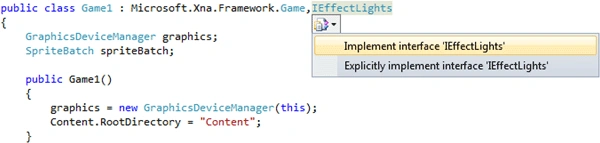
When first implemented it adds some codes:
#region
IEffectLights Members
public Vector3
AmbientLightColor
{
get
{
throw new NotImplementedException();
}
set
{
throw new NotImplementedException();
}
}
public DirectionalLight
DirectionalLight0
{
get { throw new NotImplementedException();
}
}
public DirectionalLight
DirectionalLight1
{
get { throw new NotImplementedException();
}
}
public DirectionalLight
DirectionalLight2
{
get { throw new NotImplementedException();
}
}
public void
EnableDefaultLighting()
{
throw new NotImplementedException();
}
public bool LightingEnabled
{
get
{
throw new NotImplementedException();
}
set
{
throw new NotImplementedException();
}
}
#endregion
Lets explain these functions
- AmbientLightColor:
Ambient means to light all objects within a scene equally, brightening them without adding shading.AmbientLightColor gets or sets the ambient color for a light, the range of color values is from 0 to 1. - DirectionalLight0:
Gets the first directional light for this effect. - DirectionalLight1:
Gets the second directional light for this effect. - DirectionalLight2:
Gets the third directional light for this effect. - What is Directional Light?
Its a type of Lighting.It defines a light that is assumed to be infinitely far away (something similar to the sun). This means the direction of the light rays are all parallel. - EnableDefaultLighting:
It uses all the DirectionalLights so you dont need to write codes like that:
effect.DirectionalLight0.Enabled = true;
effect.DirectionalLight0.DiffuseColor = new Vector3("Some Vector3");
effect.DirectionalLight0.Direction = new Vector3("Some Vector3");
effect.DirectionalLight0.SpecularColor = new Vector3("Some Vector3");
effect.DirectionalLight1.Enabled = true;
effect.DirectionalLight1.DiffuseColor = new Vector3("Some Vector3");
effect.DirectionalLight1.Direction = new Vector3("Some Vector3");
effect.DirectionalLight1.SpecularColor = new Vector3("Some Vector3");
effect.DirectionalLight2.Enabled = true;
effect.DirectionalLight2.DiffuseColor = new Vector3("Some Vector3");
effect.DirectionalLight2.Direction = new Vector3("Some Vector3");
effect.DirectionalLight2.SpecularColor = new Vector3("Some Vector3");
Writing "effect.EnableDefaultLighting();" is the same thing writing codes above.
Join the conversation! Your thoughts help the community grow.