

This is my first article and I hope it helps you all. In this article I am going to show you how you can use xml serialization and deserialization in vb.net using xmlserializer and streamreader/writer.
Let's go ahead...
Open a new solution in vb.net, a windows application...
Put two buttons onto your form. Then open up your code view and write these codes. I am going to explain them...
Imports System.Xml.Serialization
Imports System.IO
Public Class Form1
Private Sub Button1_Click(ByVal sender As System.Object, ByVal e As System.EventArgs) Handles Button1.Click
Dim srcustomer As New XmlSerializer(GetType(customer))
Dim cust As New customer("Ibrahim", "Ersoy", "Programmer")
Dim writestream As New StreamWriter("sampledb.xml")
srcustomer.Serialize(writestream, cust)
End Sub
Private Sub Button2_Click(ByVal sender As System.Object, ByVal e As System.EventArgs) Handles Button2.Click
Dim deser As New XmlSerializer(GetType(customer))
Dim streamrd As New StreamReader("sampledb.xml")
Dim cust1 As customer
cust1 = deser.Deserialize(streamrd)
MessageBox.Show(cust1.name & " " & cust1.surname & " is a " & cust1.jobtitle & ".", "Deserialization")
End Sub
End Class
Public Class customer
Public name As String
Public surname As String
Public jobtitle As String
Public Sub New()
End Sub
Public Sub New(ByVal name As String, ByVal surname As String, ByVal jobtitle As String)
Me.name = name
Me.surname = surname
Me.jobtitle = jobtitle
End Sub
End Class
First I am going to explain the first button's job...
Dim srcustomer As New XmlSerializer(GetType(customer)): As you know we have created a class named customer. This means we create a xmlserializer in which we will be able to use our customer class...
Dim cust As New customer("Ibrahim", "Ersoy", "Programmer"): This means we are going add our customer class new data, as we have declared on customer class like customer(Byval name as string... ) bla...bla...
Dim writestream As New StreamWriter("sampledb.xml"): In this code we are creating a xml-file named "sampledb.xml".
srcustomer.Serialize(writestream, cust): In here we are serializing, this means we are adding the datas to our xml-sampledb.
The second button's job:
Dim deser As New XmlSerializer(GetType(customer)): As you know we have created a class named customer. This means we create a xmlserializer in which we will be able to use our customer class...(as same as it is in the first button)
Dim streamrd As New StreamReader("sampledb.xml"): In this code we are reading our sampledb.xml file...
cust1 = deser.Deserialize(streamrd: In this code we are deserializing so that we will be able to use them with a messagebox.
MessageBox.Show(cust1.name & " " & cust1.surname & " is a " & cust1.jobtitle & ".", "Deserialization"): Here is the Message that shows
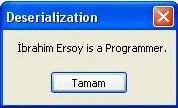
Thats all...Imagine Serialization as creating a Xml file, and deserialization as reading the Xml-File...
If u have a problem, pls ask...
Join the conversation! Your thoughts help the community grow.