

Introduction
Many of you might already know that each browser has its own local storage. Using this functionality we can store user data in the Browser Local Storage rather than sending it to the server. This scenario is best seen in mobile applications. The application stores data in the browser's local storage when the app goes offline and sends the data to the server when it gets connected.
The data remains stored with the browser even after it is closed or the computer is restarted until the browser cache is forcefully cleared.
In this demo I will show how to save and retrieve the data from browser local storage and not detecting the connectivity when it goes online.
Many of you might already know that each browser has its own local storage. Using this functionality we can store user data in the Browser Local Storage rather than sending it to the server. This scenario is best seen in mobile applications. The application stores data in the browser's local storage when the app goes offline and sends the data to the server when it gets connected.
The data remains stored with the browser even after it is closed or the computer is restarted until the browser cache is forcefully cleared.
In this demo I will show how to save and retrieve the data from browser local storage and not detecting the connectivity when it goes online.
Various ways of Browser Local Storage
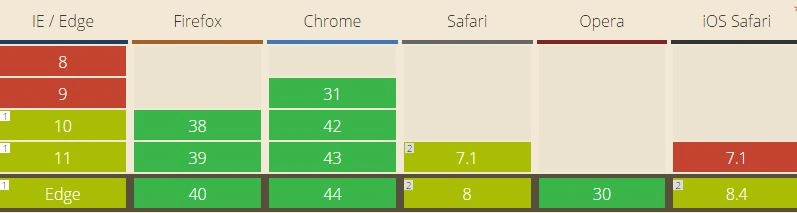
1. Web/Local Storage: Used for storing name / value pairs just like cookies. (Used in this demo). Browser Compatibility:
1. Web/Local Storage: Used for storing name / value pairs just like cookies. (Used in this demo). Browser Compatibility:
- IE8+
- Chrome 31+
- Firefox 38+
- Safari 7.1+
- Pros: Good browser Support, Simple API.
- Cons: Poor Performance on large data.

2. Web SQL Database: Used for structured databases with all the functionality and complexity of a typical SQL-powered relational database.
Firefox and IE do not support it.
- Pros: Good Performance and robust
- Cons: Not compatible with IE and Firefox

3. IndexedDB: Is a collection of "object stores" that you can just drop objects into. The stores are something like SQL tables, but in this case, there's no constraints on the object structure and so no need to define anything upfront.
It uses the best functionality of Local and IndexedDB.
Other ways (Session Storage, Cookies).
It uses the best functionality of Local and IndexedDB.
Other ways (Session Storage, Cookies).
- Pros: Good Performance, decent browser Support.
- Cons: Complex API
Getting Started
- Create a new Empty Web Project in Visual Studio.
- Install AngularJs from Nuget Package Manager.
(Tools > Nuget Packager Manager > Package Manager Console > Install-Package AngularJs).
- Code the default.aspx page.
Include AngularJs reference.
The Script
The Script
- <script type="text/javascript" src="Scripts/Angular.min.js"></script>
Create the LocalStorage Service Module to read and write the data.
- //Create the AngularJS module named StorageService
- //Create getLocalStorage service to access UpdateEmployees and getEmployees method
- var storageService = angular.module('storageService', []);
- storageService.factory('getLocalStorage', function () {
- var employeeList = {};
- return {
- list: employeeList,
- updateEmployees: function (EmployeesArr) {
- if (window.localStorage && EmployeesArr) {
- //Local Storage to add Data
- localStorage.setItem("employees", angular.toJson(EmployeesArr));
- }
- employeeList = EmployeesArr;
- },
- getEmployees: function () {
- //Get data from Local Storage
- employeeList = angular.fromJson(localStorage.getItem("employees"));
- return employeeList ? employeeList : [];
- }
- };
- });
Create an AngularJs Employee module and register with the storageService. Add the other functionalities to add, delete and count employees.
The HTML
- // Create the AngularJS module Employees and Register the storageService with it
- var app = angular.module('Employees', ['storageService']);
- // Create the Controller EmployeeController
- app.controller('EmployeesController', ['$scope', 'getLocalStorage', function ($scope, getLocalStorage) {
- $scope.appTitle = "LocalStorage Demo";
- $scope.appHeadline = "AngularJS and HTML5";
- //Read the Employee List from LocalStorage
- $scope.employees = getLocalStorage.getEmployees();
- //Count the Employee List
- $scope.count = $scope.employees.length;
- //Add Employee - using AngularJS push to add Employee in the Employee Object
- //Call Update Employee to update the locally stored Employee List
- //Reset the AngularJS Employee scope
- //Update the Count
- $scope.addEmployee = function () {
- $scope.employees.push({ 'empno': $scope.empno, 'empname': $scope.empname, 'empsalary': $scope.empsalary});
- getLocalStorage.updateEmployees($scope.employees);
- $scope.empno = '';
- $scope.empname = '';
- $scope.empsalary = '';
- $scope.count = $scope.employees.length;
- };
- //Delete Employee - Using AngularJS splice to remove the emp row from the Employee list
- //All the Update Employee to update the locally stored Employee List
- //Update the Count
- $scope.deleteEmployee = function (emp) {
- $scope.employees.splice($scope.employees.indexOf(emp), 1);
- getLocalStorage.updateEmployees($scope.employees);
- $scope.count = $scope.employees.length;
- };
- }]);
Add the ng-app to access AngularJs functionalities.
- <body ng-app="Employees">
- <div ng-controller="EmployeesController">
- <form name="frm">
- <table>
- <tr>
- <td>Emp No :
- </td>
- <td>
- <input type="text" name="empno" ng-model="empno" required><br />
- </td>
- </tr>
- <tr>
- <td>Emp Name :
- </td>
- <td>
- <input type="text" name="empname" ng-model="empname" required>
- </td>
- </tr>
- <tr>
- <td>Emp Salary :
- </td>
- <td>
- <input type="text" name="empsalary" ng-model="empsalary">
- </td>
- </tr>
- <tr>
- <td colspan="2" align="right">
- <button ng-click="addEmployee()" ng-disabled="frm.$invalid">Add Employee</button>
- </td>
- </tr>
- </table>
- lt;/form>
- Using ng-repeat in tr to loop all employees in the list.
- Display employee fields using scope {{ }}.
- Call deleteEmployee on button click and pass the employee object to delete.
- <table cellpadding="4" cellspacing="4" border="1" style="border-collapse: collapse; border: solid 1px #000">
- <tr>
- <td><b>Emp No</b></td>
- <td><b>Emp Name</b></td>
- <td><b>Emp Salary</b></td>
- <td><b>Action</b></td>
- </tr>
- <tr ng-repeat="employee in employees">
- <td>{{ employee.empno }}
- </td>
- <td>{{ employee.empname }}
- </td>
- <td>{{ employee.empsalary }}
- </td>
- <td>
- <button ng-click="deleteEmployee(employee)">Delete</button>
- </td>
- </tr>
- </table>
- <div>Total Employees : {{count}}</div>
- </div>
- <!DOCTYPE html>
- <html xmlns="http://www.w3.org/1999/xhtml">
- <head runat="server">
- <title></title>
- <!--[if lte IE 8]>
- document.write("NOT HTML5 Compatible!!");
- <![endif]-->
- <script type="text/javascript" src="Scripts/Angular.min.js"></script>
- <script type="text/javascript">
- var isHtml5Compatible = document.createElement('canvas').getContext != undefined;
- if (isHtml5Compatible) {
- initiateLocalStorage();
- }
- function initiateLocalStorage() {
- // Create the AngularJS app
- var app = angular.module('Employees', ['storageService']);
- // Create the Controller
- app.controller('EmployeesController', ['$scope', 'getLocalStorage', function ($scope, getLocalStorage) {
- $scope.appTitle = "LocalStorage Demo";
- $scope.appHeadline = "AngularJS and HTML5";
- //Read the Employee List from LocalStorage
- $scope.employees = getLocalStorage.getEmployees();
- //Count the Employee List
- $scope.count = $scope.employees.length;
- //Add Employee - using AngularJS push to add Employee in the Employee Object
- //Call Update Employee to update the locally stored Employee List
- //Reset the AngularJS Employee scope
- //Update the Count
- $scope.addEmployee = function () {
- $scope.employees.push({ 'empno': $scope.empno, 'empname': $scope.empname, 'empsalary': $scope.empsalary });
- getLocalStorage.updateEmployees($scope.employees);
- $scope.empno = '';
- $scope.empname = '';
- $scope.empsalary = '';
- $scope.count = $scope.employees.length;
- };
- //Delete Employee - Using AngularJS splice to remove the emp row from the Employee list
- //All the Update Employee to update the locally stored Employee List
- //Update the Count
- $scope.deleteEmployee = function (emp) {
- $scope.employees.splice($scope.employees.indexOf(emp), 1);
- getLocalStorage.updateEmployees($scope.employees);
- $scope.count = $scope.employees.length;
- };
- }]);
- //Create the Storage Service Module
- //Create getLocalStorage service to access UpdateEmployees and getEmployees method
- var storageService = angular.module('storageService', []);
- storageService.factory('getLocalStorage', function () {
- var employeeList = {};
- return {
- list: employeeList,
- updateEmployees: function (EmployeesArr) {
- if (window.localStorage && EmployeesArr) {
- //Local Storage to add Data
- localStorage.setItem("employees", angular.toJson(EmployeesArr));
- }
- employeeList = EmployeesArr;
- },
- getEmployees: function () {
- //Get data from Local Storage
- employeeList = angular.fromJson(localStorage.getItem("employees"));
- return employeeList ? employeeList : [];
- }
- };
- });
- }
- </script>
- </head>
- <body ng-app="Employees">
- <div ng-controller="EmployeesController">
- <h1 class="app-title">{{ appTitle }}</h1>
- <h1 class="app-headline">{{ appHeadline }}</h1>
- <form name="frm">
- <table>
- <tr>
- <td>Emp No :
- </td>
- <td>
- <input type="text" name="empno" ng-model="empno" required><br />
- </td>
- </tr>
- <tr>
- <td>Emp Name :
- </td>
- <td>
- <input type="text" name="empname" ng-model="empname" required>
- </td>
- </tr>
- <tr>
- <td>Emp Salary :
- </td>
- <td>
- <input type="text" name="empsalary" ng-model="empsalary">
- </td>
- </tr>
- <tr>
- <td colspan="2" align="right">
- <button ng-click="addEmployee()" ng-disabled="frm.$invalid">Add Employee</button>
- </td>
- </tr>
- </table>
- </form>
- <table cellpadding="4" cellspacing="4" border="1" style="border-collapse: collapse; border: solid 1px #000">
- <tr>
- <td><b>Emp No</b></td>
- <td><b>Emp Name</b></td>
- <td><b>Emp Salary</b></td>
- <td><b>Action</b></td>
- </tr>
- <tr ng-repeat="employee in employees">
- <td>{{ employee.empno }}
- </td>
- <td>{{ employee.empname }}
- </td>
- <td>{{ employee.empsalary }}
- </td>
- <td>
- <button ng-click="deleteEmployee(employee)">Delete</button>
- </td>
- </tr>
- </table>
- <div>Total Employees : {{count}}</div>
- </div>
- </body>
- </html>
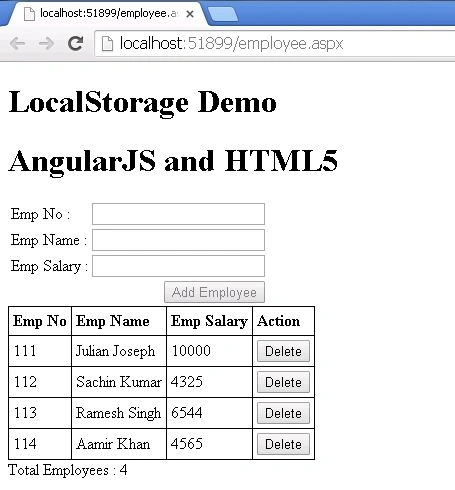
The data to be added will remain stored even after the browser is closed.
Bishwajeet DasPosted Dec 12, 2017, 4:03 AM
Plz add module to update the employee list yes It is fine but not CRUD application
BHANU PRAKASHPosted Jan 28, 2017, 3:23 AM
I am unable to run the above code can you help me out
Santhakumar MunuswamyPosted Aug 18, 2015, 2:38 PM
Good one
Chervine BhiwooPosted Aug 18, 2015, 11:00 AM
Good article
Nilesh JadavPosted Aug 18, 2015, 2:49 AM
Nice article sir
Vaikesh K PPosted Aug 18, 2015, 1:35 AM
Nice one
Rajeesh MenothPosted Aug 18, 2015, 12:32 AM
Good One
Karthikeyan KPosted Aug 17, 2015, 11:27 PM
Good one sir...Thanks for sharing
Mohammed IbrahimPosted Aug 17, 2015, 11:05 PM
nice
Pankaj Kumar ChoudharyPosted Aug 17, 2015, 9:17 PM
Nice explain sir. ....
Pankaj Kumar ChoudharyPosted Aug 17, 2015, 9:16 PM
Nice explain sir. ....