

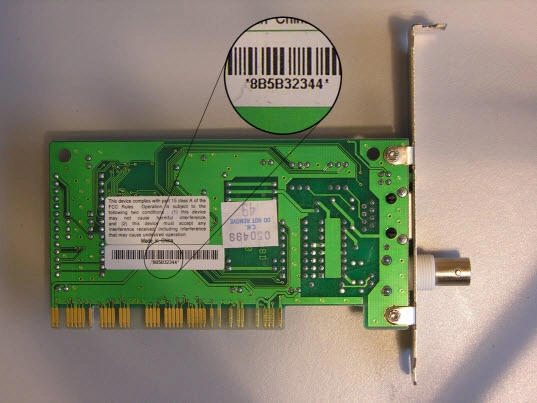
Article is aimed about how to get Media Access
Control Address (MAC) that is unique identifies for the Network Cards.
MAC addresses are assigned by card manufacturers
when they are built.
There are variety of ways to get it but by using
WMI we can get it easily and without much hassle about parsing from some source
etc .
Here is how we can see mac address using cmd
>
Getmac
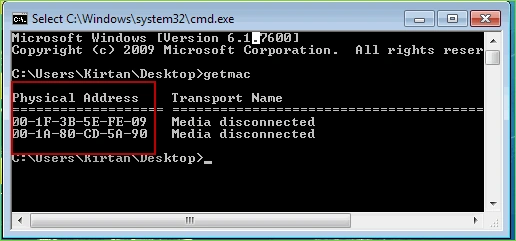
We can get mac address from cmd also by creating process and
parse the result it display but its some error prone way so let's do it
perfectly using WMI way
To use WMI we need to add reference to System.Management
library so add reference to that by
Project Menu >>Add reference
Now Let's setup form like below and do code like below
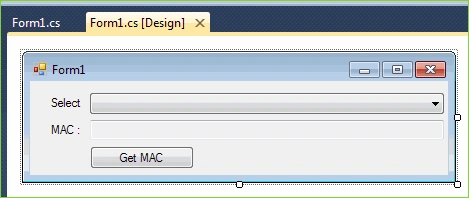
And Write code like below in code behind of Controls
{
ManagementObjectSearcher
mos = new ManagementObjectSearcher("select * from Win32_NetworkAdapter Where AdapterType='Ethernet
802.3'");
foreach
(ManagementObject mo in mos.Get())
{
comboBox1.Items.Add(mo["Name"].ToString());
}
}
private void btnGetMac_Click(object
sender, EventArgs e)
{
ManagementObjectSearcher
mos = new ManagementObjectSearcher("select * from Win32_NetworkAdapter where
Name='"+comboBox1.SelectedItem.ToString()+"'");
ManagementObjectCollection
moc = mos.Get();
if
(moc.Count > 0)
{
foreach
(ManagementObject mo in moc)
{
textBox1.Text = (string)mo["MACAddress"];
}
}
}
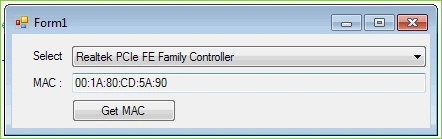
Thank you :)
Shyani MadhuriPosted Dec 1, 2015, 5:57 AM
Thank You It's Working
Hoang NhiPosted Nov 28, 2011, 11:34 AM
This code is not run on the web? I can't get Mac on my computer with aspx.net
Aiden ByfieldPosted Mar 1, 2011, 8:15 AM
Hi, I'm currently using Visual Studio 2008 C#. An error came up when I copy and pasted the code in the right part of my code. The type or namespace name 'ManagementObjectSearcher' could not be found (are you missing a using directive or an assembly reference?) Any help??