

This article has been
excerpted from book "A Programmer's Guide to ADO.NET in C#".
As an application developer, most of the time you'll be executing stored
procedure programmatically. You can execute a stored procedure programmatically
using the command object. Instead of passing a SQL statement, you pass the
stored procedure name as the SQL statement to execute a stored procedure. Each
data provider provides a command object to execute SQL statements. The command
class for the OleDb, Odbc, and Sql data provides are Oledbcommand, Odbccommand,
and Sqlcommand, respectively. In listing 10-1, I'll use sqlcommand to execute a
procedure programmatically against a SQL server database.
There are two steps involved in executing a stored procedure from your program.
First, you set the command object property CommandText as the stored procedure
name; second, you set the CommandType property as CommandType.StoredProcedure.
Listing 10-1 executes the mySP stored procedure you created in the previous
section. To test listing 10-1, I created a console application and typed listing
10-1 on the Main method. Don't forget to add a reference to the System.Data.dll
assembly and add the following two namespaces to the project before using the
Sql data provider classes:
using
System.Data;
using
System.Data.SqlClient;
Listing 10-1: Executing mySP stored procedure using Sql data provider
using System;
using
System.Data;
using
System.Data.SqlClient;
namespace
Executing_a_Stored_Procedure
{
class
Program
{
static void
Main(string[] args)
{
// Create a
Connection Object
string ConnectionString =
"Integrated Security=SSPI;" +
"Initial Catalog=Northwind;" +
"Data Source = localhost;";
SqlConnection conn =
new SqlConnection(ConnectionString);
conn.Open();
SqlCommand cmd =
new SqlCommand("mySP",
conn);
cmd.CommandType = CommandType.StoredProcedure;
SqlDataReader reader =
cmd.ExecuteReader();
while (reader.Read())
{
Console.Write(reader[0].ToString());
Console.Write(reader[1].ToString());
Console.WriteLine(reader[2].ToString());
}
Console.Read();
//Close reader and
connection
reader.Close();
conn.Close();
}
}
}
As you can see from figure 10-1, I created SqlCommand object by passing the
stored procedure as the first parameter of the SqlCommand constructor and then
set the CommandType property CommandType.StoredProcedure. The result of listing
10-1 looks like Figure 10-14.
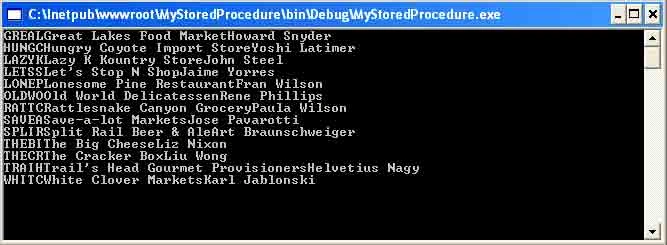
Figure 10-14. Output of stored procedure mySP
A stored procedure can also accept input, output, and both types of programmers.
Now I'll modify the mySP stored procedure a little bit. This time I'll give the
user an option to select the customers based on their country. Figure 10-15
shows the modified stored procedure.
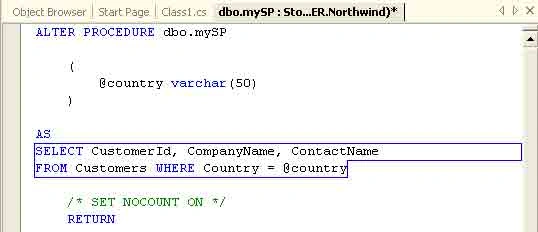
Figure 10-15. Stored procedure with parameters
As you can see from figure 10-15, I selected customers based on the country
entered by the user. You can use the SqlParameter class to create a parameter.
The SqlParameter class has properties such as Direction and Value. The Direction
property defines the direction if the stored procedure is an input or output (or
both) or has a return value. The ParameterDirection enumeration defines values
of Direction (see Table 10-1).
Table 10-1: The ParameterDirection Members
|
MEMBER |
DESCRIPTION |
|
Input |
Input parameter. |
|
InputOutput |
Both input and output parameter. |
|
Output |
Output only. |
|
ReturnValue |
The parameter returns a value returned by the stored procedure. |
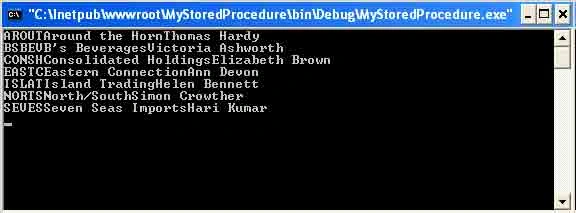
The Value property sets the value of the parameter. The following code adds a
parameter with the value UK. After you execute the mySP stored procedure. It'll
return customers from the United Kingdom only:
SqlParameter param =
new SqlParameter();
param =
StoredProcedureCommand.Parameters.Add("@country",
SqlDbType.VarChar, 50);
param.Direction =
ParameterDirection.Input;

Join the conversation! Your thoughts help the community grow.