

RotateTransform
rotates an element clockwise by a specified angle about the point. The
RotateTransform object in WPF represents RotateTransform. The Angle property
represents the angle in degrees to rotate clockwise. The CenterX and CenterY
properties represent the X and Y coordinates of the center point. By default, a ScaleTransform is centered at
the point (0,0), which corresponds to the upper-left corner of the rectangle.
The
code listed in Listing creates two rectangles with same position and sizes
accept the second rectangle is rotated at 45 degrees.
<Grid>
<!-- Original
Rectangle -->
<Rectangle
Width="200" Height="50"
Fill="Yellow"/>
<!-- Rectangle with
45 degrees rotation -->
<Rectangle
Width="200" Height="50"
Fill="Blue" Opacity="0.5">
<Rectangle.RenderTransform>
<RotateTransform
CenterX="0" CenterY="0"
Angle="45" />
</Rectangle.RenderTransform>
</Rectangle>
</Grid>
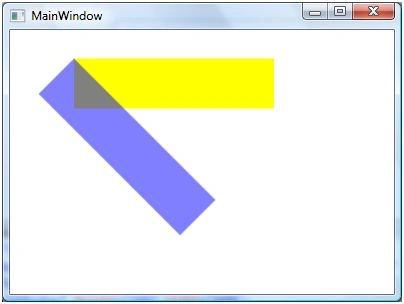
The
output of Listing looks like Figure 1.
The
following code snippet changes the values of CenterX and CenterY.
<Rectangle
Width="200" Height="50"
Fill="Blue" Opacity="0.5" Margin="61,27,117,184">
<Rectangle.RenderTransform>
<RotateTransform
CenterX="-50" CenterY="50"
Angle="45" />
</Rectangle.RenderTransform>
</Rectangle>
The
new output of looks like Figure 2 where you can see the center point of second
rectangle is shifted from its original position.
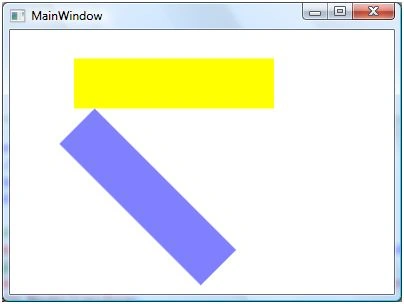
Figure 2
The code
listed in Listing creates a RotateTransform object dynamically and set it as
RenderTransform property of a Rectangle. The output looks like Figure .
private void RotateTransformSample()
{
Rectangle
originalRectangle = new Rectangle();
originalRectangle.Width = 200;
originalRectangle.Height = 50;
originalRectangle.Fill = Brushes.Yellow;
LayoutRoot.Children.Add(originalRectangle);
Rectangle
rotatedRectangle = new Rectangle();
rotatedRectangle.Width = 200;
rotatedRectangle.Height = 50;
rotatedRectangle.Fill = Brushes.Blue;
rotatedRectangle.Opacity = 0.5;
RotateTransform
rotateTransform1 = new RotateTransform(45, -50, 50);
rotatedRectangle.RenderTransform =
rotateTransform1;
LayoutRoot.Children.Add(rotatedRectangle);
}
Sivaraman DhamodaranPosted Nov 22, 2010, 5:58 AM
Mahesh thanks for sharing.