

SkewTransform
is used to skew or shear an element. Shear can be used to add depth to elements
to give them a 3-D look.
The AngleX and AngleY properties
are used to specify the skew angle of the x-axis and y-axis, and to skew the
current coordinate system along these axes. The CenterX and CenterY properties
represent the X and Y coordinates of the center point.
The
code listed in Listing creates two rectangles with same position and sizes
accept the second rectangle is skewed at 45 degrees towards x-axis.
<Rectangle
Width="200" Height="50"
Fill="Yellow" Margin="61,27,117,184"
/>
<Rectangle
Width="200" Height="50"
Fill="Blue" Opacity="0.5" Margin="59,101,119,110">
<Rectangle.RenderTransform>
<SkewTransform
CenterX="0" CenterY="0"
AngleX="45" AngleY="0" />
</Rectangle.RenderTransform>
</Rectangle>
The
output of Listing looks like Figure 1.
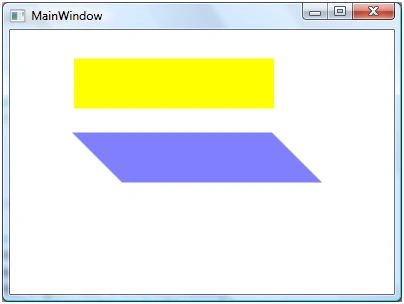
Figure 1
The
code listed in Listing creates a SkewTransform object dynamically and set it as
RenderTransform property of a Rectangle. The output looks like Figure 1.
private void SkewTransformSample()
{
Rectangle
originalRectangle = new Rectangle();
originalRectangle.Width = 200;
originalRectangle.Height = 50;
originalRectangle.Fill = Brushes.Yellow;
LayoutRoot.Children.Add(originalRectangle);
Rectangle
skewedRectangle = new Rectangle();
skewedRectangle.Width = 200;
skewedRectangle.Height = 50;
skewedRectangle.Fill = Brushes.Blue;
skewedRectangle.Opacity = 0.5;
SkewTransform
skewTransform1 = new SkewTransform(45, 0, -50, 50);
skewedRectangle.RenderTransform =
skewTransform1;
LayoutRoot.Children.Add(skewedRectangle);
}
Join the conversation! Your thoughts help the community grow.