

TableLayoutPanel control represents a panel that dynamically lays out its contents in a table format. You want to use a TableLayoutPanel in complex and sophisticated applications where you need to create dynamic layouts.
In this article, I will demonstrate how to create and use a TableLayoutPanel control in a Windows Forms application.
Creating a TableLayoutPanel
We can create a TableLayoutPanel control using the Forms designer at design-time or using the TableLayoutPanel class in code at run-time.
Design-time
To create a TableLayoutPanel control at design-time, you simply drag and drop a TableLayoutPanel control from Toolbox onto a Form in Visual Studio. After you drag and drop a TableLayoutPanel on a Form, the TableLayoutPanel looks like Figure 1. Once a TableLayoutPanel is on the Form, you can move it around and resize it using the mouse and set its properties and events.
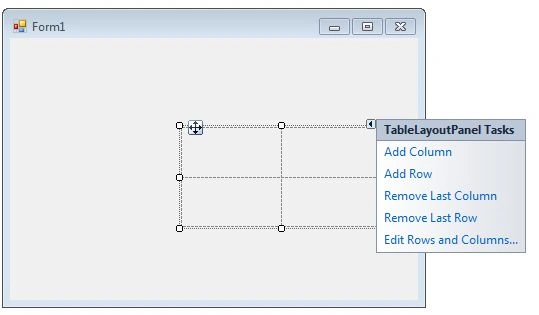
Figure 1
If you click on little handle of TableLayoutPanel, you will see options to add, remove, and edit rows and columns of the panel. Once rows and columns are added to a TableLayoutPanel, we can drag and drop child controls to these cells to manage the layouts.
Run-time
Creating a TableLayoutPanel control at run-time is merely a work of creating an instance of TableLayoutPanel class, setting its properties and adding TableLayoutPanel class to the Form controls.
The first step to create a dynamic TableLayoutPanel is to create an instance of TableLayoutPanel class. The following code snippet creates a TableLayoutPanel control object.
- TableLayoutPanel dynamicTableLayoutPanel = newTableLayoutPanel();
In the next step, you may set properties of a TableLayoutPanel control. The following code snippet sets location, size and name properties of a TableLayoutPanel.
- dynamicTableLayoutPanel.Location = new System.Drawing.Point(26, 12);
- dynamicTableLayoutPanel.Name = "TableLayoutPanel1";
- dynamicTableLayoutPanel.Size = new System.Drawing.Size(228, 200);
- dynamicTableLayoutPanel.TabIndex = 0;
Once the TableLayoutPanel control is ready with its properties, the next step is to add the TableLayoutPanel to a Form. To do so, we use Form.Controls.Add method that adds TableLayoutPanel control to the Form controls and displays on the Form based on the location and size of the control. The following code snippet adds a TableLayoutPanel control to the current Form.
- Controls.Add(dynamicTableLayoutPanel);
Adding Controls to a TableLayoutPanel
You can add controls to a TableLayoutPanel by dragging and dropping control to the TableLayoutPanel. We can add controls to a TableLayoutPanel at run-time by using its Add method.
ColumnStyle and RowStyle properties are used to specify number of columns and rows in a TableLayoutPanel. Add method is used to add a row and column to RowStyle and ColumnStyle respectively.
- dynamicTableLayoutPanel.RowStyles.Add(newRowStyle(SizeType.Absolute, 52 F));
- dynamicTableLayoutPanel.ColumnStyles.Add(newColumnStyle(SizeType.Percent, 30 F));
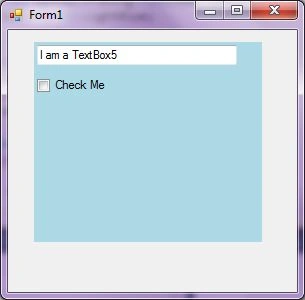
Marwa YoussefPosted Jun 9, 2021, 12:40 PM
After generating the TableLayoutPanel. I want to make a condition on a control inside a row and if true I append a new row dynamically after this control row. how can i achieve that ?
Manish MehraPosted Mar 25, 2018, 6:42 AM
How can i share image for template design
Manish MehraPosted Mar 25, 2018, 6:41 AM
I want to know which column background color have black in this control by set image in background any thing is possible.
kalu singh raoPosted Jul 11, 2016, 10:12 AM
Nice...
sumit banshalPosted Oct 18, 2010, 4:00 PM
i want to use this control to design a cash memo. but i cant write in the boxes or grids of table layout panel. can you suggest me how can i take input to my database through this control. or any suggestion for designing a cash memo. Thanks in advance.