

I was geting this annoying message and system was going into hibernate mode.
"The installed battery may not be properly connected to the computer or may not be compatible with the computer.
Click "OK" to enter Hibernate mode,and remove and reinsert the battery. See the VAIO(R) User Guide for more information about using the battery."
I found this solution from Sony Support.
Follow these steps to fix this problem.
- Power off the notebook and remove the battery.
- Make sure only the AC adapter is connected and power on the notebook.
- Click the Start button, click All Programs , click Accessories , and then click Run .
- In the Run window, type MSCONFIG and then press the Enter key.
NOTE: If prompted for an administrator password or a User Account Control prompt is displayed, type the appropriate password, click Continue or click Yes .
- In the System Configuration window, click the Startup tab.
- On the Startup tab, click to uncheck the box in front of ISB Utility .
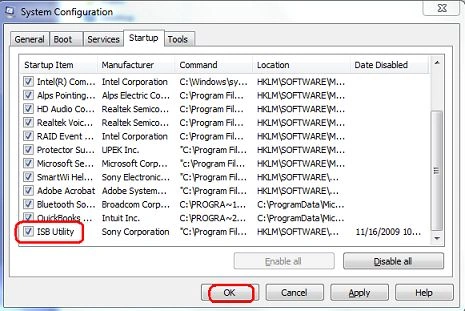
- Click the OK button.
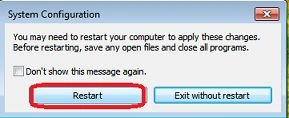
- In the System Configuration window, click the Restart button.
- Power off the notebook, reconnect the battery and power back on.
Abdul MajeedPosted Aug 16, 2020, 6:43 AM
Thanks you ,it worked for me too
hamidreza broomandyarPosted Oct 31, 2018, 4:33 AM
Very good . you are very good man
Mejdi TahaPosted Sep 10, 2015, 12:33 PM
hey frnds you can also do this by this steps 1. Click on Start, type ‘msconfig’ and then select the ‘Startup Tab’, 2. Deselect the "ISB Utility" from the startup. 3. Restart the computer. after restart you never get that popup
Nitin DabhiPosted May 2, 2013, 10:22 AM
SIMPLE About battery notifications: ctrl+alt+delete - task manager - find process ISB Mgr*32 or then right Click and open file location then Stop process ISB Mgr*32. Then go to folder C:/Program Filesx86/Sony/ISB/and delet the file And you can forget notifications
Dobry DinkovPosted Dec 3, 2012, 3:03 AM
The question now is how to set battery charge cycle to stop at 80%
Memo JaureguiPosted Sep 17, 2012, 1:34 AM
Great work I changed the HD on my vaio VPCF13UFX reinstalled everything and got a little surprise with the battery bug, fixed it with your great advice, thank you very much
baluPosted Jun 9, 2011, 2:41 PM
thanks a lot...... i have sony vaio e series.. i re_install my os, in that day, i have in this problem. now i solved that problem in this way... thank u very much...