

Introduction
Abstract
This is the 5th major revision of the core language of the World Wide Web. The HyperText Markup Language (HTML) a very popular and is in high demand. It's not just a newer version of HTML, it's a Web platform for techies that not only includes some new tags but also easy to extract data from web pages and delivers the content over multiple platforms and in multiple formats.
 History
March 7, 2007, is the day when a new HTML Working Group (HTML WG, including representatives from Opera, Mozilla, and Apple) began working work on HTML in an open participation process and using hundreds of participants the next version of Web Applications 1.0 spec was adopted that is called HTML5.
As you might know, HTML 4 is the most successful markup format ever and all the success of HTML5 is based on HTML4 as all the controls of HTML 4 are supported by HTML5 and includes new input controls.
HTML5 Features
History
March 7, 2007, is the day when a new HTML Working Group (HTML WG, including representatives from Opera, Mozilla, and Apple) began working work on HTML in an open participation process and using hundreds of participants the next version of Web Applications 1.0 spec was adopted that is called HTML5.
As you might know, HTML 4 is the most successful markup format ever and all the success of HTML5 is based on HTML4 as all the controls of HTML 4 are supported by HTML5 and includes new input controls.
HTML5 Features
- New semantic elements : Like <nav>, <header>, <footer> and <article>, and so on.
- New form features: Like date pickers, sliders and client-side validation
- Native video and audio support
- Canvas drawing API
- Web Sockets
- Offline web applications
- Web Storage
- Web workers
- Geolocation API
HTML5 APIs
After HTML's evolution later on in 1998 parts of the API for HTML developed by browser vendors and release as named DOM Level 1 then DOM Level 2 Core and after DOM Level 2 HTML and finally DOM Level 3.
Note: One thing you need to ensure is that HTML is not only used to write code as tags and angle brackets. The HTML5 specification also defines how JavaScript is interacting with those angle brackets using the Document Object Model (DOM). There is a DOM API for each corresponding tag.
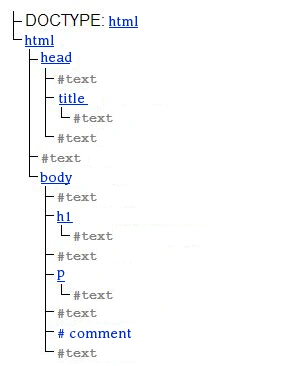
Web browsers or you can say HTML user agents, parse your written markup into a DOM tree that represent the specific document in memory, each DOM tree contains several kinds of nodes, in particular, a DOCTYPE node, elements, etc.
Let's use an example of an HTML markup snippet and understand the DOM concept.
HTML markup snippet
- <!DOCTYPE HTML>
- <html>
- <head>
- <title>Your Page Title</title>
- </head>
- <body>
- <h1>Text</h1>
- <p>Text</p>
- <!-- Comment -->
- </body>
- </html>
DOM tree of HTML markup snippet
 To enhance the interactivity of your pages HTML5 also offers several JavaScript APIs, Some HTML5 APIs are still fairly new, and not every version of every browser supports them but HTML5 is a collection of individual features. So you can't define HTML5 support (like this browser can't support HTML5), you can detect support for individual features, like canvas, video, or geolocation.
First, understand what an API is. An API (Application Programming Interface) is a collection of programming instructions and standards for accessing a software application and by using any API, you design a product supported by the service the API provides.
By using HTML5 APIs you are able to include most advanced features and interaction that provides really interesting features to your web page.
In HTML5 you can use many APIs. Some of them are:
To enhance the interactivity of your pages HTML5 also offers several JavaScript APIs, Some HTML5 APIs are still fairly new, and not every version of every browser supports them but HTML5 is a collection of individual features. So you can't define HTML5 support (like this browser can't support HTML5), you can detect support for individual features, like canvas, video, or geolocation.
First, understand what an API is. An API (Application Programming Interface) is a collection of programming instructions and standards for accessing a software application and by using any API, you design a product supported by the service the API provides.
By using HTML5 APIs you are able to include most advanced features and interaction that provides really interesting features to your web page.
In HTML5 you can use many APIs. Some of them are:
- Web Workers API
- Server-sent Events API
- WebSocket API
- Cross-document Messaging API
- Drawing
- Audio/Video
- Drag and drop
- Autofocus
- Editable
- Client-side storage
- Geolocation
The following is only a brief introduction to each API and in detail, I will explain each one of them in my future articles in this series of Learning HTML5.
- Web Workers API
To write an application where computationally a script can run in the background without blocking the main UI thread we use the Web Worker API.
- Server-sent Events API
To receive regular updates from the server through the HTTP connection. Ok let's explain, we can create a rich application using the Server-sent Events API that provides real-time updates to the browser without significant HTTP overhead. - WebSocket API
The WebSocket API and Server-sent Events API works similarly yet are a little bit different in that the WebSocket server and the client can send messages to each other anytime within a persistent connection.
- Cross-document Messaging API
When you want to make any interaction between two documents without directly exposing them to the DOM, you need to use the Cross-document Messaging API.
- Drawing
This API allows you to define an area within your page to draw on and use JavaScript commands to draw lines, shapes, text, etc. - Audio/Video
It's an API that allows you to easily implement video and audio custom player controls that work across browsers.
- Drag and drop
You can allow people to move things around on your page. - Autofocus
You can make any part of your page get focus when just the cursor point is moved. - Editable
Make content editable itself on the page. - Client-side storage
This API creates a client-side storage mechanism based on name-value pairs. - Geolocation
A Geolocation API is used in a web application to easily access any location data that has been made available, like a device's GPS capabilities.
Checking Browser Compatibility
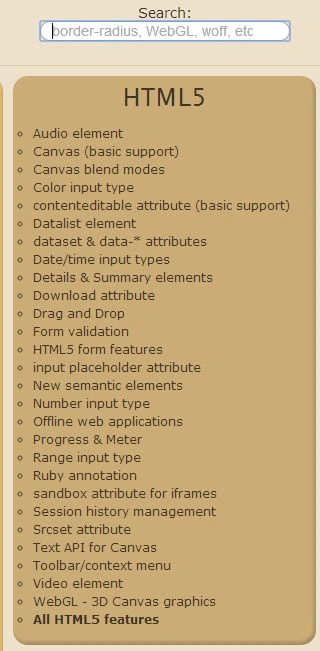
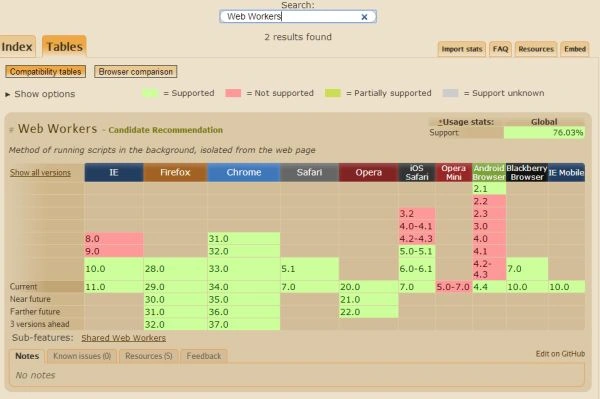
It is always good to check the browser compatibility before working on HTML5 APIs whether or not the feature is supported by your browser. Before using any API, refer to a compatibility chart that shows which browsers support that API.
I Personally use caniuse.com to check the HTML5 APIs compatibility. For example, see in the following image I am searching for the compatibility of Web Workers:
- if (!!window.Worker) {
- //do something
- }
- else {
- //do something
- }
Ajay MalikPosted Jun 1, 2016, 11:16 AM
Nice sir..
krishna deshpandePosted Jan 22, 2015, 6:16 AM
can u pls share emial-id?? i have some queries in html5
Sunny SharmaPosted Jun 3, 2014, 2:26 AM
nice writeup!
Shiju JosephPosted May 21, 2014, 1:39 AM
Good article Manish
Nayeem MansooriPosted May 14, 2014, 10:24 AM
Its is very good article..:) keepit up bro......
Former memberPosted May 14, 2014, 12:52 AM
Nice article
Gopi ChandPosted May 14, 2014, 12:09 AM
Good work sir..