

Generally, in PL/SQL while executing a program we might encounter an error. They can occurr during execution and are called an “EXCEPTION”. It will disrupt the normal flow of the program’s execution.
Exception Handling
PL/SQL provides a feature called “EXCEPTION HANDLING” to handle the exception that occurs in the PL/SQL block. When an error occurs an exception is raised, normal execution is stopped and control transfers to the exception handling code.
A PL/SQL Exception consists of the following three parts:
- Type of Exception
- An Error code
- A Message
The following shows the general syntax of Exception Handling:
DECLARE
<Declaration section>
BEGIN
<Executable command>
EXCEPTION
WHEN exception1 THEN
-Exception1 handling statements
WHEN exception2 THEN
-Exception2 handling statements
WHEN exception3 THEN
-Exception3 handling statements
WHEN Others THEN
-Exception handling statements
END;
The following are the types of exceptions to be handled: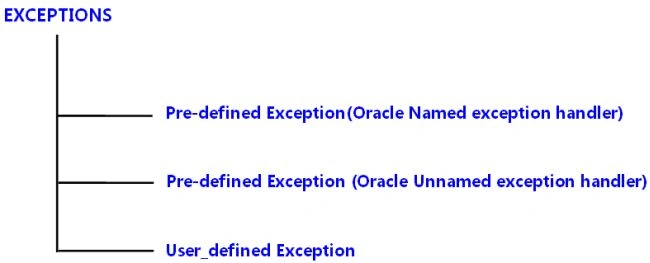
1. PRE-DEFINED / UNNAMED EXCEPTION
A Pre-defined Exception is also called a Named System Exception. They are the one to whom the names are already assigned by the PL/SQL and declared in the STANDARD package. There is no need to declare them in our own program. For example: the pre-defined exception NO_DATA_FOUND is raised when a SELECT INTO statement returns on rows.
Some of the pre-defined exceptions are as follows:
- NO_DATA_FOUND
SQL CODE : +100
ORACLE ERROR : ORA 01403
- INVALID_NUMBER
SQL CODE : -1722
ORACLE ERROR : ORA 01722
- INVALID_CURSOR
SQL CODE : -1001
ORACLE ERROR : ORA 01001
- TOO_MANY_ROW
SQL CODE : -1422
ORACLE ERROR : ORA 01422
- CURSOR_ALREADY_OPEN
SQL CODE : -6511
ORACLE ERROR : ORA 06511
- LOGIN_DENIED
SQL CODE : -1017
ORACLE ERROR : ORA 01017
Example
DECLARE
TEMP NUMBER;
Cust_name Cust_cname%type;
BEGIN
SELECT CNAME INTO CUST_name FROM CUST WHERE CUSTNUM=1;
DBMS_OUTPUT.PUT_LINE(‘CUSTNUM 1 EXIST’);
EXCEPTION
WHEN NO_DATA_FOUND THEN
DBMS_OUTPUT.PUT_LINE(‘CUST_NUM 1 DOES NOT EXIST…’);
WHEN ROWTYPE_MISMATCH THEN
DBMS_OUTPUT.PUT_LINE(‘CUST_NUM 1 DOES NOT EXIST…’);
END;
2. NON PRE-DEFINED / UNNAMED EXCEPTION
Non pre-defined errors are the ones that are not pre-named, but have a number in place of a name. These errors are RAISED automatically by the system, because they are system errors and can be handled using PRAGMA EXCEPTION_INIT. They do not occur frequently therefore Oracle has not provided the names to them.
Example
DECLARE
exception_name EXCEPTION;
PRAGMA
EXCEPTION_INIT (exception_name, Err_code);
BEGIN
Execution section
EXCEPTION
WHEN exception_name THEN
Handle the exception
END;
PRAGMA: It is a compiler directive that is processed at compile time not at runtime.
EXCEPTION_INIT: It is a built in sub-program used to provide an exception name to the constraint violation error number.
3. USER DEFINED EXCEPTION
Apart from a system exception, PL/SQL allows you to create your own exception where we can explicitly define exceptions based on a business rule, also using either a RAISE statement or the procedure DBMS_STANDARD.RAISE_APPLICATION_ERROR.
Declaring Exception
DECLARE
myexception EXCEPTION;
BEGIN
------
Raising Exception:
BEGIN
RAISE myexception;
-------
Handling Exception
BEGIN
------
----
EXCEPTION
WHEN myexception THEN
Statements;
END;
Example
The following example illustrates the concept. This program asks for a Student ID. When the user enters an invalid ID, the exception INVALID_ID is RAISED.
DECLARE
Stu_id customers.id%type := &Stu_id;
Stu_FirstName Students.FirstName%type;
Stu_LastName Students.LastName%type;
Stu_Addr Students.Address%type;
-- user defined exception
ex_invalid_id EXCEPTION;
BEGIN
IF Stu_id <= 0 THEN
RAISE ex_invalid_id;
ELSE
SELECT FirstName, LastName, Address INTO Stu_FirstName, Stu_LastName, Stu_Addr
FROM Students
WHERE id = Stu_id;
DBMS_OUTPUT.PUT_LINE ('FirstName: '|| Stu_FirstName);
DBMS_OUTPUT.PUT_LINE ('LastName: '|| Stu_LastName);
DBMS_OUTPUT.PUT_LINE ('Address: ' || Stu_Addr);
END IF;
EXCEPTION
WHEN ex_invalid_id THEN
dbms_output.put_line('ID must be greater than zero!');
WHEN no_data_found THEN
dbms_output.put_line('No such Student!');
WHEN others THEN
dbms_output.put_line('Error!');
END;
Join the conversation! Your thoughts help the community grow.