

Following is the solution to load an embedded bitmap programmatically.
To Embed a File as Resource create a new Silverlight Application Project and add an image file to it. Click on the image in Solution Explorer to show its properties in Properties Window. 'Build Action' property should be 'Resource' to tell Silverlight compiler to embed it as a resource. The 'Copy to Output Directory' property should be 'Do not Copy'.
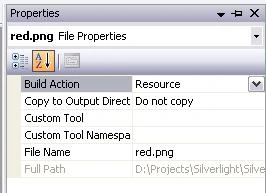
Build the solution and the image is now embedded in the application assembly.
To load the Embedded File use the Application.GetResourceStream() method.
using
System.Windows.Resources;using System.Windows.Media.Imaging;
...
StreamResourceInfo sr1 = Application.GetResourceStream(
Join the conversation! Your thoughts help the community grow.