

Silverloght 4 has lots of new fearures, for details visit Silverlight 4 . Let's start with a small application to perform CRUD operations using Linq to
SQL and RIA Services.
Open VS 2010 and create a new project named "Silverlight4LinqToSqlRiaServices"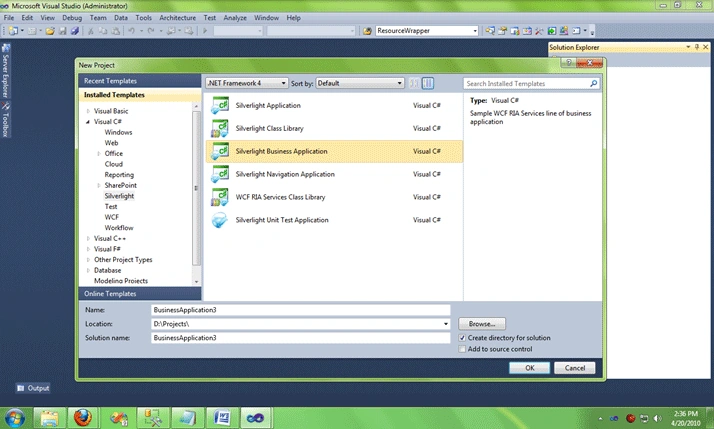
The resulting screen will be 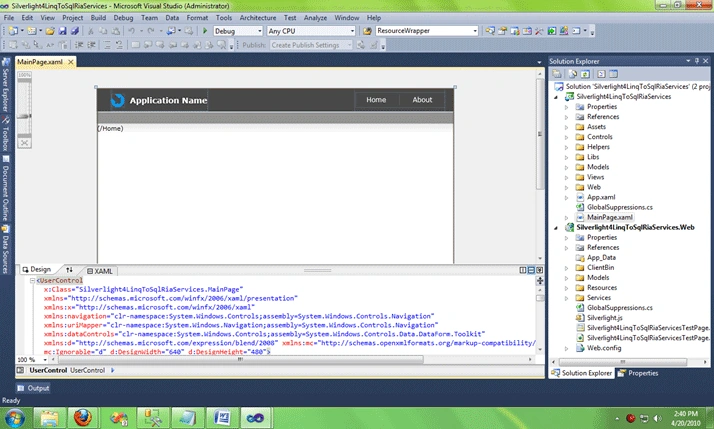
In Silverlight project view folder add new silverlight Page "EmployeeList"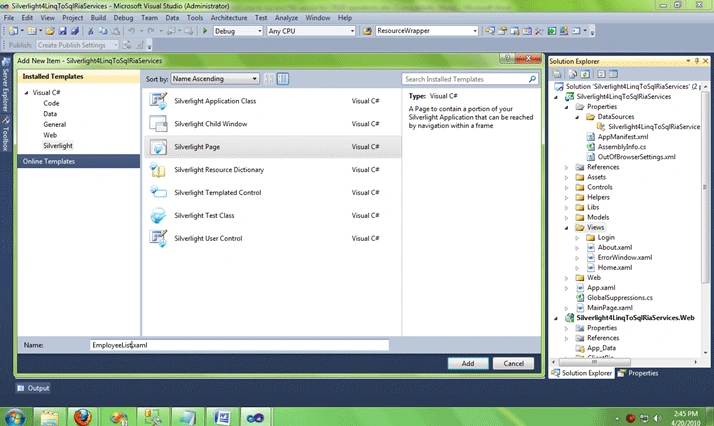
Add Employee page title in application strings file under Assets/Resources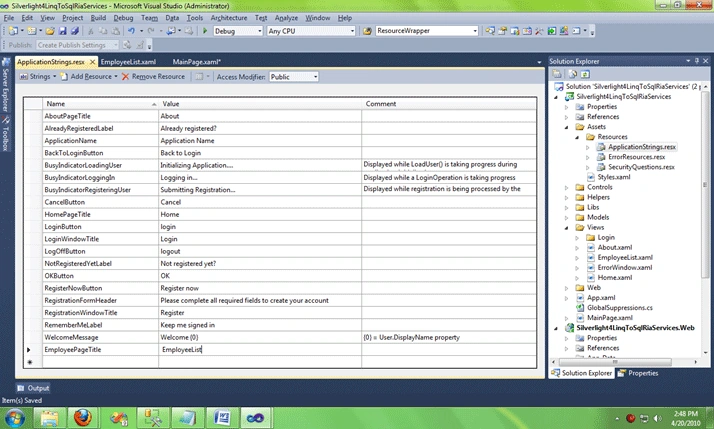
On the MainPage.xaml add new hyperlink to EmployeeList page
<HyperlinkButton Style="{StaticResource LinkStyle}"
NavigateUri="/EmployeeList" TargetName="ContentFrame" Content="{Binding Path=ApplicationStrings.EmployeePageTitle, Source={StaticResource ResourceWrapper}}"/>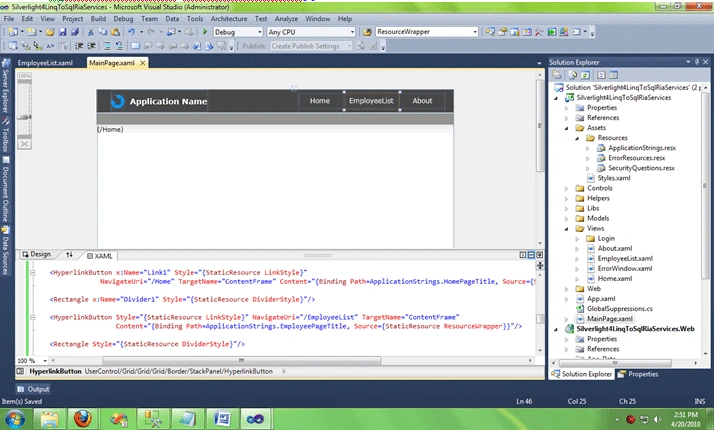
Add new Linq to Sql class 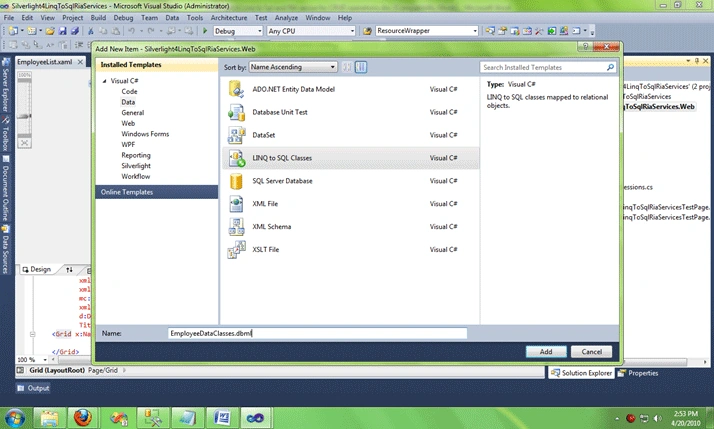
And add the Employee and Company tables and Employee_Select sp from Server Explorer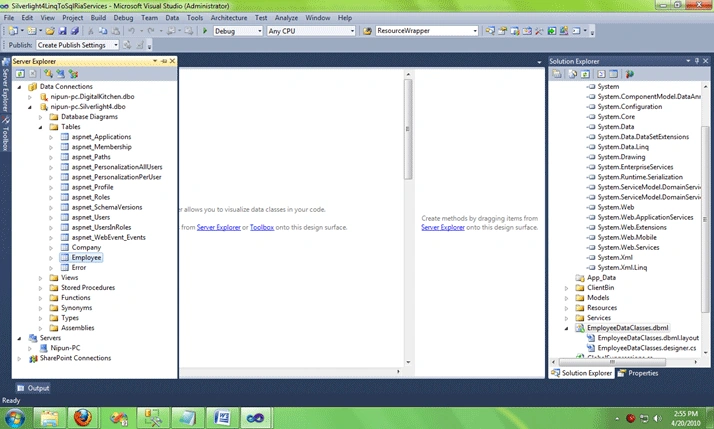
Add new domain service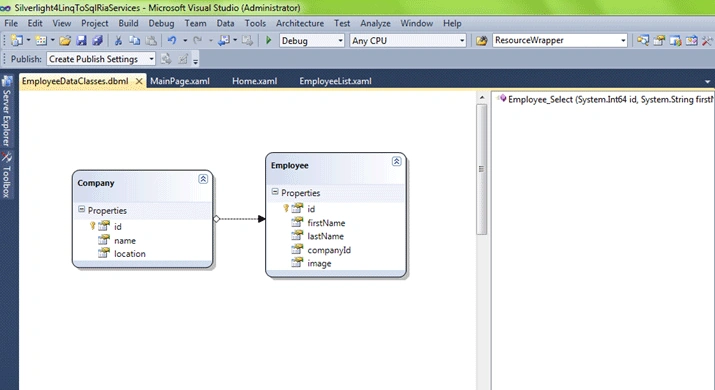
And rebuild the solution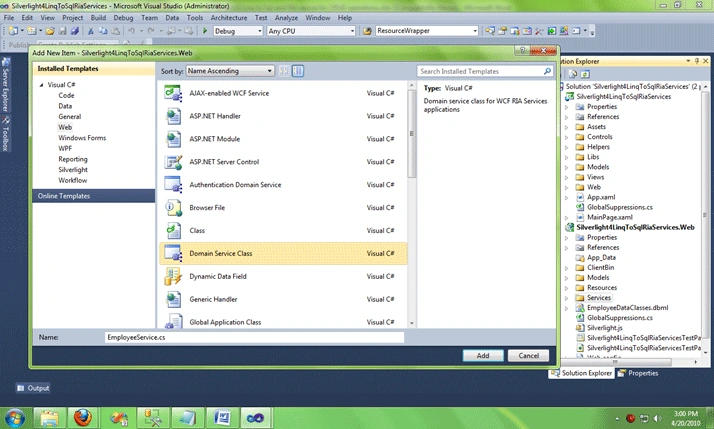
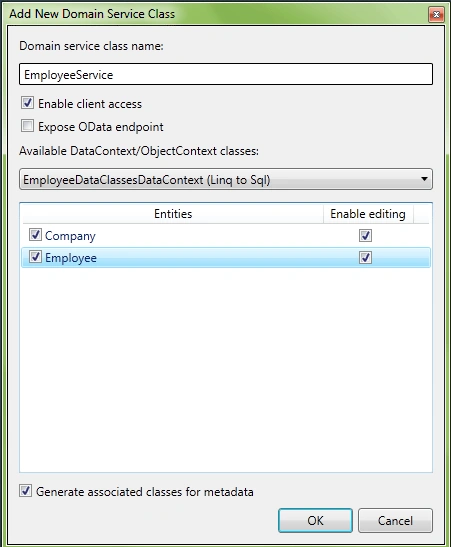
Update the EmployeeService to use the stored procedure (Employee_Select) to select records
public IList<Employee_SelectResult> Employee_Select(string employeeId, string firstName, string lastName, string companyId)
{
long? id = null; long? compId = null; string fName = null; string lName = null;
id = string.IsNullOrEmpty(employeeId.Trim()) ? id : Convert.ToInt64(employeeId);
compId = string.IsNullOrEmpty(companyId.Trim()) ? compId : Convert.ToInt64(companyId);
fName = string.IsNullOrEmpty(firstName.Trim()) ? fName : firstName;
lName = string.IsNullOrEmpty(lastName.Trim()) ? lName : lastName;
return this.DataContext.Employee_Select(id, fName, lName, compId).ToList();
}
If you try to build the solutions you may have the error saying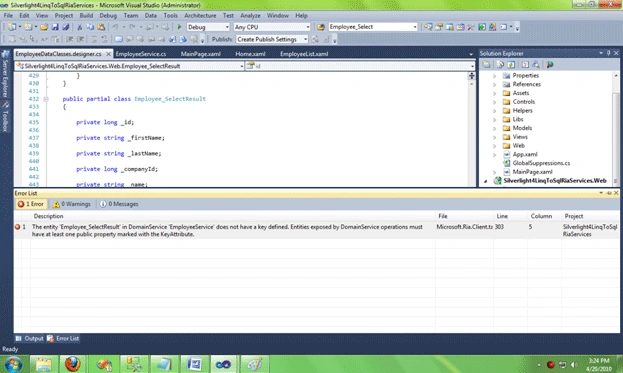
I am not sure how to overcome this, but as a work around you can add [Key] before the id property in EmployeeDataClasses.designer.cs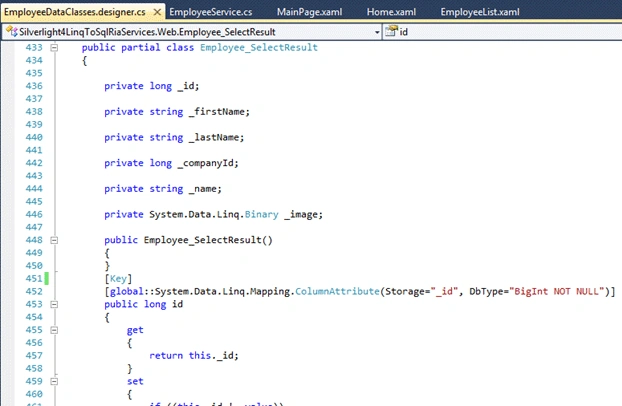
Now we get an error free build.
We can add the Employee_SelectResult or Employee datasource to EmployeeList.xaml from DataSources tab, I would go here with Employee datasource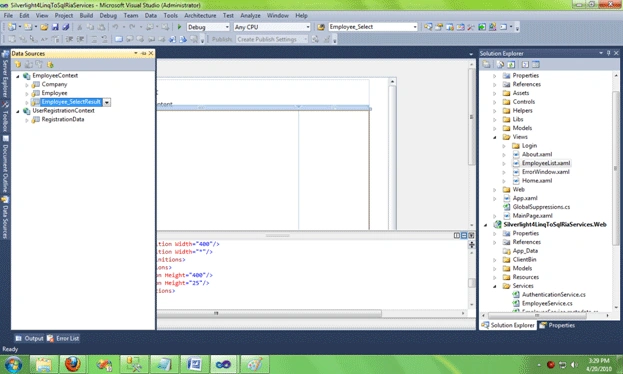
You can have the validation and descriptionViewer in EmployeeService.Metadata.cs as below=
...
internal sealed class EmployeeMetadata
{
// Metadata classes are not meant to be instantiated.
private EmployeeMetadata()
{
}
[Display(AutoGenerateField = false)]
public Company Company { get; set; }
[Display(AutoGenerateField = false)]
public long companyId { get; set; }
[Display(AutoGenerateField = false)]
[Key()]
public long id { get; set; }
[Display(Name = "First Name", Description = "Person's first name", Order = 1)]
[Required()]
[StringLength(10)]
public string firstName { get; set; }
[Display(Name = "Last Name", Description = "Person's last name", Order = 2)]
[Required()]
[StringLength(10)]
public string lastName { get; set; }
[Display(Name = "Gender", Description = "Male/Female", Order = 3)]
public Nullable<char> gender { get; set; }
[Display(Name = "Active", Description = "IsActive", Order = 4)]
public Boolean isActive { get; set; }
[Display(AutoGenerateField = false)]
public Binary image { get; set; }
}
...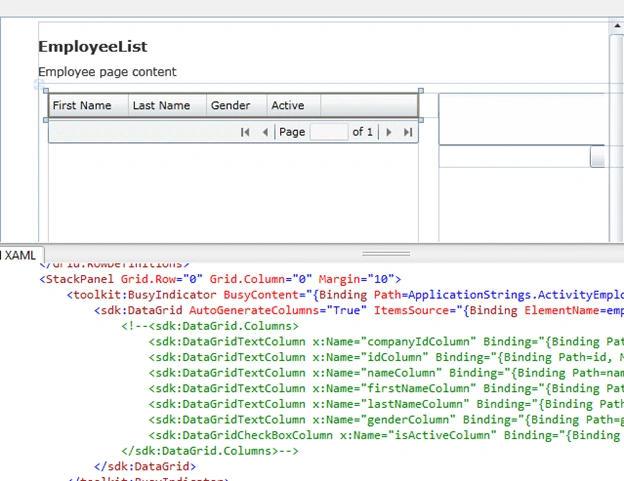
Now drop the datapager from toolbox and set its datasource same as datagrid.
<sdk:DataPager Height="26" Name="dataPager1" PageSize="10" Source="{Binding ElementName=employeeDomainDataSource, Path=Data}" />
Add Silverlight toolkit busy indicator and put the datagrid in side it.
<toolkit:BusyIndicator BusyContent="{Binding Path=ApplicationStrings.ActivityEmployeeList, Source={StaticResource ResourceWrapper}}" IsBusy="{Binding ElementName=employeeDomainDataSource, Path=DomainContext.IsLoading}">
<sdk:DataGrid AutoGenerateColumns="True" ItemsSource="{Binding ElementName=employeeDomainDataSource, Path=Data}" Name="employeeDataGrid" RowDetailsVisibilityMode="VisibleWhenSelected" Width="400" IsReadOnly="True">
</sdk:DataGrid>
</toolkit:BusyIndicator>
So the resultant screen will be 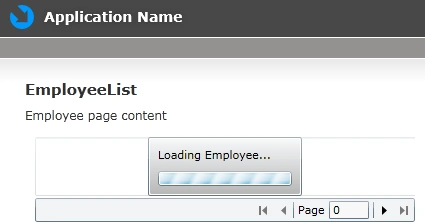
Lets add the dataform to EmployeeList.xaml from to edit the records. In employeeList.xaml you need to add
xmlns:data="clr-namespace:System.Windows.Controls;assembly=System.Windows.Controls.Data.DataForm.Toolkit"
to include dataform. Add NewTemplate and EditTemplate to this DataForm as below
<dataForm:DataForm ItemsSource="{Binding ElementName=employeeDomainDataSource, Path=Data}" Name="dataFormEmployee" AutoEdit="False" AutoCommit="False" DeletingItem="dataFormEmployee_DeletingItem" EditEnded="dataFormEmployee_EditEnded" CurrentItemChanged="dataFormEmployee_CurrentItemChanged" AddingNewItem="dataFormEmployee_AddingNewItem" DescriptionViewerPosition="BesideContent" Header="Employee Details" AutoGenerateFields="False" IsReadOnly="False">
<dataForm:DataForm.ReadOnlyTemplate>
<DataTemplate>
<StackPanel>
<dataForm:DataField Label="First Name" >
<TextBox Text="{Binding firstName, Mode=TwoWay}" />
</dataForm:DataField>
<dataForm:DataField Label="Last Name" >
<TextBox Text="{Binding lastName, Mode=TwoWay}" /> </dataForm:DataField>
<dataForm:DataField Label="Company" >
<StackPanel>
<ComboBox SelectedValuePath="id" DisplayMemberPath="name" ItemsSource="{Binding Source={StaticResource companyDomainDataSource}, Path=Data}" SelectedValue="{Binding companyId, Mode=OneWay}">
<ComboBox.ItemsPanel>
<ItemsPanelTemplate>
<VirtualizingStackPanel />
</ItemsPanelTemplate>
</ComboBox.ItemsPanel>
</ComboBox>
</StackPanel>
</dataForm:DataField>
<dataForm:DataField Label="Gender" >
<TextBox Text="{Binding gender, Mode=TwoWay,NotifyOnValidationError=True, ValidatesOnExceptions=True }" />
</dataForm:DataField>
<dataForm:DataField Label="Active" >
<CheckBox IsChecked="{Binding isActive, Mode=TwoWay,NotifyOnValidationError=True, ValidatesOnExceptions=True }" />
</dataForm:DataField>
</StackPanel>
</DataTemplate>
</dataForm:DataForm.ReadOnlyTemplate>
<dataForm:DataForm.EditTemplate>
<DataTemplate>
<StackPanel>
<dataForm:DataField Label="First Name" >
<TextBox Text="{Binding firstName, Mode=TwoWay}" />
</dataForm:DataField>
<dataForm:DataField Label="Last Name" >
<TextBox Text="{Binding lastName, Mode=TwoWay}" />
</dataForm:DataField>
<dataForm:DataField Label="Company" >
<StackPanel>
<ComboBox SelectedValuePath="id" DisplayMemberPath="name" ItemsSource="{Binding Source={StaticResource companyDomainDataSource}, Path=Data}" SelectedValue="{Binding companyId, Mode=TwoWay}">
<ComboBox.ItemsPanel>
<ItemsPanelTemplate>
<VirtualizingStackPanel />
</ItemsPanelTemplate>
</ComboBox.ItemsPanel>
</ComboBox>
</StackPanel>
</dataForm:DataField>
<dataForm:DataField Label="Gender" >
<TextBox Text="{Binding gender, Mode=TwoWay,NotifyOnValidationError=True, ValidatesOnExceptions=True }" />
</dataForm:DataField>
<dataForm:DataField Label="Active" >
<CheckBox IsChecked="{Binding isActive, Mode=TwoWay,NotifyOnValidationError=True, ValidatesOnExceptions=True }" />
</dataForm:DataField>
</StackPanel>
</DataTemplate>
</dataForm:DataForm.EditTemplate>
<dataForm:DataForm.NewItemTemplate>
<DataTemplate>
<StackPanel>
<dataForm:DataField Label="First Name" >
<TextBox Text="{Binding firstName, Mode=TwoWay}" />
</dataForm:DataField>
<dataForm:DataField Label="Last Name" >
<TextBox Text="{Binding lastName, Mode=TwoWay}" />
</dataForm:DataField>
<dataForm:DataField Label="Company" >
<StackPanel>
<riaControls:DomainDataSource AutoLoad="True" d:DesignData="{d:DesignInstance my1:Company, CreateList=true}" Height="0" LoadedData="companyDomainDataSource_LoadedData2" Name="companyDomainDataSource" QueryName="GetCompaniesQuery" Width="0">
<riaControls:DomainDataSource.DomainContext>
<my:EmployeeContext />
</riaControls:DomainDataSource.DomainContext>
</riaControls:DomainDataSource>
<ComboBox SelectedValuePath="id" DisplayMemberPath="name" ItemsSource="{Binding ElementName=companyDomainDataSource, Path=Data}" SelectedValue="{Binding companyId, Mode=TwoWay}">
<ComboBox.ItemsPanel>
<ItemsPanelTemplate>
<VirtualizingStackPanel />
</ItemsPanelTemplate>
</ComboBox.ItemsPanel>
</ComboBox>
</StackPanel>
</dataForm:DataField>
<dataForm:DataField Label="Gender" >
<TextBox Text="{Binding gender, Mode=TwoWay,NotifyOnValidationError=True, ValidatesOnExceptions=True }" />
</dataForm:DataField>
<dataForm:DataField Label="Active" >
<CheckBox IsChecked="{Binding isActive, Mode=TwoWay,NotifyOnValidationError=True, ValidatesOnExceptions=True }" />
</dataForm:DataField>
</StackPanel>
</DataTemplate>
</dataForm:DataForm.NewItemTemplate>
</dataForm:DataForm>
Add the following events in the EmployeeList.xaml.cs
{
if (MessageBox.Show("Are you sure you want to delete this item?\nThis cannot be undone", "Delete Item", MessageBoxButton.OKCancel) == MessageBoxResult.Cancel)
e.Cancel = true;
else
_isDeleting = true;
}
private void dataFormEmployee_EditEnded(object sender, DataFormEditEndedEventArgs e)
{
if (e.EditAction == DataFormEditAction.Commit)
{
if (dataFormEmployee.IsItemChanged)
employeeDomainDataSource.SubmitChanges();
if (_isInserting)
if (employeeDomainDataSource.HasChanges)
{
employeeDomainDataSource.SubmitChanges();
_isInserting = false;
}
}
else
_isInserting = false;
}
private void dataFormEmployee_CurrentItemChanged(object sender, EventArgs e)
{
if (_isDeleting)
{
if (employeeDomainDataSource.HasChanges)
{
employeeDomainDataSource.SubmitChanges();
_isDeleting = false;
}
}
}
private void dataFormEmployee_AddingNewItem(object sender, DataFormAddingNewItemEventArgs e)
{
_isInserting = true;
}
And yes you are done, you have a master/detail form to edit employees that use LinqToSQL with RIA services.
Kishan HathiwalaPosted Aug 28, 2011, 1:10 AM
Hi Nipun, Its very nice article and easy to understand. Thanks
Nazim ViraniPosted Jun 29, 2011, 6:42 AM
this is really good article for me to start work on LINQ to SQL
Andreas HPosted Apr 12, 2011, 6:45 AM
Hi Nipun, I was trying to rebuild your solution but I always run into errormessages. Anything I need to do after downloading your solution and open it with VS 2010?
Frank PattonPosted Oct 13, 2010, 5:40 PM
I have a desperate, real life question/situation ..<?xml:namespace prefix = o ns = "urn:schemas-microsoft-com:office:office" /><o:p></o:p> <o:p> </o:p> I own your book .. and love it .. wish there was more detail about RIA (I am sure you have heard than one before).<o:p></o:p> <o:p> </o:p> 1. I created a Silverlight Business Application .. and have added 4 pages in addition to the main, home, and about pages.<o:p></o:p> 2. Each page is a completed solution ..<o:p></o:p> 3. On each “page” I go to my database for the Products download.<o:p></o:p> 4. Example:<o:p></o:p> <o:p> </o:p> Page 1.<o:p></o:p> <o:p> </o:p> I go to the SQL data and create my product context. Everything is cool. <o:p></o:p> <o:p> </o:p> When I go to Page 2, why do I have to go back to the SQL database and re download the data. I think I already have it in my DomainContext.Entities.<o:p></o:p> <o:p> </o:p> I am assuming that the data is in the domain universe, somewhere .. can I access it without having to return to the SQL database when I go to a new page?<o:p></o:p> <o:p> </o:p> <o:p> </o:p> Thanks<o:p></o:p> <o:p> </o:p>
rickwPosted Oct 7, 2010, 10:11 PM
Make sure your tables have a primary key set. that's how I resolved it in my own project.
randyPosted Jul 21, 2010, 10:48 AM
I am having the same problem as Harisha, the LINQ to SQL data context is not available when creating the domain service class. I have tried different projects, VB, C#, different computers, always the same result. Has anyone solved this one? Thanks.
Annette WilsonPosted Jul 13, 2010, 9:52 PM
Thank you. Great article. I am building a Silverlight 4 application that I want to read only using stored procedures. Do I need the Domain Model for this a well?
MarceleditedPosted Jul 3, 2010, 2:01 AMEdited Jul 3, 2010, 4:06 AM
Hello Nipun, To get an error free build, I had to add a using statement. using System.ComponentModel.DataAnnotations; and... I think you'll have to switch "Add new domain service" with "And rebuild the solution" When adding the dataform I get numerous errors, then I decided to download the solution and give that a try, but that isn't working too. I get folowing eror. Load Error: Load operation failed for query getcompanies.... error 40 Could not open a connection to SQL Server.
har yalaPosted Jun 15, 2010, 9:15 AM
Hi Nipun, I ahve been following the same procedure to get mine working, but the data context that is supposed to be visible is not available i.e. the intellisense is not picking the data context in the silverlight applilcation, did u by any chance come across this issue? thanks Harisha