

Image Popup Using JQuery
In my previous article (http://www.c-sharpcorner.com/UploadFile/prathore/6651/) I discussed image scrolling using JQuery. Here I am taking a simple example (from my previous article) to demonstrate the image popup.
Step 1: Create a simple application in Visual Studio.
Step 2: Add the following JQuery:
- prototype.js
- scriptaculous.js
- effects.js
- builder.js
- lightbox
These are included in the uploaded file.
Step 3: Add the following style sheet.
lightbox.css
Step 4: Now start work on the default .aspx page.
First, link these Jquery files and styles on the page as follows:
Default .aspx:
<head runat="server">
<link href="css/lightbox.css" rel="stylesheet" type="text/css"
media="screen" /><script type="text/javascript" src="js/prototype.js"></script>
<script type="text/javascript" src="js/scriptaculous.js?load=effects,
builder"></script><script type="text/javascript" src="js/lightbox.js"></script>
</head>
Step 5: Drag a DataGrid from the toolbar and drop on the page and use the style as follows:
<asp:DataGrid ID="DataGrid1" runat="server" AutoGenerateColumns="False"CellPadding="5">
ShowHeader="true"<Columns>
<asp:TemplateColumn HeaderText="Photo">
<ItemTemplate>
<a href='<%#GetDetail(DataBinder.Eval(Container.DataItem,
"EmplayeeId"))%>' rel="lightbox"title='<%#title(DataBinder.Eval(Container.DataItem,
"EmployeeName"))%>'><img height="100" width="90" style="border
: Solid 1px Black;" src=
'<%#GetDetail(DataBinder.Eval(Container.DataItem,"EmplayeeId")
)%>' /></a>
</ItemTemplate>
</asp:TemplateColumn>
</Columns>
</asp:DataGrid>
Now fetch the record from the database such as in the following:
Default .aspx.cs:
using System;using System.Collections.Generic;
using System.Web;
using System.Web.UI;
using System.Web.UI.WebControls;
using System.Data;
using System.Data.SqlClient;
public partial class _Default : System.Web.UI.Page
{
protected void Page_Load(object sender, EventArgs e)
{
ShowFavoriteArticles();
}
private void ShowFavoriteArticles()
{
SqlConnection con = new SqlConnection();
SqlCommand cmd = new SqlCommand();
con = new SqlConnection("Data Source=server;Initial Catalog=TestData;
uid=sa;pwd=wintellect");cmd.Connection = con;
cmd.CommandText = "Select * from Puru_test_Employee";
con.Open();
DataGrid1.DataSource = cmd.ExecuteReader();
DataGrid1.DataBind();
con.Close();
}
public string GetDetail(object objEmplayeeId)
{
int EmplayeeId = int.Parse(objEmplayeeId.ToString());
string path = "images/" + EmplayeeId + ".jpg";
return path;
}
public string title(object objEmployeeName)
{
string employeename = objEmployeeName.ToString();
return employeename;
}
}
Output: Press F5 and see the result.

Figure:1
When you click an image you will see the popup like as follows:
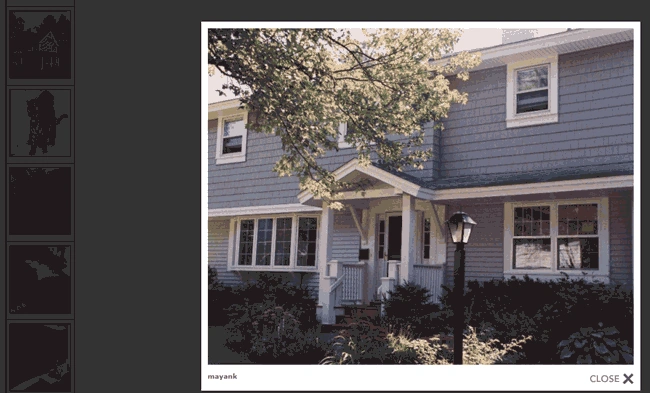
Figure 2:
Note: This is a very simple and attractive example for an image popup using JQuery. By using this example you can also show the description of the image.
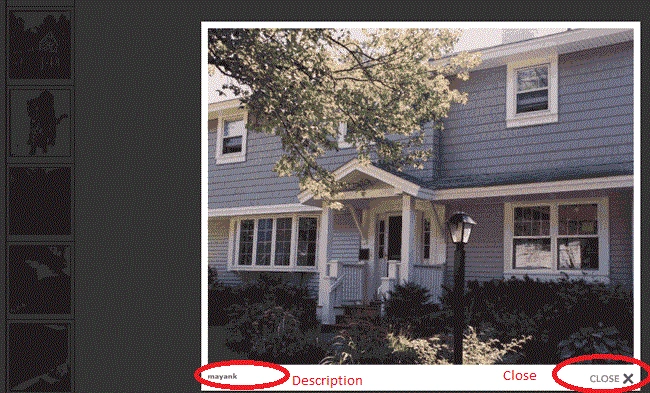
Figure 3:
Ashish TiwariPosted Sep 30, 2016, 12:31 AM
Very Nice
SubashPosted Sep 28, 2016, 7:54 AM
Nice sir
Purushottam RathorePosted May 24, 2013, 4:14 AM
Hi Vikash This is the sample application. Database is very simple so you can create your self.
vikas shahPosted Mar 17, 2013, 10:55 AM
please give database Puru_test_Employee fields name
sanjay chandraPosted Jun 12, 2012, 7:16 AM
A lot of thanks sir
Karl RichardseditedPosted Apr 11, 2011, 9:40 AMEdited Apr 11, 2011, 9:42 AM
Are you using jQuery or Prototype? In your includes, you have Prototype.js listed and not jquery so I just wanted to validate if this will work with both and you just chose prototype or if you intended for this to be a prototype article.
Karl RichardseditedPosted Apr 11, 2011, 9:40 AMEdited Mar 27, 2013, 9:06 AM
Are you using jQuery or Prototype? In your includes you have Prototype.js listed and not jquery so I just wanted to validate if this will work with both and you just chose prototype or if you intended for this to be a prototype article.