

This article has been
excerpted from book "The Complete Visual C# Programmer's Guide" from the Authors
of C# Corner.
Here are some System.String class member functions:
The ToUpper function converts a string to uppercase.: String.ToUpper().
The ToLower function converts a string to lowercase: String.ToLower().
The Concat function concatenates strings together:
- String.Concat(String[]) concatenates the string array
- String.Concat(String, String) concatenates the two strings
- String.Concat(String, String, String) concatenates the three strings
- String.Concat(String, String, String, String) concatenates the four strings
Listing 20.23 below shows an example of the
String.Concat overloaded methods.
Listing 20.23: Writing concatenated strings to the console
Console.Write("Enter
the string array length : ");
string strArr =
Console.ReadLine();
int intArr =
int.Parse(strArr);
for (int
i = 0; i < intArr; i++)
{
Console.Write("Enter
string " + i + " : ");
strTempArr[i] = Console.ReadLine();
Console.WriteLine("The
Concatenated string : " + String.Concat(strTempArr));
Console.WriteLine("the
concatenation of the first two string : " +
String.Concat(strTempArr[0],
strTempArr[1]));
Console.WriteLine("the
concatenation of the first three string : " +
String.Concat(strTempArr[0],
strTempArr[1], strTempArr[2]));
Console.WriteLine("the
concatenation of the first four string : " +
String.Concat(strTempArr[0],
strTempArr[1], strTempArr[2], strTempArr[3]));
}
In Listing 20.24 the Copy function returns a new string with the same value as
the string entered by the user.
Listing 20.24: String.Copy
Console.WriteLine("original
string : " + objString);
Console.Write("enter
the string to replace the above one : ");
string strCopy =
Console.ReadLine();
objString = String.Copy(strCopy);
Console.WriteLine("the
string after copying : " + objString);
In Listing 20.25 the CopyTo function copies a part of one string to another
string.
Listing 20.25: String.CopyTo
Console.Write("Enter
the source string : ");
string strTmp =
Console.ReadLine();
Console.Write("Enter
the starting index for source string : ");
string strSrcSt =
Console.ReadLine();
int intSrcSt =
int.Parse(strSrcSt);
Console.Write("Enter
the starting index in the destination string:");
string strDstSt =
Console.ReadLine();
int intDstSt =
int.Parse(strDstSt);
Console.Write("Enter
the number of characters to be copied from the source string : ");
string strSrcLn =
Console.ReadLine();
int intSrcLn =
int.Parse(strSrcLn);
chArray = objStringToCharArray();
strTmp.CopyTo(intSrcSt, chArray, intDstSt, intSrcLn);
objString = new
String(chArray);
Console.WriteLine("The
changed string is : " + objString);
In Listing 20.26 the EndsWith function returns a Boolean value, checking whether
the parent string ends with the value entered by the user.
Listing 20.26: String.EndsWith
Console.WriteLine("The
string to be checked :" + objString);
Console.Write("Enter
the 'ends with' string :");
String strTmp =
Console.ReadLine();
if (objString.EndsWith(strTmp))
Console.WriteLine("'"
+ objString + "' ends with '" + strTmp +
"'.");
else
Console.WriteLine("'"
+ objString + "' does not end with '" +
strTmp + "'.");
The Format static function helps in formating strings containing numbers, dates,
strings, and much more. Using the Format method you can pass in objects of
different types and have them neatly inserted into your string. You can also
handle column alignment and column width in the string. Below are some of the
rules of using the overloaded static Format method.
- Format(String str, Object obj) formats the string with one object.
- Format(String str, Object obj1, Object obj2) formats the string with two objects.
- The string should follow the formating specification: {N,[M]:[formatstring]}. N indicates the argument to be replaced and starts from zero(0). M indicates the length of formatting area, padded with spaces if the value filled in is smaller. Formatstring represents the value of the formating code.
Refer to C#.NET help for a full list of format
strings. In Listing 20.27, the C format parameter is used for currency. If the
value before the colon is negative, it is left justified to fit the number of
characters of the value; if the value is positive, it is right justified.
Listing 20.27: String.Format
String strTmp =
"{0} is working in {1,10} to earn {2,5:C} per
month.\n{0} then works again in {1,-10} to earn the {2,-5:C} in cash";
Console.WriteLine("The
source string is : " + strTmp);
Console.Write("Enter
the first replacement string (a name) : ");
String strTmp1 =
Console.ReadLine();
Console.Write("Enter
the second replacement string (a place) : ");
String strTmp2 =
Console.ReadLine();
Console.Write("Enter
a numeral : ");
String strTmp3 =
Console.ReadLine();
int intTmp =
int.Parse(strTmp3);
Console.WriteLine("the
modified string :" + String.Format(strTmp,
strTmp1, strTmp2, intTmp));
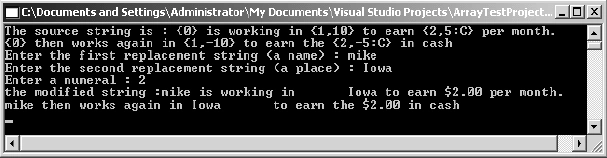
Figure 20.1: Output of Formatted String
The GetHashCode function returns the hash code(a 32-bit signed integer value)
for the string:
Console.WriteLine("Hash
of '" + objString + "' is : " +
objString.GetHashCode());
If you want to insert a string into the middle of another string, you can use
the Insert method. The Insert method is illustrated in Listing 20.28 by having
the user enter a string to be inserted into an existing string at a chosen
position.
Listing 20.28: String.Insert
Console.WriteLine("the
original string : " + objString);
Console.Write("Enter
the string to be inserted : ");
string strTmp =
Console.ReadLine();
Console.Write("Enter
the position where it has to be inserted :");
int intTmp =
int.Parse(Console.ReadLine());
objString = objString.Insert(intTmp, strTmp);
Console.WriteLine("the
modified string : " + objString);
The Join function joins two strings and string arrays into one body:
- String.Join(string str, string[] strarr) joins the string arrays using str.
- String.Join(string str, string[] strarr, int i, int j) joins the string arrays using str, starting from the ith array element and continuing j number of elements after it.
The StartsWith method is similar to the
EndsWith method, except it verifies that a substring exists at the beginning of
the parent string. As shown in Listing 20.29, the StartsWith function returns a
Boolean value indicating whether the string starts with a string entered by the
user.
Listing 20.29: String.StartsWith
Console.WriteLine("The
original string : " + objString);
Console.Write("Enter
the string to search for :");
string strTmp =
Console.ReadLine();
if (objString.StartsWith(strTmp))
Console.WriteLine("The
string '" + objString + "' starts with '"
+ strTmp + "'.");
else
Console.WriteLine("The
string '"+objString+"' does not start with '"
+ strTmp + "'.");
The SubString function retrieves a part of the string from the original string:
- String.Substring(int i) retrieves the string starting from i (zero based).
- String.Substring(int i,int j) retrieves the string starting from i and having a length j.
The Split function splits a string delimited with some specified characters. It identifies the substrings that are delimited by one or more characters specified in an array, then returns these substrings in a string array. Delimiter characters are not included in the substrings. The Split function has forms like this:
- string[] Split(params char[])
- string[] Split(params char[] separator)
The Split function returns one of these:
- An array consisting of a single element containing the entire string if the string contains none of the characters in the separator list.
- An array of substrings if the string is delimited by one or more of the characters specified in the separator list passed in the Split method.
- An array of substrings in a string delimited by white space characters if those characters occur and the separator array passed is a null reference or contains no delimiter characters.
- String.Empty (a static read-only field that represents the empty string) where two separator are adjacent or a separator is found at the beginning or end of the string.
For example, if we want to split string
38,\n29, 57 with a character array separator list containing comma and space
characters, we will get "38", "", "29", "", "57" as string array elements
returned. Or, if we want to split string "38..29..57" with the character array
delimiter list containing a period '.' , we will get "38", "", "29", "", "57" as
string array elements.
The Trim function removes white space characters or specified characters from
the beginning and end of the string:
- String.Trim() removes white space characters from the beginning and end of the string.
- String.Trim(char[] c) removes all occurrences of a set of characters in the array from the beginning and end of the string.
As demonstrated in Listing 20.30, the TrimEnd
function removes all occurrences of the set of characters in the array from the
end of the string.
Listing 20.30: String.TrimEnd
Console.WriteLine("The
original string is : " + objString);
Console.Write("Enter
the character array : ");
char[] c =
Console.ReadLine().ToCharArray();
Console.WriteLine("The
modified string is : " + objString.TrimEnd(c));
As demonstrated in Listing 20.31, the TrimStart function removes all occurrences
of the set of characters in the array from the beginning of the string.
Listing 20.31: String.TrimStart
Console.WriteLine("The
original string is : " + objString);
Console.Write("Enter
the character array : ");
char[] c =
Console.ReadLine().ToCharArray();
Console.WriteLine("The
modified string is : " + objString.TrimStart(c));
The IndexOf function returns the index of the first occurrence of a character or
string in a given string. The search for the string stops when the required
value is found or when the end of the string is reached. The function returns
the index if the value is found or -1 if it is not found. The IndexOf function
has these forms:
- IndexOf(char c) returns the occurence c in the string.
- IndexOf(string str) returns the occurence of str in the string.
- IndexOf(char c, int i) returns the occurence of c in the string, with the search starting from i.
- IndexOf(string str, int i) returns the occurence of str in the string, with the search starting from i.
- IndexOf(char c, int i, int j) returns the occurence of c in the string, with the search starting from i and examining j character positions.
- IndexOf(string str, int i, int j) returns the occurence of str in the string, with the search starting from i and examining j character positions.
The IndexOfAny function returns the index of the first occurrence of any character of the character array in the given string. The search of the string stops when the required value is found or until the end of the string is reached. It returns the index if the value is found or -1 if it is not found. The IndexOfAny function has these forms:
- IndexOfAny(char[] c) returns the occurrence of any character of the array in the string.
- IndexOfAny(char[] c, int i) returns the occurrence of any character of the array in the string, with the search starting from i.
- IndexOfAny(char[] c, int i, int j) returns the occurrence of any character of the array in the string, with the search starting from i and examining j character positions.
Conclusion
Hope this article would have helped you in understanding the
important Member Functions using C#. See other articles on the website on .NET and C#.
 |
The Complete Visual C# Programmer's Guide covers most of the major components that make up C# and the .net environment. The book is geared toward the intermediate programmer, but contains enough material to satisfy the advanced developer. |
RS PrajapatiPosted Apr 17, 2015, 12:17 PM
Good enough