

You can use the <table>,<tr>, and <td> tags to create a table and its rows in HTML. For example, the HTML code in Listing 7-25 creates a table with two rows and three columns with their values.
Listing. HTML code for a Table control
- <table border="1" width="39%">
- <tr>
- <td width="33%">
- Row1,Col1
- </td>
- <td width="33%">
- Row1,Col2
- </td>
- <td width="34%">
- Row1,Col3
- </td>
- </tr>
- <tr>
- <td width="33%">
- Row2,Col1
- </td>
- <td width="33%">
- Row2,Col2
- </td>
- <td width="34%">
- Row2,Col3
- </td>
- </tr>
- </table>
The System.Web.UI.Controls namespace defines the Table class, along with the other Web controls. You can create tables in .NET using a Table control and its helper controls TableRow and TableCell. As with all Web controls, you can create a Table control at run-time as well as at design-time using the VS .NET IDE. Table 7-9 describes the Table control and its helper controls.
Table: ASP.NET table and its Helper Control Classes
Manages a collection of table cells such as adding a cell to a row or removing a cell from it.
| CONTROL | CODE | DESCRIPTION |
| Table | <asp:Table> | The System.Web.UI.Table class encapsulates an HTML table. An HTML table control, used to creates a table with the help of TableRow and TableCell. |
| TableRow | <asp:TableRow> | The System.Web.UI.TableRow class encapsulates a row within a table, which later can be used to get or set row's cells values using TableCell. |
| TableCell | <asp:TableCell> | The System.Web.UI.TableCell class encapsulates a cell within a table. |
| TableRowCollection | <asp:TableRowCollection> | The System.Web.UI.TableCell class encapsulates a TableRowCollection and is used to manage a collection of table a collection or removing a row from it. |
| TableCellCollection | <asp:TableCellCollection> | Manages a collection of table cells such as adding a cell to a row or removing a cell from it. |
| TableHeaderCollection | <asp:TableHeaderCell> | Encapsulate a table header cell. |
Creating a table at design-time
You can create a table at design as well as run-time. To add a table control to your form at design-time, just drag and drop a table control from the Web Control toolbox to a Web form. Then use the Properties windows to add the rows and cells to the table.
The Rows property of a Table control adds rows to a table (see Figure 7-55).
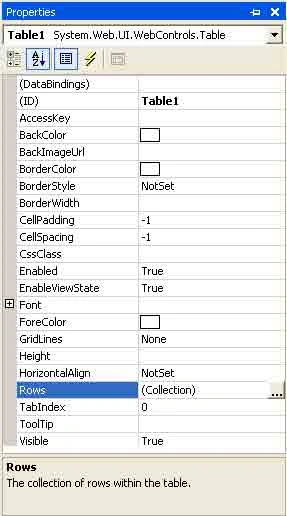
Figure. Table control properties
In this example, I added three rows to the table by using the Add button of the TableRow Collectionn Editor. (Clicking on the Collection of rows properties launches the TableRow Collection Editor; See Figure 7-56).
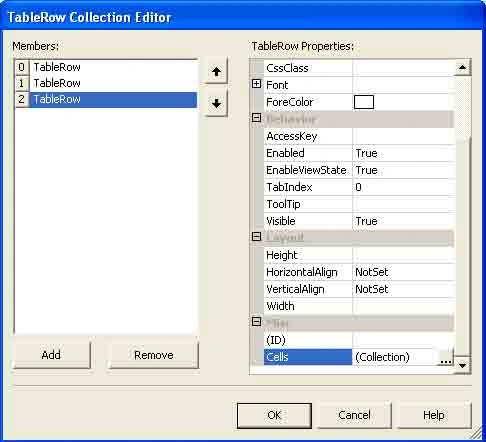
Figure. Adding rows with the TableRow Collection Editor
Now simply add cells to the rows by using the Cells property of a row. Use the Text property of a cell to add a value to the cell, and use the Add and Remove buttons of the TableCell Collection Editor to add and remove cells from a row. (You can launch the TableCell Collection Editor by clicking on the Collection of Cells property; see Figure 7-57)
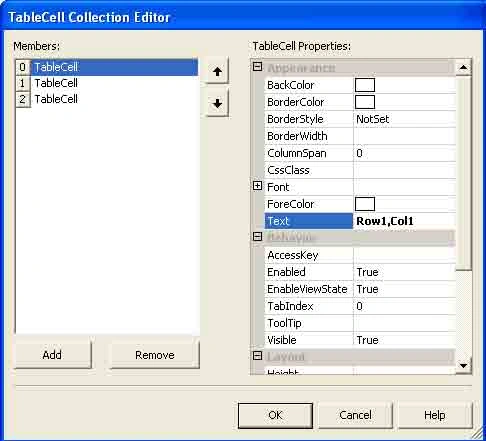
Figure. TableCell Collection Editor
After taking this action, the IDE writes the ASP code for you, which looks like Listing 7-26.
Listing. ASP.NET code for a table control
- <asp:Table ID="Table1" runat="server" Height="123px" Width="567px">
- <asp:TableRow runat="server">
- <asp:TableCell runat="server"></asp:TableCell>
- <asp:TableCell runat="server"></asp:TableCell>
- <asp:TableCell runat="server"></asp:TableCell>
- </asp:TableRow>
- <asp:TableRow runat="server">
- <asp:TableCell runat="server"></asp:TableCell>
- <asp:TableCell runat="server"></asp:TableCell>
- <asp:TableCell runat="server"></asp:TableCell>
- </asp:TableRow>
- <asp:TableRow runat="server">
- <asp:TableCell runat="server"></asp:TableCell>
- <asp:TableCell runat="server"></asp:TableCell>
- <asp:TableCell runat="server"></asp:TableCell>
- </asp:TableRow>
- </asp:Table>
Hope this article would have helped you in understanding the table web control in ASP.NET. See other articles on the website also for further reference.
Reegan DuraiPosted Feb 28, 2013, 4:44 AM
I want to create dynamically table and also get cell value to cell click