

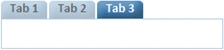
This article explains us how to give own css style for Ajax TabContainer Control.
1. Create new ASP.NET AjaxEnabled Website.
2. Drag and Drop TabContainer Control from Toolkit to web form.
3. Drag and Drop TabPanel Control from Toolkit to TabContainer.And Drop Label, Textbox and Button Controls to TabPanels, like this
<cc1:TabContainer ID="TabContainer1" runat="server" ActiveTabIndex="0">
<cc1:TabPanel ID="TabPanel1" runat="server" HeaderText="Tab 1">
<ContentTemplate>
<asp:TextBox ID="TextBox1"
runat="server"></asp:TextBox>
</ContentTemplate>
</cc1:TabPanel>
<cc1:TabPanel ID="TabPanel2"
runat="server"
HeaderText="Tab
2">
<ContentTemplate>
<asp:Label ID="Label1" runat="server"
Text="Label"></asp:Label>
</ContentTemplate>
</cc1:TabPanel>
<cc1:TabPanel ID="TabPanel3" runat="server" HeaderText="Tab 3">
<ContentTemplate>
<asp:Button ID="Button1"
runat="server"
Text="Button1"
/>
</ContentTemplate>
</cc1:TabPanel>
</cc1:TabContainer>
4. Now create a new Style Sheet with the following css code.
/*Header*/
.Tab .ajax__tab_header
{
color: #4682b4;
font-family:Calibri;
font-size: 14px;
font-weight: bold;
background-color: #ffffff;
margin-left: 0px;
}
/*Body*/
.Tab .ajax__tab_body
{
border:1px solid #b4cbdf;
padding-top:0px;
}
/*Tab Active*/
.Tab .ajax__tab_active .ajax__tab_tab


Dan BrewertonPosted Dec 1, 2017, 2:23 PM
Ok, it was having my file names incorrect. However, now what it does is bumps the inner tab down about 10px-15px on every tab. The tab and outer are just fine, it is only the left.
Dan BrewertonPosted Dec 1, 2017, 12:22 PM
Hi, I tried using the code shown but the default AJAX CSS is overriding what I set. Any idea how to fix this?
Jose MurilloPosted Oct 6, 2015, 6:31 PM
thanks, it looks very well now.
Raghavendra UPosted Apr 15, 2015, 5:22 AM
just copy paste
hami hamiPosted Apr 14, 2015, 6:48 AM
hi how to download this source???
hami hamiPosted Apr 14, 2015, 6:48 AM
hihow to download this source???
narisepalli pavaniPosted Jul 13, 2013, 2:20 AM
i wrote all the stylings and code but not able to see tab container in that format
Raghavendra UPosted May 14, 2013, 10:09 AM
next to the 5th point right click and saveas
sandhiya vsPosted May 14, 2013, 2:41 AM
where i download the images
shafaqat aliPosted Mar 4, 2013, 11:34 PM
good
Preethy J KamathPosted Nov 30, 2012, 1:36 AM
Where can i download images and css used in this post?
Rajaprabhu RajaPosted Jul 25, 2012, 3:25 AM
good
Orsan AwawdiPosted Aug 15, 2010, 7:05 PM
great!