

In this article I am going to show how we can generate image of any type on fly by choosing our forecolor, background color, our text, our font style. I am saving the images inside Images folder. I am showing all images in the form.
This is the aspx code.
<%@ Page Language="C#" AutoEventWireup="true" CodeFile="Default.aspx.cs" Inherits="_Default" %>
<!DOCTYPE html PUBLIC "-//W3C//DTD XHTML 1.0 Transitional//EN" "http://www.w3.org/TR/xhtml1/DTD/xhtml1-transitional.dtd">
<html xmlns="http://www.w3.org/1999/xhtml">
<head runat="server">
<title></title>
</head>
<body>
<form id="Form1" runat="server">
<table cellpadding="0" cellspacing="0" width="50%" align="center" border="4">
<tr>
<td>
<table cellpadding="4" cellspacing="4" width="90%" align="right">
<tr>
<td>
<asp:Label ID="lblFontFamily" Text="Font:" runat="server" Width="200px"></asp:Label>
<asp:DropDownList ID="Ddlfont" runat="SERVER">
<asp:ListItem Value="Times New Roman">Times New Roman</asp:ListItem>
<asp:ListItem Value="Lucida Sans Unicode">Lucida Sans Unicode</asp:ListItem>
<asp:ListItem Value="Arial">Arial</asp:ListItem>
<asp:ListItem Value="Courier">Courier New</asp:ListItem>
<asp:ListItem Value="Verdana">Verdana</asp:ListItem>
</asp:DropDownList>
</td>
</tr>
<tr>
<td>
<asp:Label ID="Label1" Text=" Font size:" runat="server" Width="200px"></asp:Label>
<asp:DropDownList ID="DdlFontSize" runat="SERVER">
<asp:ListItem Value="7">7</asp:ListItem>
<asp:ListItem Value="8">8</asp:ListItem>
<asp:ListItem Value="9">9</asp:ListItem>
<asp:ListItem Value="10">10</asp:ListItem>
<asp:ListItem Value="11">11</asp:ListItem>
<asp:ListItem Value="12">12</asp:ListItem>
<asp:ListItem Value="13">13</asp:ListItem>
<asp:ListItem Value="14">14</asp:ListItem>
<asp:ListItem Value="15">15</asp:ListItem>
<asp:ListItem Value="16">16</asp:ListItem>
</asp:DropDownList>
</td>
</tr>
<tr>
<td>
<asp:Label ID="Label3" Text="Background color:" runat="server" Width="200px"></asp:Label>
<asp:DropDownList ID="DdlBgColor" runat="server">
<asp:ListItem Value="White">White</asp:ListItem>
<asp:ListItem Value="Red">Red</asp:ListItem>
<asp:ListItem Value="Yellow">Yellow</asp:ListItem>
</asp:DropDownList>
</td>
</tr>
<tr>
<td>
<asp:Label ID="Label4" Text="Font color:" runat="server" Width="200px"></asp:Label>
<asp:DropDownList ID="DdlForeColor" runat="server">
<asp:ListItem Value="Black">Black</asp:ListItem>
<asp:ListItem Value="Blue">Blue</asp:ListItem>
<asp:ListItem Value="Green">Green</asp:ListItem>
</asp:DropDownList>
</td>
</tr>
<tr>
<td>
<asp:Label ID="Label5" Text="Text of image:" runat="server" Width="200px"></asp:Label>
<asp:TextBox ID="txtImageText" runat="server"></asp:TextBox>
</td>
</tr>
<tr>
<td>
<asp:Label ID="Label6" Text="Name of image:" runat="server" Width="200px"></asp:Label>
<asp:TextBox ID="txtImageName" runat="server"></asp:TextBox>
</td>
</tr>
<tr>
<td>
<asp:Label ID="Label2" Text="Type of Image:" runat="server" Width="200px"></asp:Label>
<asp:DropDownList ID="DdlImageType" runat="server">
<asp:ListItem Value="png">png</asp:ListItem>
<asp:ListItem Value="jpg">jpg</asp:ListItem>
<asp:ListItem Value="gif">gif</asp:ListItem>
<asp:ListItem Value="tiff">tiff</asp:ListItem>
</asp:DropDownList>
</td>
</tr>
<tr>
<td align="center">
<asp:Button ID="btnSubmit" Text="Generate graphic" runat="server" OnClick="btn_OnClick" />
</td>
</tr>
<tr>
<td>
<asp:Label ID="lblError" runat="server" ForeColor="Red" Visible="false"></asp:Label>
</td>
</tr>
</table>
</td>
</tr>
<tr>
<td>
<div class="bottomColumn">
<asp:DataList ID="dlImageList" RepeatColumns="4" runat="server">
<ItemTemplate>
<table cellpadding="0" cellspacing="0" width="100%" align="center" border="1">
<tr>
<td width="100px" height="100px" align="center" valign="middle">
<asp:Image ID="imgShow" ImageUrl='<%# Eval("Name","~/Images/{0}")%>' runat="server"
AlternateText='<%# Eval("Name") %>' />
</td>
</tr>
</table>
</ItemTemplate>
</asp:DataList>
</div>
</td>
</tr>
</table>
</form>
</body>
</html>
This is the aspx.cs code
using System;
using System.Collections.Generic;
using System.Linq;
using System.Web;
using System.Web.UI;
using System.Web.UI.WebControls;
using System.IO;
using System.Drawing;
using System.Drawing.Imaging;
public partial class _Default : System.Web.UI.Page
{
protected void Page_Load(object sender, EventArgs e)
{
if (!Page.IsPostBack)
{
ShowImage();
}
}
protected void btn_OnClick(object sender, EventArgs e)
{
string ImageSavePath = @"C:\Documents and Settings\PR\My Documents\Visual Studio 2008\WebSites\GraphicsOnTheFly\Images\";
Bitmap newBitmap = null;
Graphics g = null;
try
{
Font fontCounter = new Font(Ddlfont.SelectedValue.ToString(), Int32.Parse(DdlFontSize.SelectedValue.ToString()));
newBitmap = new Bitmap(1, 1, PixelFormat.Format32bppArgb);
g = Graphics.FromImage(newBitmap);
SizeF stringSize = g.MeasureString(txtImageText.Text, fontCounter);
int nWidth = (int)stringSize.Width;
int nHeight = (int)stringSize.Height;
g.Dispose();
newBitmap.Dispose();
newBitmap = new Bitmap(nWidth, nHeight, PixelFormat.Format32bppArgb);
g = Graphics.FromImage(newBitmap);
if (DdlBgColor.SelectedValue == "White")
{
g.FillRectangle(new SolidBrush(Color.White), new Rectangle(0, 0, nWidth, nHeight));
}
if (DdlBgColor.SelectedValue == "Red")
{
g.FillRectangle(new SolidBrush(Color.Red), new Rectangle(0, 0, nWidth, nHeight));
}
if (DdlBgColor.SelectedValue == "Yellow")
{
g.FillRectangle(new SolidBrush(Color.Yellow), new Rectangle(0, 0, nWidth, nHeight));
}
if (DdlForeColor.SelectedValue == "Black")
{
g.DrawString(txtImageText.Text, fontCounter, new SolidBrush(Color.Black), 0, 0);
}
if (DdlForeColor.SelectedValue == "Blue")
{
g.DrawString(txtImageText.Text, fontCounter, new SolidBrush(Color.Blue), 0, 0);
}
if (DdlForeColor.SelectedValue == "Green")
{
g.DrawString(txtImageText.Text, fontCounter, new SolidBrush(Color.Green), 0, 0);
}
if (DdlImageType.SelectedValue == "png")
{
newBitmap.Save(ImageSavePath + txtImageName.Text + ".png", ImageFormat.Png);
}
if (DdlImageType.SelectedValue == "gif")
{
newBitmap.Save(ImageSavePath + txtImageName.Text + ".gif", ImageFormat.Gif);
}
if (DdlImageType.SelectedValue == "jpg")
{
newBitmap.Save(ImageSavePath + txtImageName.Text + ".jpeg", ImageFormat.Jpeg);
}
if (DdlImageType.SelectedValue == "tiff")
{
newBitmap.Save(ImageSavePath + txtImageName.Text + ".tiff", ImageFormat.Tiff);
}
lblError.Text = "Image Generated Successfully...";
lblError.Visible = true;
ShowImage();
}
catch (Exception ex)
{
Console.WriteLine(ex.ToString());
}
finally
{
if (null != g) g.Dispose();
if (null != newBitmap) newBitmap.Dispose();
}
}
public void ShowImage()
{
DirectoryInfo myImageDir = new DirectoryInfo(MapPath("~/Images/"));
try
{
dlImageList.DataSource = myImageDir.GetFiles();
dlImageList.DataBind();
}
catch (System.IO.DirectoryNotFoundException)
{
Response.Write("<script language =Javascript> alert('Upload File(s) First!');</script>");
}
}
}
When we run the application then first we set the attributes for our image.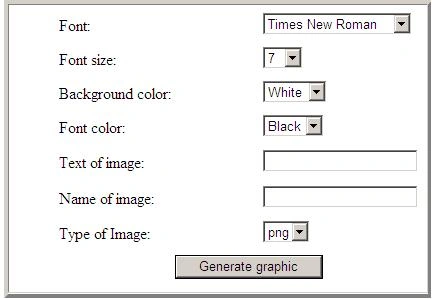
Image 1
When we generate image then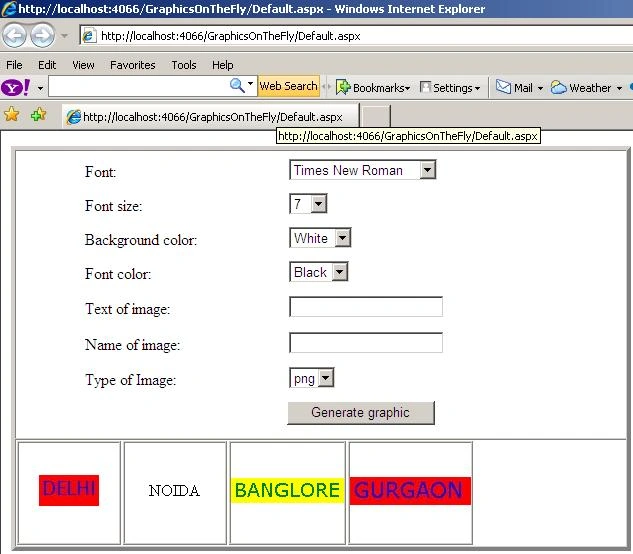
Image 2.
Bjarne WinklerPosted Dec 28, 2009, 2:03 PM
Happy holidays, I do not want to be negative, but here are three things to learner: 1) First of foremost; this is not article, it is a listing of source code without any comments. I could have accepted this as an article if the code had been well documented as all code should be. 2) Hard coding of the “ImageSavePath” is an absolute no-no. If hard coded you cannot move and reuse the code without first changing the code and that means Code Once, Test Once, Reuse Many Time goes out the door. The use if either calling the OS for relative folder position or the simple use of “~” would have been a better solution. 3) The last one is real bad. We have in two different places (the ASPX and the CS) code definition of constants so if I have misspelled one of the constants the code will not work, and second if I would at a later time add another constant, I have to remember to do it in both places. I have one more, but that falls in under religion with regards to how one codes. I like to not have intelligent directly under an event but build an assembly where the intelligent is stored; hence splitting the smart stuff from the pretty stuff. Why do I like this? Well the intelligent can now be reused and expanded as my life goes on without having to think about what could break. And on the pretty side I just have to think CCS if I want to change the look and feel, hence making a Website dynamic. See if some of the above would have been introduced in the text we would have had an article. Again I am not here to make someone upset and be negative; I am here to help us all to be better designers / programmers. May 2010 become a better year with regards to articles and codes! Bjarne
Dharmendra GaurPosted Dec 15, 2009, 12:17 AM
Good One Rahul, Keep it up.