

One of the most common functionality in any ASP.NET application is to print forms and controls.
In this article, I am going to show how can we achieve this print functionality in our asp.net application. For this, I created a PrintHelper class. In this class, I made a method 'PrintWebControl'. With this method, we can print any server control alike GridView, DataGrid, Panel, TextBox, etc.
This is my PrintHelper.cs.
using System;
using System.Data;
using System.Configuration;
using System.Web;
using System.Web.Security;
using System.Web.UI;
using System.Web.UI.WebControls;
using System.Web.UI.WebControls.WebParts;
using System.Web.UI.HtmlControls;
using System.IO;
using System.Text;
using System.Web.SessionState;
/// <summary>
/// Summary description for PrintHelper
/// </summary>
public class PrintHelper
{
    public PrintHelper()
    {
        //
        // TODO: Add constructor logic here
        //
    }
    public static void PrintWebControl(Control ctrl)
    {
        PrintWebControl(ctrl, string.Empty);
    }
    public static void PrintWebControl(Control ctrl, string Script)
    {
        StringWriter stringWrite = new StringWriter();
        System.Web.UI.HtmlTextWriter htmlWrite = new System.Web.UI.HtmlTextWriter(stringWrite);
        if (ctrl is WebControl)
        {
            Unit w = new Unit(100, UnitType.Percentage); ((WebControl)ctrl).Width = w;
        }
        Page pg = new Page();
        pg.EnableEventValidation = false;
        if (Script != string.Empty)
        {
            pg.ClientScript.RegisterStartupScript(pg.GetType(), "PrintJavaScript", Script);
        }
        HtmlForm frm = new HtmlForm();
        pg.Controls.Add(frm);
        frm.Attributes.Add("runat", "server");
        frm.Controls.Add(ctrl);
        pg.DesignerInitialize();
        pg.RenderControl(htmlWrite);
        string strHTML = stringWrite.ToString();
        HttpContext.Current.Response.Clear();
        HttpContext.Current.Response.Write(strHTML);
        HttpContext.Current.Response.Write("<script>window.print();</script>");
        HttpContext.Current.Response.End();
    }
}
Here, in this application, I created 2 pages. First is the default page of the content that I want to print. On the same page, I set a Print button also. When it will be clicked, it will redirect the user to the second page, named as 'Print. aspx'.
Default.aspx
<%@ Page Language="C#" AutoEventWireup="true" CodeFile="Default.aspx.cs" Inherits="_Default" %>
<!DOCTYPE html PUBLIC "-//W3C//DTD XHTML 1.0 Transitional//EN" "http://www.w3.org/TR/xhtml1/DTD/xhtml1-transitional.dtd">
<html xmlns="http://www.w3.org/1999/xhtml">
<head runat="server">
    <title>Pring in ASP.NET</title>
</head>
<body>
    <form id="form1" runat="server">
        <div>
            <asp:Button ID="btnPrint" runat="server" Text="Print" OnClick="btnPrint_Click" /><br />
            <asp:Panel ID="pnl1" runat="server">
                <table cellpadding="4" cellspacing="4" width="50%" align="center">
                    <tr>
                        <td align="center">
                            Fill all information
                        </td>
                    </tr>
                    <tr>
                        <td>
                            <asp:Label ID="Label1" runat="server" Text="Email" Width="130px"></asp:Label>
                            <asp:TextBox runat="server"></asp:TextBox>
                        </td>
                    </tr>
                    <tr>
                        <td>
                            <asp:Label ID="Label2" runat="server" Text="Name" Width="130px"></asp:Label>
                            <asp:TextBox ID="TextBox1" runat="server"></asp:TextBox>
                        </td>
                    </tr>
                    <tr>
                        <td>
                            <asp:Label ID="Label6" runat="server" Text="Country" Width="130px"></asp:Label>
                            <asp:TextBox ID="TextBox5" runat="server"></asp:TextBox>
                        </td>
                    </tr>
                    <tr>
                        <td>
                            <asp:Label ID="Label3" runat="server" Text="Mobile" Width="130px"></asp:Label>
                            <asp:TextBox ID="TextBox2" runat="server"></asp:TextBox>
                        </td>
                    </tr>
                </table>
            </asp:Panel>
        </div>
    </form>
</body>
</html>
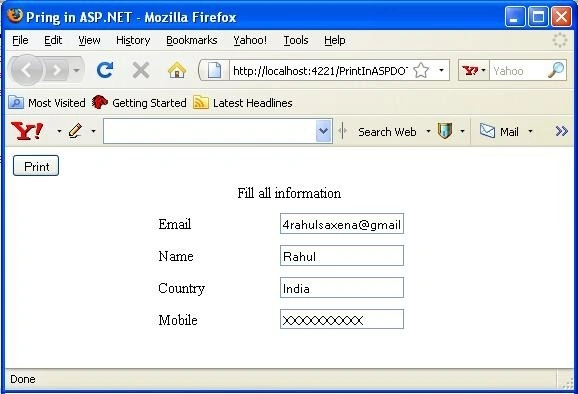
Image 1
Click event of the 'print' button is.
protected void btnPrint_Click(object sender, EventArgs e)
{
    Session["ctrl"] = pnl1;
    ClientScript.RegisterStartupScript(this.GetType(), "onclick", "<script language=javascript>window.open('Print.aspx','PrintMe','height=300px,width=300px,scrollbars=1');</script>");
}
When the 'Print' button is clicked, the screen will look as under in Image 2.
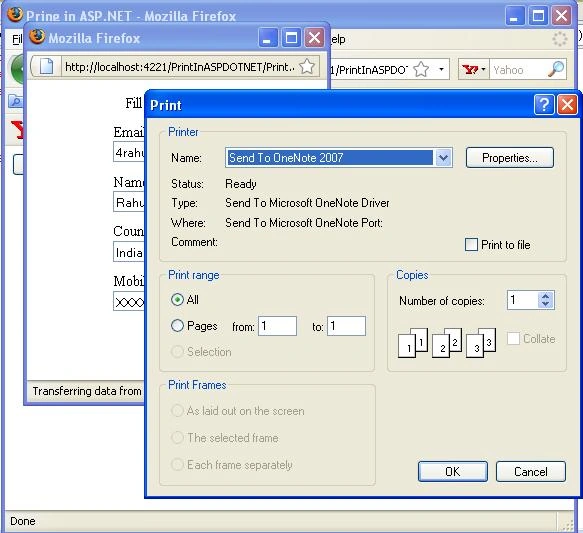
Image 2
Following is the load event of this page, 'Print. aspx'.
protected void Page_Load(object sender, EventArgs e)
{
    Control ctrl = (Control)Session["ctrl"];
    PrintHelper.PrintWebControl(ctrl);
}
The BallPosted Jun 4, 2022, 3:41 PM
Code is working fine thanks bro god bless you
Zahfi ZafryPosted Nov 7, 2019, 1:59 AM
Hi the popup for print is open and close automatically. Please help
Mikhail ZhuykovPosted Mar 22, 2019, 8:32 AM
Same error is your code add: Page.ClientScript.RegisterStartupScript...
praveenPosted Sep 12, 2018, 1:28 AM
How can we add Header
Nikhil UtnalkarPosted Apr 15, 2018, 1:10 AM
How can we add Header Text and print the required text boxes
Lee DouglasPosted Mar 22, 2018, 5:14 PM
Can you tell me how to have the Font transfer to the print.aspx page.
Mortada YeassenPosted Jan 15, 2018, 12:36 AM
Thanks a lot. Did you add any extra control to this test.
Ansar AhmadPosted Jul 1, 2017, 6:24 AM
Grate boss awesome
Michael GriffithsPosted May 1, 2016, 5:56 AM
Nice post
hari selvaPosted Apr 13, 2016, 5:58 PM
how to automatically close print.aspx ?
Niren GuptaPosted Nov 30, 2015, 9:47 PM
compilation error
Vong KhatPosted May 18, 2015, 10:31 PM
Help me. Error Warning 1 The given expression is never of the provided ('System.Web.UI.WebControls.WebControl') type after add to another project
Mohammed NajmuddinPosted Jan 1, 2015, 4:26 PM
Excellent work..... Thanks a ton..
Rajesh kumarPosted Sep 22, 2014, 11:31 PM
This is very good code. But i have one problem with this... CSS Not applying while taking print out time. Please give a solution for this problem.
Lalit RaghuvanshiPosted Jun 14, 2014, 1:36 PM
another good link: http://www.webcodeexpert.com/2014/06/print-page-content-place-inside-div-tag.html
Naga SureshPosted May 30, 2014, 2:08 AM
i have an error at pnl1..can i get the solution for this?
MikeMastersPosted Feb 5, 2014, 2:22 PM
Your code is good, but, when finish appear a small window (print.aspx) like a pop up, how I can close this window automatically? what modificaction I need to do in your code?
P KumarPosted Dec 28, 2013, 5:59 AM
i have taken your code but it is giving error as "unable to evaluate expression because the code is optimized or a native frame" can u please help me
P KumarPosted Dec 28, 2013, 5:57 AM
Can you please explain the line Session["ctrl"] = pnl1;....Regards Mahesh
murali RaoPosted Jul 15, 2013, 8:01 AM
in the print.cs file i am getting an error over PrintHelper that PrintHelper is not existing in the current contest can u please help me
arafayPosted Jul 2, 2013, 2:32 AM
i want print the document in the landscape manner when i click on print option,, help it out
Praveen KumarPosted May 17, 2013, 6:54 AM
thank u very nice
raghu kiranPosted May 14, 2013, 3:41 AM
hey sorry..i checked ur code for panel..its worked fine...i didnt observe that panel in source code...anyway thank u
raghu kiranPosted May 14, 2013, 3:16 AM
hi thank you for sharing code...i have a panel and i want to print the content of panel..but this code not seems to be working for panel...any suggestions........
Lalan KumarPosted Apr 6, 2013, 6:06 AM
thank bhai
Lalan KumarPosted Apr 6, 2013, 6:06 AM
thank bhai
Mahesh MoodleyPosted Apr 2, 2013, 8:22 AM
Can you please explain the line Session["ctrl"] = pnl1;....MVS is underlining pnl1 in red Regards Mahesh
nikta nateghiPosted Feb 23, 2013, 5:31 AM
hi thanks for your great post i have a div in my page and i set an image as its background url but when i print it using printhelper class i see no image could you help me please thanks in advance
veenaPosted Feb 20, 2013, 11:35 AM
this code is not working in VB .net,can u plz post that too.. Thanks.
Shourya VerdhanPosted Jan 26, 2013, 9:13 PM
Hi Rahul, Thank you so much Rahul it works MAN.... :)
Shourya VerdhanPosted Jan 26, 2013, 9:13 PM
Hi Rahul, Thank you so much Rahul it works MAN.... :)
chellappan alagappanPosted Dec 6, 2012, 5:40 AM
Hai, I have dynamic controls in my page how to print using asp.net code
AshwinPosted Oct 10, 2012, 6:16 AM
I have two gridview. But when i try printing as you said in the preview its comes one under the other. :( How do i make it to come side by side
POOJA SISODIAPosted Jan 27, 2012, 1:17 AM
How do i increase the font size while printing
sundar lakhmanPosted Sep 29, 2011, 9:31 AM
Hai Rahul, HOw are you? and nice to see you in here. I am beginner in asp.net with c#. I am happy to copy your code, but this is not working..............
Anele NgqanduPosted Sep 7, 2011, 7:45 AM
So can this also work for printing using the gridview control?
John SmithPosted Jun 9, 2011, 3:57 AM
Hey Moron, Stop claiming things as your own. Once an idiot always an idiot. Expertise in copying is more correct.
John SmithPosted Jun 9, 2011, 3:32 AM
Hi Rahul, That's a really great article that you took credit for; you stupid Indian. Aren't you breaking the rule of copied contents? Here is the original content written over a year back before you post it as your own. http://www.dotnetcurry.com/ShowArticle.aspx?ID=92 What a retard..
Krishna GaradPosted May 10, 2011, 9:12 AM
Hi thank's for sharing but my prob is on my form there are images but those images not getting printed.
sajan yamahaPosted May 9, 2011, 2:57 AM
Please make a way to get css in here,else a way to print the panel in a specified location not everytime at the extreme top-left side of the paper...
Francisco EsparzaPosted Apr 8, 2011, 10:03 AM
Thank you for your extremelly valuabe article. It works great! I had been reading books and searching the web and nothing that I found worked as easy and straight as your code. Now, I need to add to the printing the ability to print the contents from a formview or gridview in a free format report. I am not interested in the grid but need to be able to print the records I get and print them in a loop till all of the records associated with a student are printed. Hope someone can help.. thanks!
Francisco EsparzaPosted Apr 8, 2011, 9:58 AM
are you getting this?
Turab SunasaraPosted Mar 9, 2011, 2:25 AM
How To Print Manually in Asp.Net
MariaPosted Feb 2, 2011, 8:24 PM
Thank you. This was very helpful. Would you happen to how to resize the control so that I can have my control print on one page?
Halit AyPosted Jan 22, 2011, 6:14 AM
the code witch you wrote doese't work at server but ist works at local pls help http://www.halitaycicek.com/default.aspx test..
satheyaraaj P TPosted Dec 18, 2010, 5:03 AM
how to set paper margin in this print class
Setu SahuPosted Nov 13, 2010, 8:15 AM
Hello Rahul Sir.... I just want to thank to you.... You have Solved My Problem(Printing Gridview).... vry good programming style..... thanks again.... [email protected]
renuka salaviPosted Apr 21, 2010, 2:09 AM
can you suggest me to print text from textbox in vb.net ...
Jitendra TiwarieditedPosted Feb 19, 2010, 10:52 PMEdited Feb 19, 2010, 11:01 PM
Thanks Rahul, I tried this code but data is not transfer to my Print.aspx page. Please suggest
brijesh subhaganPosted Nov 8, 2009, 3:39 AM
I tried this code,but CSS is not working while printing..Please suggest
sony danielPosted Sep 23, 2009, 3:32 AM
Hi rahul, i had created the helpprinterl class as u said,but iam not getting pg.EnableEventValidation = false; pg.DesignerInitialize();<?xml:namespace prefix = o ns = "urn:schemas-microsoft-com:office:office" /><o:p></o:p> these lines in class file. when typing pg.(not gettingenableeventvalidation) and also with designerintialize. Please help me to solve my problem. Thanks