

This sample demonstrates how to use AutoComplete
functionality using JQuery. AutoComplete is used to like popup panel to display
words that has the prefix typed into textbox.
Getting Started
Creating a ASP.NET Application:
- Open Visual
Studio 2010.
- Go to File =>
New => Web Site.
- Select ASP.NET
Web Site from the Installed templates
- Enter the Name
and choose the location.
- Click OK.
<title>jQuery Autocomplete Sample</title>
<link rel="stylesheet" href="theme/jquery.ui.all.css">
<script src="jquery-1.4.4.js"></script>
<script src="ui/jquery.ui.core.js"></script>
<script src="ui/jquery.ui.widget.js"></script>
<script src="ui/jquery.ui.position.js"></script>
<script src="ui/jquery.ui.autocomplete.js"></script>
$(function () {
var technologies = [
"ActiveDirectory",
"ADO.NET",
"AJAX",
"Algorithms",
"ASP.NET",
"ASP.NET
MVC",
"Assemblies",
"BizTalk
Server",
"C#",
"Career
Advice",
"Cloud
Computing",
"COBOL.NET",
"Compact
Framework",
"Deployment",
"DirectX",
"Enterprise
Development",
"Exception
Handling",
"Financial
Applications",
"Games
Programming",
"Hardware",
"HTML",
"JQuery",
"LINQ",
"MESSAGE
QUEUE",
"Mobile
EMBEDDED",
"Networking",
"Pocket
PC",
"Printing",
"Project
Management",
"Remoting",
"Sharepoint",
"Silverligh",
"Testing",
"Threading",
"WCF",
"Web
Forms",
"Web
Services",
"WF",
"Windows
Phone"
];
$("#tags").autocomplete({
source: technologies
});
});
</script>
<style type="text/css">
#tags
{
width:
249px;
}
</style>
<div class="demo">
<div class="ui-widget">
<label for="tags">Technologies: </label>
<input id="tags"
style="font-family: 'Cordia New'; font-size: x-large; font-weight: normal; font-style: italic; font-variant: normal; color: #FF0000" />
</div>
</div>
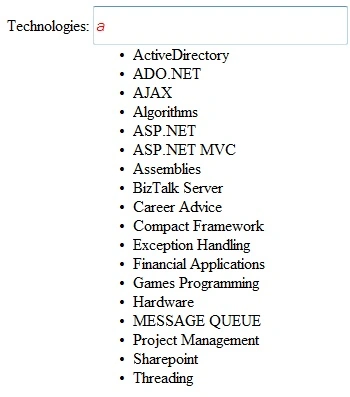
Figure 1.
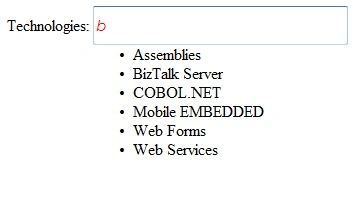
Figure 2.
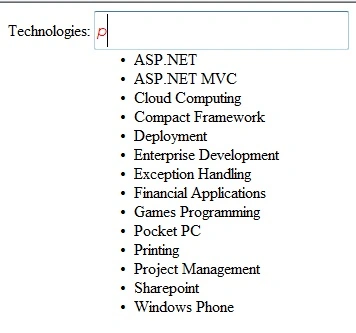
Figure 3.
Saber ShaikhPosted May 16, 2015, 5:52 AM
Good keep it up
Hassan HumayunPosted Feb 1, 2011, 2:32 AM
this is one way of doing it , another way could be my making an async call to a service which returns the xml that can be binded to the variable.