Introduction
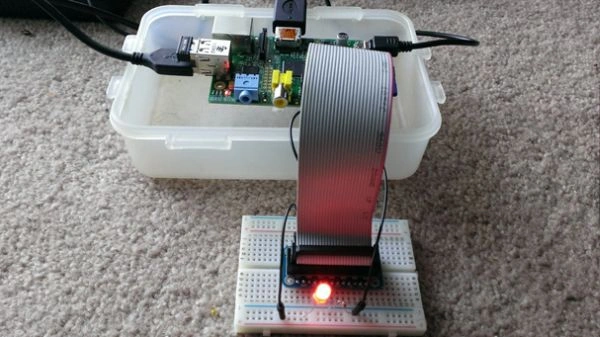
Figure 1: Weather Demo Device
In this article, we will look into building a sample Weather App using Raspberry PI, Mono C# and RaspberryPi.Net (Mono.NET interface to the GPIO pins).
Note: Consider this one as a starting point in getting your hands wet in writing a C# code snippet and running them the same on the PI. Hence we don’t make use of a hardware sensor but instead, make use of web service to get the weather information.
The following is the list of things that are required for this demo Weather App:
- Raspberry PI (Model A, B or B+).
- Ethernet or USB WiFi Adapter.
- A Desktop/Laptop installed with MonoDevelop IDE.
- One LED and a 330 ohm 1/4 watt resistor.
- HDMI to DVI cable or HDMI cable depending on whether you are connecting PI to your computer monitor or HDMI TV.
Please Note: The following code is being reused and modified to work:
https://github.com/raharrison/GoogleAPI/tree/master/GoogleWeather
Background
If you are a beginner to Raspberry PI, please have a look into an excellent
article by Guruprasad.K.Basavaraju which helped me understand the basics.
The first thing one has to do is register yourself and get the API Key from the following
link:
We will be making an HTTP Web Request to the following formatted URL and get the weather information. Please note that this API is free for personal and non-commercial use with a "fairuse" of 250 daily accesses.
HTTP Web Request
Link
The key thing here is the API Key and the city for which you are interested in getting the weather information.
HTTP Web Response
The following is the HTTP Response consisting of forecast and weather conditions. We will be only concentrating on reading the current weather conditions.
Hide Copy Code
- <xml_api_reply version="1">
- <weather module_id="0" tab_id="0">
- <current_conditions>
- <!-- Some inner tags containing data of current weather -->
- <condition data="Sunny" />
- <temp_f data="32" />
- <temp_c data="0" />
- <humidity data="Humidity: 0%" />
- <icon data="/images/weather/sunny.gif" />
- <wind_condition data="Wind: SE at 9 mph" /> </current_conditions>
- </weather>
- </xml_api_reply>
Let us write some code in fetching the weather condition. The following is the code snippet of a WeatherEntity for holding the weather info.
- public class WeatherEntity
- {
- public string City
- {
- get;
- set;
- }
- public string Condition
- {
- get;
- set;
- }
- public string TempInFahrenheit
- {
- get;
- set;
- }
- public string TempInCentigrade
- {
- get;
- set;
- }
- public string Humidity
- {
- get;
- set;
- }
- public string Wind
- {
- get;
- set;
- }
- public string Day
- {
- get;
- set;
- }
- public string High
- {
- get;
- set;
- }
- public string Low
- {
- get;
- set;
- }
- }
Here is the code snippet to get the weather condition. The code is self-explanatory where we are loading the XML response to XmlTextReader and then loading the same to XmlDocument so that we can select the nodes that we are interested in.
- public static WeatherEntity GetWeatherCondition(string apiKey, string city)
- {
- var weatherEntity = new WeatherEntity();
- using(var weatherXmlReader = new XmlTextReader(string.Format("http://api.previmeteo.com/{0}/ig/api?weather={1}", apiKey, city)))
- {
- var doc = new XmlDocument();
- doc.Load(weatherXmlReader);
- if(doc.SelectSingleNode("xml_api_reply/weather/problem_cause") != null)
- {
- weatherEntity = null;
- }
- else
- {
- weatherEntity.City = doc.SelectSingleNode("/xml_api_reply/weather/forecast_information/city")
- .Attributes["data"].InnerText;
- weatherEntity.Condition = doc.SelectSingleNode("/xml_api_reply/weather/current_conditions/condition")
- .Attributes["data"].InnerText;
- weatherEntity.TempInCentigrade = doc.SelectSingleNode("/xml_api_reply/weather/current_conditions/temp_c")
- .Attributes["data"].InnerText;
- weatherEntity.TempInFahrenheit = doc.SelectSingleNode("/xml_api_reply/weather/current_conditions/temp_f")
- .Attributes["data"].InnerText;
- weatherEntity.Humidity = doc.SelectSingleNode("/xml_api_reply/weather/current_conditions/humidity")
- .Attributes["data"].InnerText;
- weatherEntity.Wind = doc.SelectSingleNode("/xml_api_reply/weather/current_conditions/wind_condition")
- .Attributes["data"].InnerText;
- }
- }
- return weatherEntity;
- }
You must be probably wondering where I am using the LED and register.
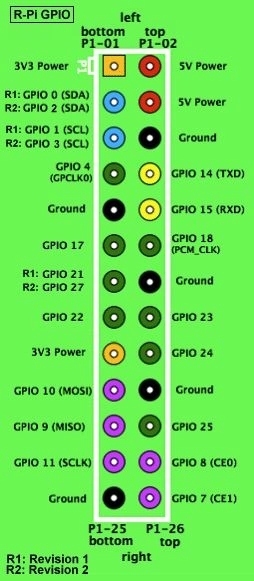
It’s time to have a little understanding of the Raspberry PI GPIO (General Purpose Input/Output). The following picture shows the GPIO pins in the PI. We will be using the Ground and GPIO 17 (3V3 Power pins) with a register to glow an LED-based on specific criteria.
More information about the GPIO can be found
here.
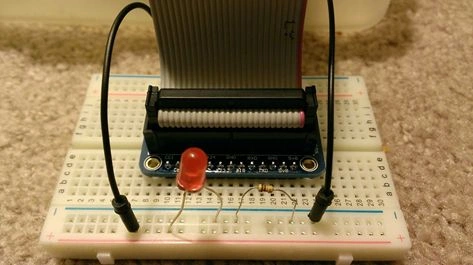
You have to make use of two jumper wires and connect the same to “Ground” and Pin 17 of GPIO as in the following snapshot. It doesn’t have to be Pin 17 but we are using it for this demo app.
Note: Make sure you accidentally do no connect through the 5V Power.
The longer end of the LED has to be connected with the resistor which is in-turn connected with the GPIO Pin 17. Whereas the lower end of the LED has to be connected to “Ground” as shown below.
Now it’s the time to have a look into the code snippet which is responsible for taking the city name as input and further making a call to get the weather condition so that we can display the same on Console.
- public static void Main(string[] args)
- {
- String apiKey = "<API_KEY>";
- GPIOFile led = null;
- Console.WriteLine("Enter city name: ");
- var city = Console.ReadLine();
- try
- {
- var weather = GetWeatherCondition(apiKey, city);
- if(weather != null)
- {
- Console.WriteLine("************************************************** ");
- Console.WriteLine("TempC: " + weather.TempInCentigrade);
- Console.WriteLine("TempF: " + weather.TempInFahrenheit);
- Console.WriteLine("Condition: " + weather.Condition);
- Console.WriteLine(weather.Humidity);
- Console.WriteLine(weather.Wind);
- Console.WriteLine("************************************************** ");
-
- if(int.Parse(weather.TempInCentigrade) < 5)
- {
- led = new GPIOFile(GPIOPins.V2_GPIO_17);
- led.Write(PinState.High);
- }
- }
- else
- {
- Console.WriteLine("Problem in fetching in the weather information.");
- }
- }
- catch(Exception ex)
- {
- Console.WriteLine(ex.ToString());
- }
- Console.WriteLine("Press any key to exit!");
- Console.ReadLine();
- if(led != null) led.Write(PinState.Low);
- }
Let us take a look into how we glow the LED based on a specific temperature value. The following is the link to the library that we are making use of. You can download the same and compile and reference in your projects. It’s very easy to use library.
RaspberryPi.Net GitHub
As per the above code, if the temperature in centigrade is less than 5, then we are creating an instance of GPIOFile with the PIN as 17. With a single line of code, by making a call to write method of GPIOFile instance with a value as
PinState.High will glow the LED on Pin 17 in our case.
Let us see how one can run the application on Raspberry PI. Firstly, you have to install mono on the PI. You need to run the following command on the Linux terminal. You can execute the same remotely by connecting to PI through SSH (use Putty app) or you can directly run the same on Raspberry PI.
sudo apt-get install mono-complete
Have a look into the following
link to get started with Mono
Compile the Weather App source code so that you can upload the necessary executable to PI. I have used an FTP client tool named FileZilla and have connected to PI and uploaded the required executable.
Please make sure to run the Weather Demo app under “root” user as there are necessary permissions required for the GPIO library to access to path “
/sys/class/gpio”.
Point of Interest
I am still a beginner to IoT and Raspberry Pi. Since when I got this little device, I started playing and learning a lot. Working with Mono C# is really cool. I am being a .NET Programmer and quickly started in writing a C# code to run on Linux.



Sr KarthigaPosted Feb 14, 2016, 7:52 AM
Good one sir
Mukesh KumarPosted Oct 31, 2015, 11:19 AM
Great Work!
Gowtham KPosted Oct 31, 2015, 10:37 AM
Good One
Harshad PansuriyaPosted Oct 31, 2015, 7:45 AM
Nice one