
Prelude
Several examples of how to utilize COBOL in a Microsoft .NET environment have been circulating for a number of years. Some of these examples are quite dated and due to Framework enhancements, (2.0, 3.0, 4.0, 4.5 and now 4.6) the use of the namespaces as well as the syntax used to access them has changed significantly. Micro Focus recently released Visual COBOL 2.3, our flag-ship product for Visual Studio 2015. With a number of changes that have occurred in both .NET and Visual COBOL update of all our previous articles is in order. So over the next couple of months we will be updating all of our previous articles to the latest versions and introducing new articles with new content. We hope you find these articles educational and valuable to you and a benefit to your organization.
This particular article has benefited from a number of changes in Micro Focus Visual COBOL. The addition of interfacing capabilities in .NET and JVM have made the process of accessing data hidden in COBOL applications much simpler for not only the C# developer but also for the COBOL developer who has to provide the access to the data stores. Spend a few minutes reviewing the article and see how simply you can now access COBOL based data from C# or VB.NET or Java or any other distributed language.
Article Description
COBOL programmers have for years used '01' level (or Group Descriptions) as a means of creating a data structure for related items. It would be safe to say these Data Groups are used in just about every COBOL program that has been written and probably will ever be written. They provide a quick way for COBOL programmers to group together data that has some form of relationship. For example, the name of a region and the total sales for a particular timeframe as in the following structure:
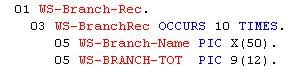
In the above sample we see an '01' (or Group) description for a field called WS-Branch-Rec. This is the highest definition for a related group of data items. Underneath this item there are two additional data items, WS-BRANCH-NAME and WS-BRANCH-TOT. Each of these items occurs 10 times in a table. You can think of the structure in terms of a spreadsheet, 10 rows with two columns of data. The variable WS-BRANCH-NAME is defined as a "PIC X(50)" which means it is 50 characters in length and is an alphanumeric data item (or a String in C#). WS-BRANCH-TOT is defined as a "PIC 9(12)" is a numeric data item. The equivalent in C# would be an integer.
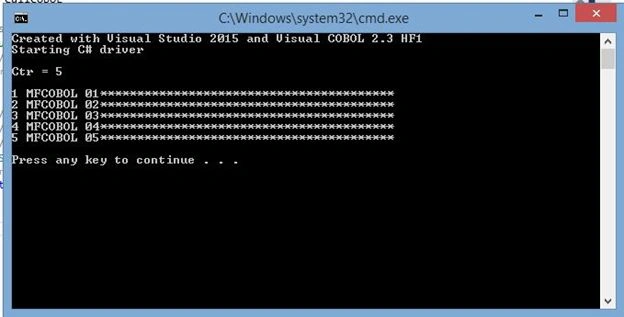
In this article we will begin with a C# console application calling a COBOL DLL file. The C# application will pass it a number of occurrences to create a table (much like a user requesting a specific number of months to report on). The COBOL program will accept the user request (which we have currently defaulted to 5), create the data group and pass control back to the C# program. The C# program will then read in the data group and display the results on the screen.
Please keep in mind that while the example is not of a completely finished and polished application the intent is to demonstrate how to utilize your existing COBOL business logic and interact with a new C# front-end.
C# coding
We will assume you are comfortable with the C# language. If you have any questions in this area please consult with one of your local C# experts.
As we mentioned above, we will call the COBOL program, passing it a variable to define the number of occurrences we wish to populate. The following code illustrates how to do this:
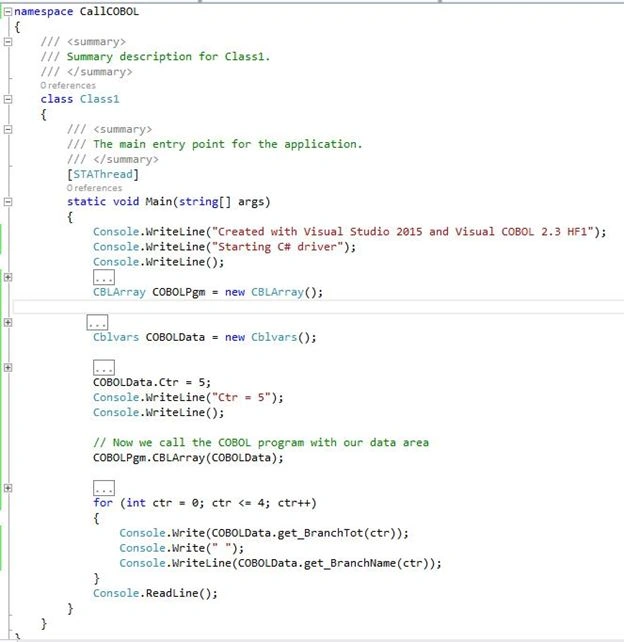
The first three lines are basic display statements to inform the operator we are beginning the process. The fourth line of code though instantiates our COBOL program. The fifth line of code is the key to working with the COBOL data groups. In this line we create an instance of the data that we have defined in our COBOL program. This data has been exposed using a compiler directive added when the COBOL program was built within Visual Studio.
In the Properties for the COBOL program we added two new compiler directives: ilsmartlinkage and ilcutprefix(WS-) as shown:
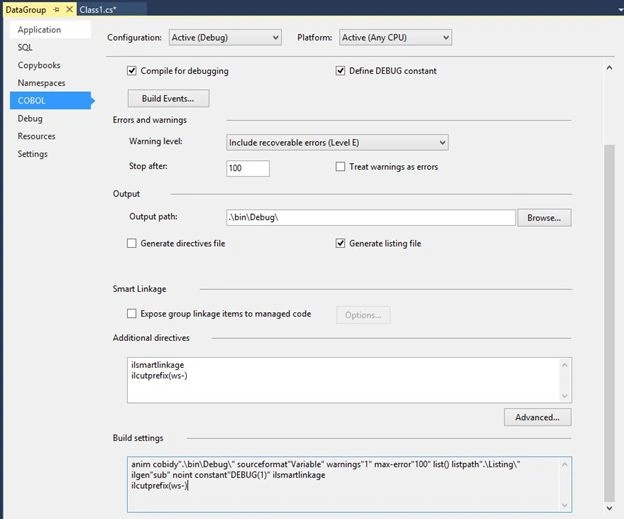
The two compiler directives:

Accessing COBOL Data Groups
Join the conversation! Your thoughts help the community grow.
Sign in to leave a comment
It is the same account you read, post and publish with — and you will come straight back to this page.

Santhakumar MunuswamyPosted Dec 22, 2015, 8:30 AM
Thanks for sharing