

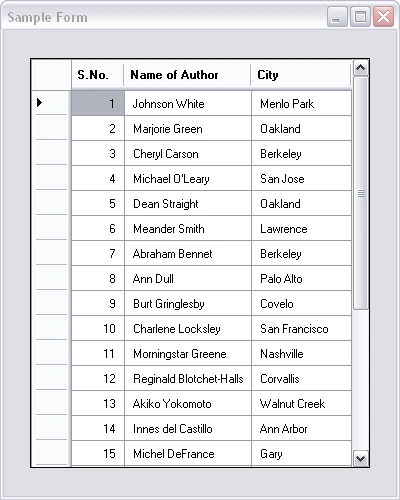
Figure.1
The first column in Figure.1 displays sequential row numbers. I have achieved this output by using the following function.
private DataTable AutoNumberedTable(DataTable SourceTable)
{
DataTable ResultTable = new DataTable(); DataColumn AutoNumberColumn = new DataColumn();
AutoNumberColumn.ColumnName=
"S.No.";AutoNumberColumn.DataType =
typeof(int);AutoNumberColumn.AutoIncrement =
true;AutoNumberColumn.AutoIncrementSeed = 1;
AutoNumberColumn.AutoIncrementStep = 1;
ResultTable.Columns.Add(AutoNumberColumn);
ResultTable.Merge(SourceTable);
return ResultTable;}
Refer http://msdn.microsoft.com/en-us/library/yctw654b.aspx on How to: Create an Autonumber DataColumn
Explanation
The function receives a DataTable as parameter. It create a Data Table, ResultTable. Then add a Data Column,AutoNumberColumn with auto incrementing behaviour. Then the SourceTable is merged with the ResultTable. The Merge method will add the rows of the source table to the destimation table one by one. Consequently, autonumber column values are generated as sequential row numbers
Implementation
In a few minutes, we will create a Windows Forms Application to test the case. Create a Windows Form and add a DataGridView. Write the following code in the Load event of the form.
private
void Form1_Load(object sender, EventArgs e){
using
(SqlConnection Connection=new SqlConnection(this.ConnectionString)){
using
(SqlCommand Command= Connection.CreateCommand()){
Command.CommandText =
SqlDataAdapter
dataAdapter=new SqlDataAdapter(Command);DataTable
dataTable = new DataTable();dataAdapter.Fill(dataTable);
this
.dataGridView1.DataSource = AutoNumberedTable(dataTable);}
}
}
Then add the ConnectionString property given below and AutoNumberedTable function given above in the body of the form. Run the program. See what happens!
private
string ConnectionString{
get
{
SqlConnectionStringBuilder
ConnectionBuilder = new SqlConnectionStringBuilder();ConnectionBuilder.DataSource =
"myDataSource";ConnectionBuilder.InitialCatalog =
"myDatabase";ConnectionBuilder.UserID =
"myUserID";ConnectionBuilder.Password =
"myPassword";return
ConnectionBuilder.ToString();}
}
SqlConnectionStringBuilder
provides a simple way to create and manage the contents of connection strings.Refer http://msdn.microsoft.com/en-us/library/system.data.sqlclient.sqlconnectionstringbuilder(VS.80).aspx on SqlConnectionStringBuilder Class
Details of Sample Application Seen in Figure.1
Database
: PubsQuery :
"SELECT au_fname + ' ' + au_lname as [Name of Author],City FROM AUTHORS"Add the following namespaces on top.
using
System;using
System.Data;using
System.Data.SqlClient;using
System.Windows.Forms; Happy Coding! Happy Dotneting!
Bharodiya NisargPosted Jun 30, 2018, 1:40 PM
What if I want to show this auto numbers (Sr. No.) in Hexadecimal???
Salman MushtaqPosted Dec 22, 2017, 12:59 PM
Very informative article. Thanks for writing.
Sneha DEoreeditedPosted May 16, 2012, 7:24 AMEdited May 16, 2012, 7:24 AM
Thank you so much..It helped me...
StudNimaPosted Dec 13, 2010, 12:28 PM
Wonderful Sir, Such works are very useful.... Please go on with such and more better works.
SameerPosted Oct 10, 2010, 4:48 AM
Hello, I am new in C#, coul dyou please help me for the below? I have my results (data content of a drive) in ListBox, how do I make the same in DataGridView? Thanks
denny simonPosted Jul 1, 2010, 6:12 PM
I have try this ,but mine have sum of quantity at the bottom of the datagridview.I want the number only at the detail part.But the number goes on to the blank line and then to the sum of quantity. (I have 10 lines of details,followed by 1 blank line,followed by sum of quantity line)
Baris VPosted Jul 14, 2009, 3:39 AM
Thank you very much. This is exactly what I need.
BinabicPosted Jan 12, 2009, 4:07 PM
thx
sara lionPosted Dec 15, 2008, 6:16 AM
Mr.santo ,u did a great thing however i saw ur works before, i expect much more greater thing from u. i know u will not stop and u continue showing us ur talent ,u proved ur self as execelent software engineer good luck
sara lioneditedPosted Dec 14, 2008, 2:02 PMEdited Dec 16, 2008, 11:41 AM
this is gorgeous well done wish u all the best