

Rresizable interaction interaction will allows us to resize a DOM element by dragging it with mouse. You can specify constraints like maxheight, container etc on resizing an element. We can define callbacks on element's resize start, resizing and stop. Below script gives basic resizing feature:
<html>
<head>
<title>jQuery UI Resizable - Basic</title>
<link type="text/css" href="jquery-ui-1.7.2.custom.css" rel="stylesheet" />
<script type="text/javascript" src="jquery-1.3.2.min.js"></script>
<script type="text/javascript" src="ui.core.js"></script>
<script type="text/javascript" src="ui.resizable.js"></script>
<script type="text/javascript">
$(function() {
$('#resizeDiv').resizable({ maxHeight: 550,
maxWidth: 200,
minHeight: 150,
minWidth: 100, ghost: true, alsoResize: '#containerResize'
}); //Other Options: delay: ms, distance: in px
$('#containerResize').resizable({ containment: 'parent', aspectRatio: .6 });
}); </script>
</head>
<body>
<div id="resizeDiv" style="width: 100px; height: 150px" class="ui-widget-content">
JQuery Enabled Resize....
</div>
<div id="container" style="width: 200px; height: 200px" class="ui-widget-content">
<h3 class="ui-widget-header">
Containment</h3>
<div id="containerResize" style="width: 100px; height: 100px" class="ui-state-active">
<h3 class="ui-widget-header">
Resizable</h3>
</div>
</div>
</body>
</html>
We need below files to implement resizing:
-
jquery-1.3.2.js
-
ui.core.js
-
ui.resizable.js
-
jquery-ui-1.7.2.custom.css taken from 'sunny' theme.
In above script, we specified resizable element using resizable() function with constraints like minHeight, ghost etc. We can specify below options in resizable() function:
-
containment: Limits resizing to within the bounds of specified element. We can pass DOM element, selector or 'parent' as container for it.
-
ghost: If it is true, shows semi-transparent element while resizing the element.
-
alsoResize: Resizes the elements synchronously with specified element.
-
aspectRatio: Allows to resize on specified aspect ratio[ width and height ratio].
-
distance: Resize won't start until mouse is moved beyond specified distance in pixels.
-
animate: Animates to the final size after resizing in a sliding way.
-
start: This event is triggered at start of resizing the element. Similarly, stop event is triggered after resizing is stopped. And resize is fired while resizing is going on as shown below:
<script type="text/javascript">
$(function() {
$('#resizeDiv').resizable({
start: function() { $('#container').append('Resize started'); },
stop: function() { $('#container').append('Resize stopped'); },
resize:function() {$('#container').append('Resize going on');}
});
});
</script>
All callbacks accept two arguments. One is browser event and other is prepared ui object having fields like size, position, original size etc of the resizable element. The final output will be like this: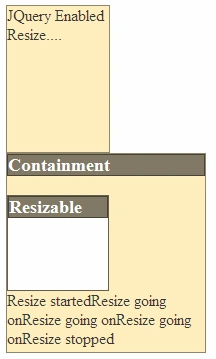
For complete list of methods, events in Resizable API, refer: http://jqueryui.com/demos/resizable/.
I am ending the things here. I am attaching the source code with it. In coming articles, we will cover other interactions provided by JQuery UI in depth. I hope this article will be helpful for all.
Join the conversation! Your thoughts help the community grow.