

Introduction
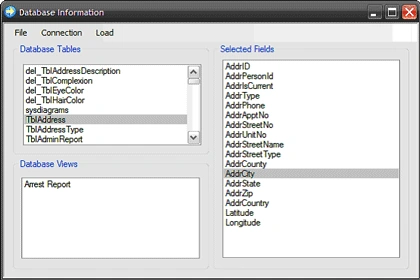
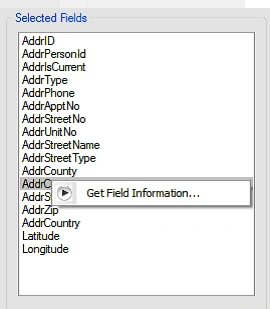
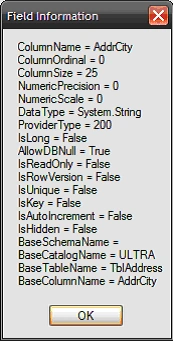
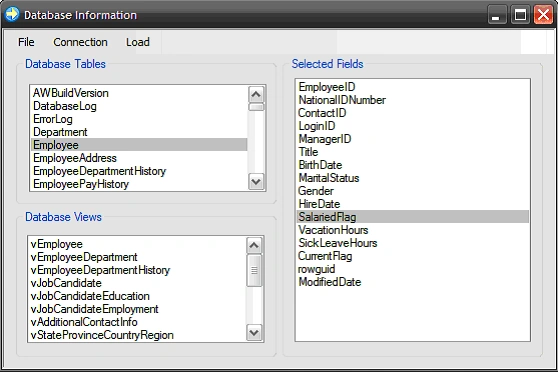
- frmDataDisplay.cs: Containing the main application and most of the code.
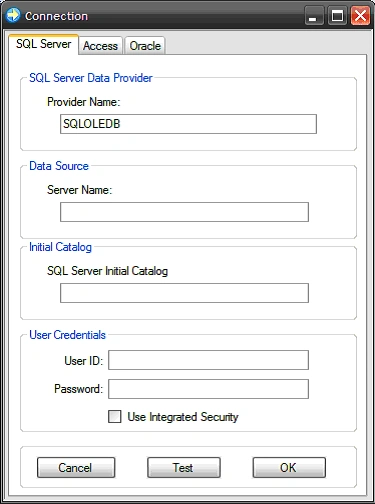
- frmConnect.cs: Containing a dialog used to connect to a database.
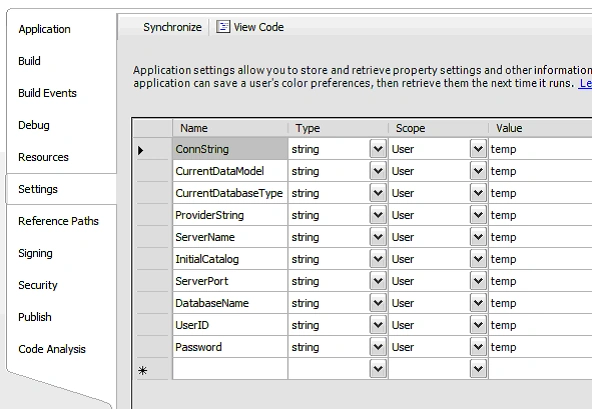
- using System;
- using System.Collections;
- using System.Configuration;
- using System.ComponentModel;
- using System.Data;
- using System.Data.OleDb;
- using System.Drawing;
- using System.Text;
- using System.Windows.Forms;
- namespace DBSpy {
- public partial class frmConnect: Form {
- /// <summary>
- /// Default constructor
- /// </summary>
- public frmConnect() {
- InitializeComponent();
- }
- /// <summary>
- /// Store the Oracle settings and test the connection
- /// string
- /// </summary>
- /// <param name="sender"></param>
- /// <param name="e"></param>
- private void btnOracleOK_Click(object sender, EventArgs e) {
- // Future use; if a current data model and database
- // type need to be identified and saved with the connect
- // string to identify its purpose
- Properties.Settings.Default.CurrentDataModel = "MyOracle";
- Properties.Settings.Default.CurrentDatabaseType = "Oracle";
- // Set the actual connection string properties into
- // the application settings
- Properties.Settings.Default.ProviderString = txtOracleProvider.Text;
- Properties.Settings.Default.Password = txtOraclePassword.Text;
- Properties.Settings.Default.UserID = txtOracleUserID.Text;
- Properties.Settings.Default.ServerName = txtOracleDBname.Text;
- // Set the connection string
- Properties.Settings.Default.ConnString = "Provider=" + Properties.Settings.Default.ProviderString + ";Password=" +
- Settings.Default.Password + ";User ID=" + Properties.Settings.Default.UserID + ";Data Source=" + Properties.Settings
- .Default.ServerName;
- // Save the property settings
- Properties.Settings.Default.Save();
- //Test Connection
- if (Properties.Settings.Default.ConnString != string.Empty) {
- using(OleDbConnection conn = new OleDbConnection(Properties.Settings.Default.ConnString)) {
- try {
- // test with an open attempt
- conn.Open();
- this.Dispose();
- } catch (Exception ex) {
- // if the connection fails, inform the user
- // so they can fix the properties
- MessageBox.Show(ex.Message, "Connection Error");
- }
- }
- }
- }
The next section of the code is used to handle the Oracle connection string test; even though attempts to save the connection properties also tests the connection, this method is made available to allow the user to test a connection and view whether or not the connection string passes. Again, the code is annotated to describe each section of the code.
- /// <summary>
- /// Test the Oracle Connection String
- /// </summary>
- /// <param name="sender"></param>
- /// <param name="e"></param>
- private void btnOracleTest_Click(object sender, EventArgs e) {
- try {
- // Future use; if a current data model and database
- // type need to be identified and saved with the connect\
- // string to identify its purpose
- Properties.Settings.Default.CurrentDataModel = "MyOracle";
- Properties.Settings.Default.CurrentDatabaseType = "Oracle";
- // Set the actual connection string properties into
- // the application settings
- Properties.Settings.Default.ProviderString = txtOracleProvider.Text;
- Properties.Settings.Default.Password = txtOraclePassword.Text;
- Properties.Settings.Default.UserID = txtOracleUserID.Text;
- Properties.Settings.Default.ServerName = txtOracleDBname.Text;
- // Set the connection string
- Properties.Settings.Default.ConnString = "Provider=" + Properties.Settings.Default.ProviderString + ";Password=" +
- Properties.Settings.Default.Password + ";User ID=" + Properties.Settings.Default.UserID + ";Data Source=" +
- Properties.Settings.Default.ServerName;
- // Save the property settings
- Properties.Settings.Default.Save();
- } catch (Exception ex) {
- MessageBox.Show(ex.Message, "Error saving connection informaiton");
- }
- //Test Connection
- if (Properties.Settings.Default.ConnString != string.Empty) {
- using(OleDbConnection conn = new OleDbConnection(Properties.Settings.Default.ConnString)) {
- try {
- // test the connection with an open attempt
- conn.Open();
- MessageBox.Show("Connection attempt successful.", "Connection Test");
- } catch (Exception ex) {
- // inform the user if the connection fails
- MessageBox.Show(ex.Message, "Connection Error");
- }
- }
- }
- }
The next method is merely used to close the form if the user decides to cancel the operation.
- /// <summary>
- /// Close the form
- /// </summary>
- /// <param name="sender"></param>
- /// <param name="e"></param>
- private void btnOracleCancel_Click(object sender, EventArgs e) {
- this.Dispose();
- }
The next bit of code handles the check changed event for the integrated security check box control found on the SQL Server tab. If the control is checked, the user name and password are not used and the connection string will be formatted to use integrated security.
The next event handler closes the form if the user decides to cancel the operation.
- /// <summary>
- /// Close the form
- /// </summary>
- /// <param name="sender"></param>
- /// <param name="e"></param>
- private void btnSQLserverCancel_Click(object sender, EventArgs e) {
- this.Dispose();
- }
The next section of code is used to test the SQL Server connection string; it functions much the same as does the Oracle connection test with the only exception being that it formats the connection string differently based upon the user's selection of the Use Integrated Security check box control.
- /// <summary>
- /// Test the SQL Server connection string
- /// based upon the user supplied settings
- /// </summary>
- /// <param name="sender"></param>
- /// <param name="e"></param>
- private void btnSqlServerTest_Click(object sender, EventArgs e) {
- try {
- // Future use; if a current data model and database
- // type need to be identified and saved with the connect
- // string to identify its purpose
- Properties.Settings.Default.CurrentDataModel = "MySqlServer";
- Properties.Settings.Default.CurrentDatabaseType = "SqlServer";
- // Set the properties for the connection string
- Properties.Settings.Default.ProviderString = txtSqlServerProvider.Text;
- Properties.Settings.Default.Password = txtSqlServerPassword.Text;
- Properties.Settings.Default.UserID = txtSqlServerUserID.Text;
- Properties.Settings.Default.ServerName = txtSqlServerDBName.Text;
- Properties.Settings.Default.InitialCatalog = txtSqlServerInitialCat.Text;
- // configure the connection string based upon the use
- // of integrated security
- if (cbxIntegratedSecurity.Checked == true) {
- Properties.Settings.Default.ConnString = "Provider=" + Properties.Settings.Default.ProviderString + ";DataSource = " + Properties.Settings.Default.ServerName + ";Initial Catalog = " + Properties.Settings.Default.InitialCatalog + ";Integrated Security=SSPI;";
- } else {
- Properties.Settings.Default.ConnString = "Provider=" + Properties.Settings.Default.ProviderString +
- ";Password=" + Properties.Settings.Default.Password + ";User ID=" + Properties.Settings.Default.UserID +
- ";Data Source=" + Properties.Settings.Default.ServerName + ";Initial Catalog=" +
- Properties.Settings.Default.InitialCatalog;
- }
- // Save the property settings
- Properties.Settings.Default.Save();
- } catch (Exception ex) {
- // inform the user if the connection was not saved
- MessageBox.Show(ex.Message, "Error saving connection information");
- }
- //Test Connection
- if (Properties.Settings.Default.ConnString != string.Empty) {
- using(OleDbConnection conn = new OleDbConnectionProperties.Settings.Default.ConnString) {
- try {
- // test the connection with an open attempt
- conn.Open();
- MessageBox.Show("Connection Attempt Successful.", "Connection Test");
- } catch (Exception ex) {
- // inform the user if the connection test failed
- MessageBox.Show(ex.Message, "Connection Test");
- }
- }
- }
- }
The following event handler sets the connection string and tests the SQL Server connection as defined by the user's entries into the form.
- private void btnSqlServerOK_Click(object sender, EventArgs e) {
- try {
- // Future use; if a current data model and database
- // type need to be identified and saved with the connect
- // string to identify its purpose
- Properties.Settings.Default.CurrentDataModel = "MySqlServer";
- Properties.Settings.Default.CurrentDatabaseType = "SqlServer";
- // Set the properties for the connection
- Properties.Settings.Default.ProviderString = txtSqlServerProvider.Text;
- Properties.Settings.Default.Password = txtSqlServerPassword.Text;
- Properties.Settings.Default.UserID = txtSqlServerUserID.Text;
- Properties.Settings.Default.ServerName = txtSqlServerDBName.Text;
- Properties.Settings.Default.InitialCatalog = txtSqlServerInitialCat.Text;
- // configure the connection string based upon
- // the use of integrated security
- if (cbxIntegratedSecurity.Checked == true) {
- Properties.Settings.Default.ConnString = "Provider=" + Properties.Settings.Default.ProviderString + ";Data Source=" + Properties.Settings.Default.ServerName + ";Initial Catalog=" + Properties.Settings.Default.InitialCatalog + "; Integrated Security=SSPI;";
- } else {
- Properties.Settings.Default.ConnString = "Provider=" + Properties.Settings.Default.ProviderString Password = "+ Properties.Settings.Default.Password + ";
- User ID = " + Properties.Settings.Default.UserID +";
- Data Source = " + Properties.Settings.Default.ServerName + ";
- Initial Catalog = " +Properties.Settings.Default.InitialCatalog;
- }
- // Save the property settings
- Properties.Settings.Default.Save();
- } catch (Exception ex) {
- // inform the user if the connection information was not
- // saved
- MessageBox.Show(ex.Message, "Error saving connection information.");
- }
- //Test Connection
- if (Properties.Settings.Default.ConnString != string.Empty) {
- using(OleDbConnection conn = new OleDbConnection(Properties.Settings.Default.ConnString)) {
- try {
- // test the connection with an open attempt
- conn.Open();
- this.Dispose();
- } catch (Exception ex) {
- // inform the user if the connection was not saved
- MessageBox.Show(ex.Message, "Connection Test");
- }
- }
- }
- }
The next event handler closes the form if the user decides to cancel the operation.
- /// <summary>
- /// Close the form
- /// </summary>
- /// <param name="sender"></param>
- /// <param name="e"></param>
- private void btnAccessCancel_Click(object sender, EventArgs e) {
- this.Dispose();
- }
This event handler is used to open an open file dialog used to allow the user to navigate to and select an Access database.
- /// <summary>
- /// Browse for an access database
- /// </summary>
- /// <param name="sender"></param>
- /// <param name="e"></param>
- private void btnBrowse_Click(object sender, EventArgs e) {
- OpenFileDialog openFile = new OpenFileDialog();
- openFile.Title = "MS Access Database";
- openFile.DefaultExt = "mdb";
- openFile.Filter = "Access Database (*.mdb)|*mdb";
- openFile.ShowDialog();
- txtAccessDBname.Text = openFile.FileName;
- }
The next bit of code is used to test a connection to an Access database.
SharadPosted Jul 22, 2015, 12:41 AM
Really cool..
Mahesh ChandPosted Dec 30, 2010, 11:18 AM
Good article Scott.
Jesus PeregrinaPosted Oct 3, 2008, 11:26 AM
Is it posible to obatin a list of the stored procedures of the database and obtain its parameters to?