This is Part 2 of ADO.NET. In this section, we will touch base on one of the important concepts in ADO.NET.
In case if you have not seen Part 1 of ADO.NET, click
here
Happy job hunting......
(B) How do we use stored procedures in ADO.NET and how do we provide parameters to the stored procedures?
ADO.NET provides the SqlCommand object, which provides the functionality of executing stored procedures.
Note :- Sample code is provided in folder "WindowsSqlClientCommand". There are two stored procedures created in the same database "Employees" which were created for the previous question.
- CREATE PROCEDURE SelectByEmployee @FirstName nvarchar(200) AS
- Select FirstName from Employees where FirstName like @FirstName + '%'
- CREATE PROCEDURE SelectEmployee AS
- Select FirstName from Employees
- If txtEmployeeName.Text.Length = 0 Then
- objCommand = New SqlCommand("SelectEmployee")
- Else
- objCommand = New SqlCommand("SelectByEmployee")
- objCommand.Parameters.Add("@FirstName", Data.SqlDbType.NVarChar, 200)
- objCommand.Parameters.Item("@FirstName").Value = txtEmployeeName.Text.Trim()
- End If
In the above sample, not much has been changed only that the SQL is moved to the stored procedures. There are two stored procedures one is "Select Employee" which selects all the employees and the other is "SelectByEmployee" which returns employee name starting with a specific character. As you can see to provide parameters to the stored procedures, we are using the parameter object of the command object. In such a question interviewer expects two simple answers one is that we use a command object to execute stored procedures and the parameter object to provide a parameter to the stored procedure. The above sample is provided only for getting the actual feel of it. Be short be nice and get a job.
(B) How can we force the connection object to close after my data reader is closed?
Command method Execute reader takes a parameter called as Command Behavior wherein we can specify saying close connection automatically after the Data reader is close.
- objDataReader = pobjCommand.ExecuteReader (CommandBehavior.CloseConnection)
(B) I want to force the data reader to return only schema of the datastore rather than data.
- objDataReader = pobjCommand.ExecuteReader (CommandBehavior.SchemaOnly)
(B) How can we fine-tune the command object when we are expecting a single row?
Again, CommandBehaviour enumeration provides two values Single Result and Single Row. If you are expecting a single value then pass "CommandBehaviour.SingleResult" and the query is optimized accordingly if you are expecting a single row then pass "CommandBehaviour.SingleRow" and the query is optimized according to a single row.
(B) Which is the best place to store the connection string in .NET projects?
Config files are the best places to store connection strings. If it is a web-based application "Web.config" file will be used and if it is a windows application "App.config" files will be used.
(B) What are the steps involved to fill a dataset?
- Twist: - How can we use a data adapter to fill a dataset?
- Sample code is provided in "WindowsDataSetSample" folder in CD."LoadData" has all the implementation of connecting and loading to the dataset. This dataset is finally bound to a List Box. Below is the sample code.
- Private Sub LoadData()
- Dim strConnectionString As String
- strConnectionString = AppSettings.Item("ConnectionString")
- Dim objConn As New SqlConnection(strConnectionString)
- objConn.Open()
- Dim objCommand As New SqlCommand("Select FirstName from Employees")
- objCommand.Connection = objConn
- Dim objDataAdapter As New SqlDataAdapter()
- objDataAdapter.SelectCommand = objCommand
- Dim objDataSet As New DataSet
- End Sub
In such type of questions, the interviewer is looking from a practical angle, that have you worked with dataset and data adapters. Let me try to explain the above code first and then we move to what steps should be told during the interview.
- Dim objConn As New SqlConnection(strConnectionString)
- objConn.Open()
First step is to open the connection. Again, note the connection string is loaded from config file.
- Dim objCommand As New SqlCommand("Select FirstName from Employees")
- objCommand.Connection = objConn
The second step is to create a command object with the appropriate SQL and set the connection object to this command.
- Dim objDataAdapter As New SqlDataAdapter()
- objDataAdapter.SelectCommand = objCommand
The third step is to create the Adapter object and pass the command object to the adapter object.
- objDataAdapter.Fill(objDataSet)
The fourth step is to load the dataset using the "Fill" method of the data adapter.
- lstData.DataSource = objDataSet.Tables(0).DefaultView
- lstData.DisplayMember = "FirstName"
- lstData.ValueMember = "FirstName"
The fifth step is to bind to the loaded dataset with the GUI. At this moment sample has a list box as the UI. Binding of the UI is done by using the Default View of the dataset. Just to revise every dataset has tables and every table has views. In this sample, we have only loaded one table i.e. Employee table so we are referring to that with an index of zero.
Just say all the five steps during the interview and you will see the smile on the interviewer's face and appointment letter in your hand.
(B) What are the various methods provided by the dataset object to generate XML?
Note:- XML is one of the most important leaps between classic ADO and ADO.NET. So this question is normally asked more generally how can we convert any data to XML format. The best answer is to convert into a dataset and use the below methods.
- ReadXML
Read's an XML document into Dataset.
- GetXML
This is a function, which returns the string containing the XML document.
- Writexml
This writes XML data to disk.
(B) How can we save all data from the dataset?
Dataset has the "Accept Changes" method, which commits all the changes since the last time "Accept changes" has been executed.
Note:- This book does not have any sample of Accept changes. We leave that to readers as a homework sample. But yes from the interview aspect that will be enough.
(B) How can we check that some changes have been made to the dataset since it was loaded?
Twist: - How can we cancel all changes done in the dataset?
Twist: - How do we get values, which are changed, in a dataset?
For tracking down changes, Dataset has two methods, which come as rescue "Get Changes "and "Has Changes".
- Get Changes
Returns dataset, which is changed since it, was loaded, or since Accept changes were executed.
- Has Changes
Or abandon all changes since the dataset was loaded to use "Reject Changes This property indicates that has any changes been made since the dataset was loaded or the accept changes method was executed.
Note:- One of the most misunderstood things about these properties is that it tracks the changes of the actual database. That is a fundamental mistake; actually the changes are related to only changes with the dataset and have nothing to with changes happening in the actual database. As the dataset is disconnected and does not know anything about the changes happening in the actual database.
(B) How can we add/remove row is in the "Data Table" object of "Dataset"?
"Data table" provides "NewRow" method to add a new row to "Data Table". "Data Table" has a "DataRowCollection" object that has all rows in a "Data Table" object. Following are the methods provided by the "DataRowCollection" object:-
- Add
Adds a new row in Data Table
- Remove
It removes a "Data Row" object from the "Data Table"
- Remove At
It removes a "Data Row" object from "Data Table" depending on the index position of the "Data Table".
(B) What is the basic use of "Data View"?
"Data View" represents a complete table or can be a small section of rows depending on some criteria. It is best used for sorting and finding data within the "data table".
Data view has the following methods:-
If we want to manipulate data of the "Data Table" object create "Data View" (Using the "Default View" we can create "Data View" object) of the "Data Table" object and use the following functionalities:-
(B) What is the difference between "Dataset" and "Data Reader"?
Twist: - Why is Dataset slower than Data Reader is? The fourth point is the answer to the twist.
Note:- This is my best question and we expect everyone to answer it. It is asked almost 99% in all companies...Basic very Basic cram it.
Following are the major differences between "Dataset" and "Data Reader":-
- "Dataset" is a disconnected architecture, while "Data Reader" has a live connection while reading data. If we want to cache data and pass to a different tier "Dataset" forms the best choice and it has decent XML support.
- When an application needs to access data from more than one table "Dataset" forms the best choice.
- If we need to move back while reading records, the "data reader" does not support this functionality.
- However, one of the biggest drawbacks of Dataset is speed. As "Dataset" carry considerable overhead because of relations, multiple tables, etc speed is slower than "Data Reader". Always try to use "Data Reader" wherever possible, as it is meant especially for speed performance.
(B) How can we load multiple tables in a Dataset?
- objCommand.CommandText = "Table1"
- objDataAdapter.Fill(objDataSet, "Table1")
- objCommand.CommandText = "Table2"
- objDataAdapter.Fill(objDataSet, "Table2")
Above is a sample code, which shows how to load multiple "Data Table" objects in one "Dataset" object. Sample code shows two tables "Table1" and "Table2" in object ObjDataSet.
- lstdata.DataSource = objDataSet.Tables("Table1").DefaultView
In order to refer "Table1" Data Table, use Tables collection of Datasets and the Default view object will give you the necessary output.
(B) How can we add a relation between tables in a Dataset?
- Dim objRelation As DataRelation
- objRelation = New DataRelation("CustomerAddresses", objDataSet.Tables("Customer").Columns("Custid"), objDataSet.Tables("Addresses").Columns("Custid_fk"))
- objDataSet.Relations.Add(objRelation)
Relations can be added between "Data Table" objects using the "Data Relation" object. Above sample, code is trying to build a relationship between "Customer" and "Addresses" "Data table" using "Customer Addresses" "Data Relation" object.
(B) What is the use of Command Builder?
Command Builder builds "Parameter" objects automatically. Below is a simple code, which uses a command builder to load its parameter objects.
- Dim pobjCommandBuilder As New OleDbCommandBuilder(pobjDataAdapter)
- pobjCommandBuilder.DeriveParameters(pobjCommand)
Be careful while using the "Derive Parameters" method as it needs an extra trip to the Datastore, which can be very inefficient
(B) What's the difference between "Optimistic" and "Pessimistic" locking?
In pessimistic locking when the user wants to update data it locks the record and till then no one can update data. Other users can only view the data when there is pessimistic locking.
In optimistic locking, multiple users can open the same record for updating, thus increase maximum concurrency. The record is only locked when updating the record. This is the most preferred way of locking practically. Nowadays in browser-based applications, it is very common, and having pessimistic locking is not a practical solution.
(A) How many ways are there to implement locking in ADO.NET?
Following are the ways to implement locking using ADO.NET:-
- When we call the "Update" method of Data Adapter it handles locking internally. If the Dataset values are not matching with current data in the Database, it raises a concurrency exception error. We can easily trap this error using Try. Catch block and raise appropriate error messages to the user.
- Define a Date timestamp field in the table. When actually you are firing the UPDATE SQL statements, compare the current timestamp with one existing in the database. Below is a sample SQL which checks for timestamp before updating and any mismatch in timestamp it will not update the records. This I the best practice used by industries for locking.
- Update table1 set field1=@test where Last Timestamp=@Current Timestamp
- Check for original values stored in SQL SERVER and actually changed values. In stored procedure check before updating that the old data is the same as the current Example in the below-shown SQL before updating field1, we check that is the old field1 value the same. If not then someone else has updated and necessary action has to be taken.
- Update table1 set field1=@test where field1 = @oldfield1value
Locking can be handled at the ADO.NET site or at the SQL SERVER side i.e. in stored procedures. For more details of how to implementing locking in SQL SERVER read "What are different locks in SQL SERVER?" in the SQL SERVER chapter.
(A) How can we perform transactions in .NET?
The most common sequence of steps that would be performed while developing a transactional application is as follows:
- Open a database connection using the Open method of the connection object.
- Begin a transaction using the Begin Transaction method of the connection object. This method provides us with a transaction object that we will use later to commit or rollback the transaction. Note that changes caused by any queries executed before calling the Begin Transaction method will be committed to the database immediately after they execute. Set the Transaction property of the command object to the above-mentioned transaction object.
- Execute the SQL commands using the command object. We may use one or more command objects for this purpose, as long as the Transaction property of all the objects is set to a valid transaction object.
- Commit or roll back the transaction using the Commit or Rollback method of the transaction object.
- Close the database connection.
(I) What is the difference between Dataset? Clone and Dataset. Copy?
- Clone: - It only copies structure, does not copy data.
- Copy: - Copies both structure and data.
(A) Can you explain the difference between an ADO.NET Dataset and an ADO Recordset?
There two main basic differences between recordset and dataset:-
- With dataset you a retrieve data from two databases like oracle and SQL server and merge them in one dataset, with the record set this is not possible
- All representation of Dataset is using XML while recordset uses COM.
- Recordset cannot be transmitted on HTTP while Dataset can be.
(A) Explain in detail the fundamental of connection pooling?
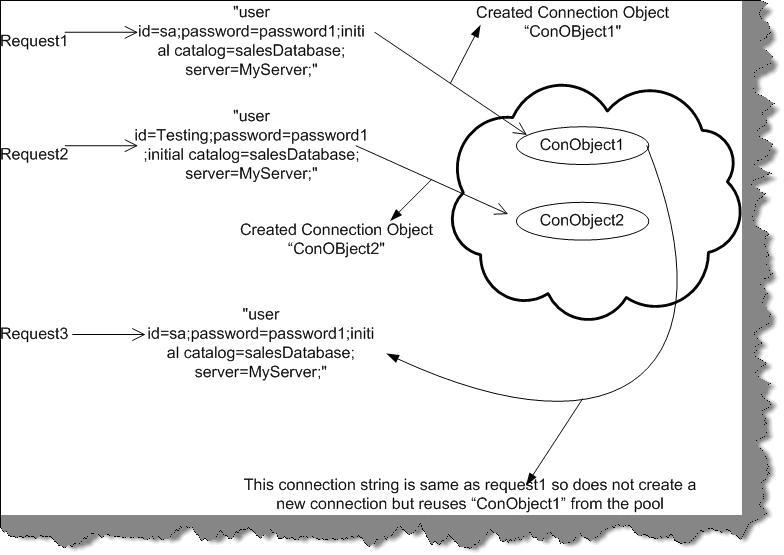
When a connection is opened the first time, a connection pool is created and is based on the exact match of the connection string given to create the connection object. Connection pooling only works if the connection string is the same. If the connection string is different, then a new connection will be opened, and connection pooling will not be used.
Figure 9.5: - Connection Pooling action.
Let us try to explain the same pictorially. In the above figure, you can see there are three requests "Request1", "Request2", and "Request3". "Request1" and "Request3" have the same connection string so no new connection object is created for "Request3" as the connection string is the same. They share the same object "ConObject1". However, the new object "ConObject2" is created for "Request2" as the connection string is different.
Note: - The difference between the connection string is that one has "User id=sa" and the other has "User id=Testing".
(A)What is Maximum Pool Size in ADO.NET Connection String?
The maximum pool size decides the maximum number of connection objects be pooled. If the maximum pool size is reached and there is no usable connection available the request is queued until connections are released back into the pool. So it's always a good habit to call the close or dispose of the method of the connection as soon as you have finished work with the connection object.
(A)How to enable and disable connection pooling?
For .NET it is enabled by default but if you want to just make sure set Pooling=true in the connection string. To disable connection pooling set Pooling=false in the connection string if it is an ADO.NET Connection. If it is an OLEDBConnection object set OLE DB Services=-4 in the connection string.
(I) What extra features does ADO.Net 2.0 have?
- Bulk Copy Operation
Bulk copying of data from a data source to another data source is a newly added feature in ADO.NET 2.0. ADO.NET introduces bulk copy classes that provide the fastest way to transfer\ data from one source to the other. Each ADO.NET data provider has bulk copy classes. For example, in SQL .NET data provider, the bulk copy operation is handled by SqlBulkCopy class, which can read a DataSet, DataTable, DataReader, or XML objects.
- Data Paging
A new method is introduced ExecutePageReader which takes three parameters - CommandBehavior, startIndex, and pageSize. So if you want to get rows only from 10 - 20, you can simply call this method with start index as 10 and page size as 10.
- Batch Update
If you want to update a large number of data on set ADO.NET 2.0 provides the UpdateBatchSize property, which allows you to set the number of rows to be updated in a batch. This increases the performance dramatically as a round trip to the server is minimized.
- Load and Save Methods
In the previous version of ADO.NET, only DataSet had Load and Save methods. The Load method can load data from objects such as XML into a DataSet object and the Save method saves the data to a persistent media. Now DataTable also supports these two methods. You can also load a DataReader object into a DataTable by using the Load method.
- New Data Controls
In the toolbox, you can see three new controls - DataGridView, DataConnector, and DataNavigator.
- DataReader's New Execute Methods
Some new execute methods introduced are ExecutePageReader, ExecuteResultSet, and ExecuteRow.


Join the conversation! Your thoughts help the community grow.