

Creating Multi Threaded WPF Applications
There can be certain scenario's when you're application has to perform some heavy CPU intensive tasks and is running on UI thread (your WPF application) could drastically pull down the performance of your application as UI related tasks in WPF could themselves be extensive, as WPF forces all the UI work being done on the thread that created the UI . And for a UI intensive application (for example, which shows a real time streaming of data) with high resource consumption, the cost of rendering the visual could prove too much for the single thread. This in turn could lead to freezing of your UI.
If your application reaches to such a state it is always a better idea to create your resource intensive UI applications on dedicated threads, this article will give you an incremental approach to creating such an Application.
Single Threaded Application in WPF:
First create a WPF application in Visual Studio. Choose File->New->Project, then Visual C# -> WPF Application. Give appropriate name to the application and click "Ok"
Add the following piece of code to window1.xaml.cs:
using System.Windows;
using System.Threading;
namespace SingleThreadUI
{
/// <summary>
/// Interaction logic for Window1.xaml
/// </summary>
public partial class Window1 : Window
{
public Window1()
{
InitializeComponent();
Thread _thread = Thread.CurrentThread;
this.DataContext = new { ThreadID = _thread.ManagedThreadId };
}
private void OnCreateNewWindow(object sender, RoutedEventArgs e)
{
Window1 w1 = new Window1();
w1.Show();
}
}
}
In the constructor of the window1 class we create the data context containing thread's ID which could be used to bind to a TextBox or Label in the UI. A click event handler is also there which is used to create new Windows. The Window.xaml should look like this:
<Window x:Class="SingleThreadUI.Window1"
xmlns="http://schemas.microsoft.com/winfx/2006/xaml/presentation"
xmlns:x="http://schemas.microsoft.com/winfx/2006/xaml"
Title="Window1" Height="300" Width="300">
<StackPanel>
<StackPanel Orientation="Horizontal" Height="30">
<TextBlock Text="Window created on :" FontSize="13"/>
<TextBlock Text="{Binding ThreadID}" FontSize="13"/>
</StackPanel>
<Button Click="OnCreateNewWindow" Content="New Window" Width="100" Margin="10" Height="25"/>
</StackPanel>
</Window>
When we click on the New Window button, it will create clones of the window and one could see the ThreadId remains same for all the windows.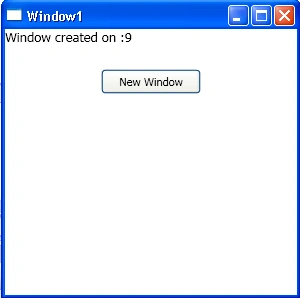
Here we are still creating the Window clones, but we wrapped the window creation code in Click event Handler of the New Window button.
Code for creating dedicated UI threads for each Window:
For creating WPF window on dedicated threads, Change the OnCreateNewWindow event Handler as:
private void OnCreateNewWindow(object sender, RoutedEventArgs e)
{
Thread thread = new Thread(() =>
{
Milan SanganieditedPosted Dec 5, 2012, 6:59 AMEdited Dec 5, 2012, 7:02 AM
->I have used above code in my App. Problem i m getting is one of the Brush.Dispatcher.Thread is previous thread (i.e 't1'). ->While my current thread is 't2' ->'t1' is my previous thread on which i closed my window ->'t2' is new thread ->Brush is at common place and not creating new each time -> I m getting cross thread exception How to get rid of this problem? Please help ASAP
Madhu sudhanPosted Sep 7, 2011, 1:32 PM
HI, we are developing a application in VB.NET Can you convert the code in VB.NET, also we have a treeview and on each click of node we generate a report, which will take some time, so we need to show a window with a loading.gif file to make sure user know that something is happening. please provide a solution on this. do you have progress bar solution to it Thanks, Madu
Roberto ValentiniPosted Sep 13, 2010, 5:16 AM
Is it possible to have a Panel controlled by another thread? or Is it possible to enclose a wpf window that runs on a different thread inside a panel?