

Here I am trying to show some of the basic functionalities of the powerful asp.net control BulletedList.
BulletedList Control will generate or be rendered into a list of items in a bulleted format, even we can attach an image as bulleted style format.
BulletedList Control is inherited from ListControl. Here are the list of different Bulleted Styles:
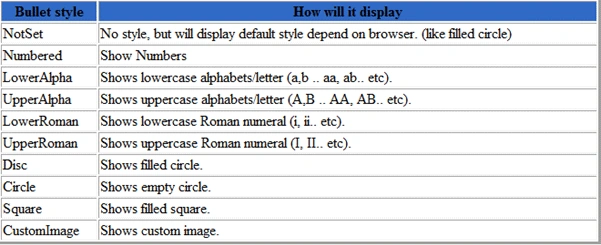
We can even use different CSS list-style of <ul> html tag in BulletedList control.
For Example: When we use property BulletStyle = "NotSet", it will display default style depending on browser (such as a filled circle).
If we don't want to see the filled circle we need to apply style="list-style-type: none;". This will fully remove the list style.

How to use bullet style "CustomImage"? It's Simple.
Set property BulletStyle="CustomImage" and BulletImageUrl="~/images/1.jpg"; this will display an image next to list text.
Remember to set proper pixel size for images.
Property DisplayMode --> DisplayMode is used for the display behavior of list items.
The different types of behavior are Text, LinkButton (event BulletedList.Click is used to post back to the server) and
Hyper Link (will navigate to a URL from Value assigned to ListItem).
Property FirstBulletNumber --> By setting FirstBulletNumber we can specify the value that starts the numbering of list items in the BulletedList control.
How to create a Horizontal BulletedList?
We need to use css styling by setting display: inline; padding: 0px; margin: 5px; for ul and li tags.
The output will be rendered as horizontal. You can even attach client side event to avoid post back.
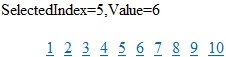
On BulletedList.Click we can retrieve the selected value and text.
The attached sample also shows how to fetch records from database and bind to BulletedList Control.
Download and test the codes. Please update your comments.
M zunair RafiqeditedPosted Nov 22, 2011, 6:14 AMEdited Nov 22, 2011, 6:14 AM
The BulletedList control creates a list in bullet format.To specify the individual list items that you want to appear in a BulletedList control, place a ListItem object for each entry between the opening and closing tags of the BulletedList control. The below code example show how to create a BulletedList control with list items that are formatted as link buttons.Label control Display message when a list item is clicked. For Details <a href="http://codingvilla.com/bulletlist-control-asp-net-3.5-single-article-139.aspx" title="BulletedList Control in Asp.Net">BulletedList Control in Asp.Net</a>
Kavita BPosted Mar 3, 2011, 6:03 AM
This is a simple control but explained nicely.. thanx