

Sometimes we need to develop an application that can be use in multiple
countries in different languages. In this article we will know how to devlope
that type of web application. Let us see in this article how to cater different
contents based on the culture using Globalization in ASP.NET.
Here We have two Options one is Resource file and second is XML files to hold
the language based translation. We can also extend this project to work with
database based language translation.
To localize a page/control few steps would be taken, which are as follows:
-
The initialization of the strings should always come from the resources file.
- The key values in the resource file would be stored in the "namespace.module.functionality.controlclientid.property"
way. There will be a default text associated with each control. Now onwards
besides the key there will be a default text associated with the control which
would be passed to the content manager. This would help to maintain the hard
coded texts in the resource file and need not to use reflection to traverse
through the line of code.
- Title: In all .aspx pages change <HEAD> to <HEAD runat="server">. This will help us to handle Title (Browser's Title Bar) at runtime dynamically without affecting much code as well as JavaScript.
- Hard Coded in server control: Any text which needs to be localized would be processed in the initialized controls event. If that text is available in the designer file then that text would be removed and moved to the initializeControls() event.
- Hardcoded text in HTML (see comments above): Any hardcoded text in HTML/Designer will be converted to server side asp Literal Control. Key-value pair will be added to resource files just like normal server side controls do. For these controls, key will be derived as "Namespace.ClassName.ControlId.Property" and value would be the existing value. The localization would be done in InitializeControls method of the page.
- Hard Coded text in List Controls
Sample Code:
protected void
Page_Load(object sender,
EventArgs e)
{
ImportLocalization();
}
public void
ImportLocalization()
{
Header1.Text = ResourceProvider.GetLocalValue("Home_Header1_Text");
Header2.Text = ResourceProvider.GetLocalValue("Home_Header2_Text");
Header3.Text = ResourceProvider.GetLocalValue("Home_Header3_Text");
link1.Text = ResourceProvider.GetLocalValue("Home_link1_Text");
rbDuplicates.Items[0].Text =
ResourceProvider.GetLocalValue("Home_rbDuplicates_0_Text");
rbDuplicates.Items[1].Text =
ResourceProvider.GetLocalValue("Home_rbDuplicates_1_Text");
}
Class Diagram and WebSite:
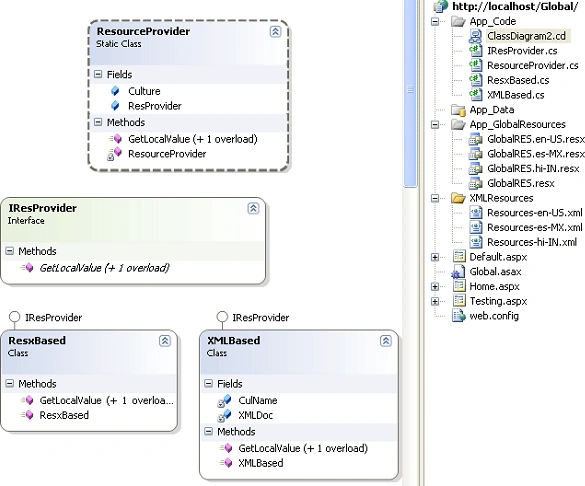
Code Files:
ResourceProvider is a static call which uses IresProvider Interface to access
ResxBased/XMLBased classes based on the configuration updated in Web.Config.
public
static class
ResourceProvider
{
public static
IResProvider ResProvider;
public static
CultureInfo Culture;
static ResourceProvider()
{
switch (ConfigurationSettings.AppSettings["ResProvider"])
{
case "RES":
ResProvider = new
ResxBased();
break;
case
"XML":
ResProvider = new
XMLBased();
break;
}
}
public static
string GetLocalValue(string
Key, string DefaultText)
{
return ResProvider.GetLocalValue(Key,
DefaultText, Culture);
}
public static
string GetLocalValue(string
Key)
{
return ResProvider.GetLocalValue(Key,
Culture);
}
}
ResxBased/XMLBased both classes implement IResprovider Interface. ResxBased
class is used to get the localized content from resource files, and XMLBased
class is used to get the localized content from XML files.
public
class ResxBased:IResProvider
{
public ResxBased()
{ }
#region
IResProvider Members
public string
GetLocalValue(string Key,
string DefaultText,
CultureInfo Culture)
{
string retVal =
string.Empty;
try
{
retVal = HttpContext.GetGlobalResourceObject("GlobalRES",
Key, Culture).ToString();
}
catch (NullReferenceException)
{
//do any loging here
retVal = DefaultText;
}
return retVal;
}
public string
GetLocalValue(string Key,
CultureInfo Culture)
{
string retVal =
string.Empty;
try
{
retVal = HttpContext.GetGlobalResourceObject("GlobalRES",
Key, Culture).ToString();
}
catch (NullReferenceException)
{
//do any loging
}
return retVal;
}
#endregion
}
public
class XMLBased:IResProvider
{
static
XmlDocument XMLDoc;
static string
CulName = string.Empty;
public XMLBased()
{
}
#region IResProvider Members
public string
GetLocalValue(string Key,
string DefaultText,
CultureInfo Culture)
{
string retVal =
string.Empty;
try
{
if (XMLDoc ==
null || CulName != Culture.Name)
{
CulName = Culture.Name;
XMLDoc = new
XmlDocument();
string path = System.AppDomain.CurrentDomain.BaseDirectory
+ "XMLResources/Resources-" + Culture.Name +
".xml";
XMLDoc.Load(path);
}
retVal = XMLDoc.GetElementsByTagName(Key).Item(0).InnerText;
}
catch (NullReferenceException
exp)
{
//Do Any Loging here
retVal = DefaultText;
}
return retVal;
}
public string
GetLocalValue(string Key,
CultureInfo Culture)
{
string retVal =
string.Empty;
try
{
if (XMLDoc ==
null || CulName != Culture.Name)
{
CulName = Culture.Name;
XMLDoc = new
XmlDocument();
string path = System.AppDomain.CurrentDomain.BaseDirectory
+ "XMLResources/Resources-" + Culture.Name +
".xml";
XMLDoc.Load(path);
}
retVal =
XMLDoc.GetElementsByTagName(Key).Item(0).InnerText;
}
catch (NullReferenceException
exp)
{
//Do Any Loging
}
return retVal;
}
#endregion
}
On Login/Default Page or any start up page we will ask user to select any
available country/culture, I which he want to see the complete web application.
Code of the Default/Home Page
HTML
<asp:DropDownList
ID="DDCuntryList"
runat="server"
AutoPostBack="True"
onselectedindexchanged="DropDownList1_SelectedIndexChanged"
>
<asp:ListItem
Value="en-US">UNITED
STATES</asp:ListItem>
<asp:ListItem
Value="es-MX">MAXICON</asp:ListItem>
<asp:ListItem
Value="hi-IN">INDIA</asp:ListItem>
</asp:DropDownList>
C#
public
partial class
_Default : System.Web.UI.Page
{
protected void
Page_Load(object sender,
EventArgs e)
{
if (!Page.IsPostBack)
{
string culName =
string.Empty;
if (ResourceProvider.Culture
== null)
{
culName = CultureInfo.CurrentCulture.Name;
}
else
{
culName = ResourceProvider.Culture.Name;
}
foreach (ListItem
item in DDCuntryList.Items)
{
if (item.Value == culName)
{
DDCuntryList.SelectedValue = item.Value;
ResourceProvider.Culture
= CultureInfo.CreateSpecificCulture(item.Value);
break;
}
}
if (DDCuntryList.SelectedIndex > -1)
{
ImportLocalization();
}
}
}
protected void
DropDownList1_SelectedIndexChanged(object
sender, EventArgs e)
{
string selectedLanguage =
string.Empty;
if (DDCuntryList.SelectedIndex >= 0)
{
selectedLanguage = DDCuntryList.SelectedItem.Value.ToString();
ResourceProvider.Culture =
CultureInfo.CreateSpecificCulture(selectedLanguage);
}
ImportLocalization();
}
public void
ImportLocalization()
{
Lab1.Text = ResourceProvider.GetLocalValue("Default_Lab1_Text");
HPL1.Text = ResourceProvider.GetLocalValue("Default_HPL1_Text");
DDCuntryList.Items[0].Text = ResourceProvider.GetLocalValue("Default_DDCuntryList_0_Text");
DDCuntryList.Items[1].Text =
ResourceProvider.GetLocalValue("Default_DDCuntryList_1_Text");
DDCuntryList.Items[2].Text =
ResourceProvider.GetLocalValue("Default_DDCuntryList_2_Text");
}
}
Snap Shot Of Application:
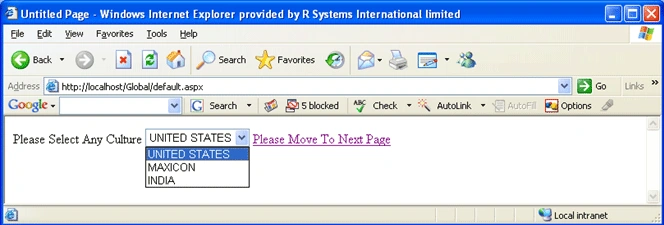
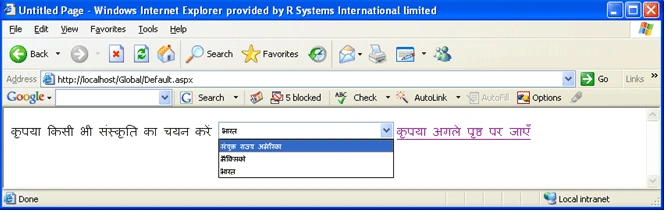
If it is changed to India:
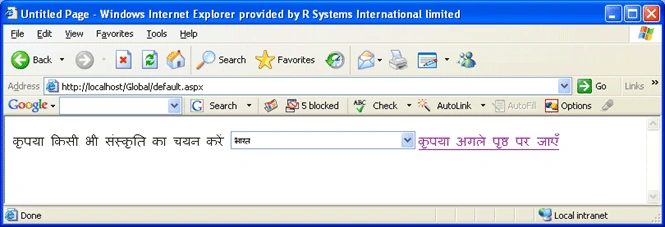
If we click on the next page then all the pages will displayed in Hindi
Contents:
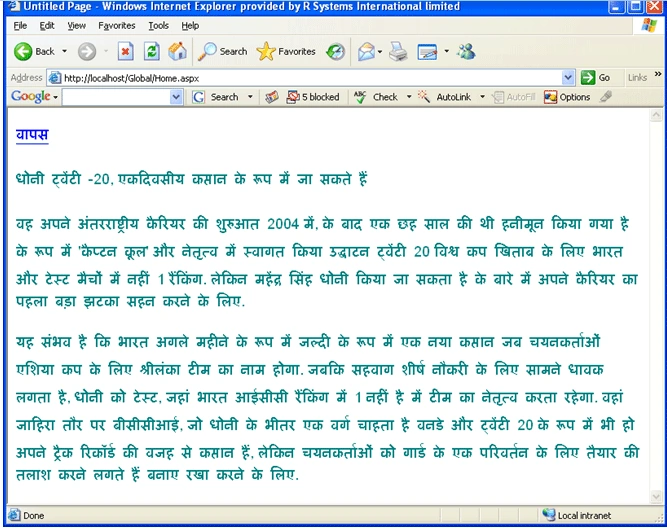
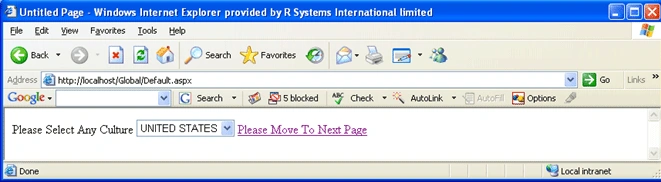
If We go Back to Default:
And select USA, then page content will be changed to English.
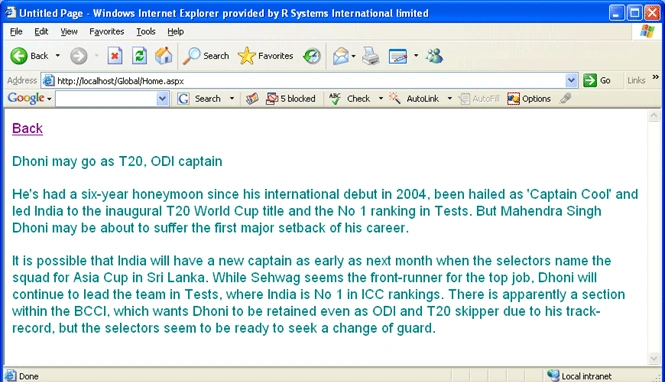
If we Click on the Link to move to next page.
Upendra Pratap ShahiPosted Jul 6, 2015, 3:02 AM
nice...