

There is a listing of clubs, and the user base wants to submit requests for a new club to be added to the list. In the first view, clubs are listed in a grid view control. The user clicks an add club link to submit a club using the form view control. The view changes to allow a user submission and the list of clubs are hidden from view. The form view control is contained in a generic web user control. When the user selects submit or cancel a message must be sent to the page containing the control. The information continued in the message used to display a message indicating a successful or cancelled submission. When the user has completed or cancelled the submission the view changes back to the listing of the clubs. The appropriate message is displayed and the submission form is hidden from view.
Illustrating the Use Case
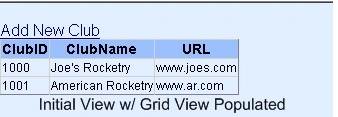
This is how the application starts with the grid view populated. The user clicks the add new club link to submit a new club.
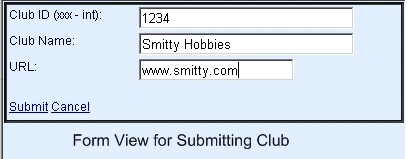
The user enters the club information and chooses to submit or cancel the entry. The page, which is the container of the web user control, receives a message indicating the user's choice.
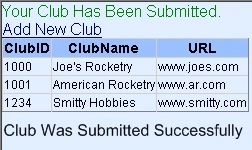
This demonstrates that the user chose to submit the club and the form view user control sent a message that bubbled up the containing page. The page determines the submission was a success and displays an acknowledgement.
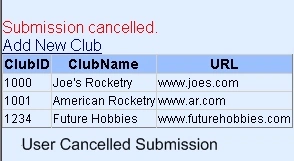
When the user chooses to cancel the submission, the web user control that contains the form view sends a message to the page containing the control. Here the user chose to cancel the club submission.
Background
The Challenge and Solution: To implement this business process the developer must leverage event bubbling. Using event bubbling, a message is sent from the web user control back to the club listing page. The information in the message is used to change the state of the page and list an acknowledgement of the submission. Unfortunately, the documentation on the web describing how to implement this process is scarce and sketchy at best. This article illustrates to the developer the details of how to implement this process.
Event Bubbling in a Nut Shell: An event bubble simply contains a message that is sent from one object to another. The message is contained in a class that inherits from EventArgs. EventArgs is a system base class that contains event data. This of course is a simplification of the concept.
To illustrate, the page class contains both the grid view and the custom web user control. The web user control is a container for the form view control. The form view control contains the submit and cancel links.
What we want is to send a message from the submit or cancel links up through the control hierarchy to the Club List page container. The message is said to bubble up to the page container. There an event handler interprets the message and displays the success or cancellation message to the user.
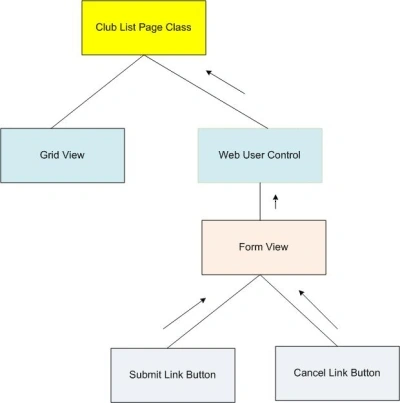
That is about as deep as this article is going to get into the event bubbling theory. On to composing the code.
Key Elements
The UserControlEventArgs class has two parts. The class declaration and the declaration of the event delegate.
| UserControlEventArgs Class | |
| Instance Variable(s) | |
| InsertComplete | This flag indicates a successful insertion of a new record or a cancellation of the submission. |
| Event Delegate | |
| ClubInsertedEventHandler | Accepts two argument. The first is the sender of type object. The second is the UserControlEventArgs used to pass the message in the bubble. |
The WebUserControlAddUser class requires an instance variable for the event handler.
| WebUserControlAddUser | |
| Instance Variable | |
| public event ClubInsertedEventHandler ClubInsertComplete; | Declare this variable to be an event of type ClubInserted EventHandler. This is used to raise the event that will bubble up to the ClubList page. |
| Firing the Event | |
| UserControlEventArgs args = new UserControlEventArgs(true); | Declare the args variable that will be passed into the event bubble. |
| ClubInsertComplete(this, args); | Raise the event. |
Finally, the ClubList page consumes the event.
| Club List Page | |
| Click Event (aspx) | |
| OnClubInsertComplete="ClubInsertComplete" | The web user control WebUserControlAddUser invodes the methoc ClubInsertComplete. |
| Handling the Web User Control Event | |
| ClubInsertComplete(object sender, UserControlEventArgs e) | "e" exposes the InsertComplete variable that is passed as an argument into the event handler. |
Composing the code
Key Concepts: The UserControlEventArgs class is used to pass the message from the web user control to the default web page that contains the user control. A delegate called the ClubInsertedEventHandler is used to declare the "args" delegate type for the event that is raised in the user control. The event is called "ClubInsertComplete."
The delegate event declaration resides in the UserControlEventArgs class. Note that the declaration is external to the class. It is a mistake to include the delegate within the body of the UserControlEventArgs class and will cause the event to be hidden from the default page which is the container for the web user control.
When a record has been inserted into the data table the args value is instantiated and passed into the "ClubInsertComplete" event as an argument. Note that the delegate for the event follows the Microsoft pattern for declaring events.
When the "ClubInsertComplete" event is raised the event bubbles up to the default page that is a container for the "WebUserControlAddUser" and there it is handled. VS2008 intellisence does not show the event in the customary manner. However, the user can go to the GUI portion of the default page where the user control has been added. There VS2008 intellisence will list the "OnClubInsertComplete" event that is set to the "ClubInsertComplete" method in the default code behind.
Steps to Follow:
Step 1) The ClubList class is a helper that simply creates a datatable and populates it with a list of clubs. They will be displayed in the grid view control on the default page.
Static Class ClubList:
| Methods | Description |
| BuildClubList() | A data table is populated with a default club list. The club list is later bound to the gridview control. |
| AddClub() | Add a club to the data table. |
| ClearTable() | Specific to the VS2008 debugger. It is necessary to clear out the table when using a static class because the object has not been disposed by the debugger when it is closed between debuggin runs. |
- using System;
- using System.Data;
- /// <summary>
- /// Jeff Kent - 11/14/2009
- /// Helper that is used to populate the gridview,
- /// add a new club, and expose the data table for binding.
- /// This is intended only for use in demonstrating this application, and
- /// it is not suitable for production use.
- /// </summary>
- public static class ClubList
- {
- private static DataTable _dt = new DataTable("ClubList");
- //PROPERTY THAT EXPOSES THE DATA TABLE FOR BINDING.
- static public DataTable dt
- {
- get { return _dt; }
- set { _dt = value; }
- }
- //CLEAR THE TABLE BECAUSE OF A
- //PECULARITY WITH VS2008 WHEN
- //RUNNING IN DEBUG MODE.
- static public void ClearTable()
- {
- _dt.Columns.Clear();
- _dt.Rows.Clear();
- }
- // CREATE A CLUB LIST AND RETURN THE DATA TABLE.
- static public DataTable BuildClubList()
- {
- DataColumn col;
- DataColumn col2;
- DataColumn col3;
- DataRow row;
- // Create new Datacol, set DataType,
- // colName and add to DataTable.
- col = new DataColumn();
- col.DataType = Type.GetType("System.Int32");
- col.ColumnName = "ClubID";
- col.ReadOnly = true;
- col.Unique = false;
- // Add the col to the DatacolCollection.
- _dt.Columns.Add(col);
- col2 = new DataColumn();
- col2.DataType = Type.GetType("System.String");
- col2.ColumnName = "ClubName";
- col2.AutoIncrement = false;
- col2.Caption = "Club Name";
- col2.ReadOnly = false;
- col2.Unique = false;
- _dt.Columns.Add(col2);
- col3 = new DataColumn();
- col3.DataType = Type.GetType("System.String");
- col3.ColumnName = "URL";
- col3.AutoIncrement = false;
- col3.Caption = "URL";
- col3.ReadOnly = false;
- col3.Unique = false;
- _dt.Columns.Add(col3);
- row = _dt.NewRow();
- row["ClubID"] = 1000;
- row["ClubName"] = "Joe's Rocketry";
- row["URL"] = "www.joes.com";
- _dt.Rows.Add(row);
- row = _dt.NewRow();
- row["ClubID"] = 1001;
- row["ClubName"] = "American Rocketry";
- row["URL"] = "www.ar.com";
- _dt.Rows.Add(row);
- return _dt;
- }
- //ADD A CLUB TO THE DATA TABLE.
- public static DataTable AddClub(int ClubID, string ClubName, string url)
- {
- DataRow row;
- row = _dt.NewRow();
- row["ClubID"] = ClubID;
- row["ClubName"] = ClubName;
- row["URL"] = url;
- _dt.Rows.Add(row);
- row = _dt.NewRow();
- return _dt;
- }
- }
Class UserControlEventArgs contains a single property InsertComplete that encapsulates the message being sent from the web user control to the club list page. The EventArgs inheritance is a base class that resides in the system.
Sumier MustafaPosted Apr 27, 2010, 5:21 AM
Why did you use RaiseBubbleEvent(sender, e); and OnBubbleEvent(object source, EventArgs args)