

Many people don't pay attention to the fact that controls couldn't be directly invoked within a thread context other than the one within which they have been created. And then their applications fall down because a run time error will be raised when firing the application. It is technically called none valid cross thread operation. It generates an InvalidOperationException.
As explanation to this error, I can say that each thread has its proper boundary exactly like a state that has a boundary. And it is not legal to travel from a county to another one without achieving some administrative tasks. It is exactly the same fact from an analogical point of view.
Therefore, it is not possible for a control that has been created within a given thread to be directly used within another thread event when one try to avoid the problem by using a Backgroundworker he/she won't resolve the problem if he/she doesn't have a complete idea about dealing with controls and or objects within a multithreaded contexts.
There are many used techniques in order to resolve the problem and I will represent one of those techniques.
But first let's see what will happen when an invalid cross threaded operation is designed and tested:
First, create a new windows application project and add a progress bar, a button and a label into the form1 so that it appears as under:
Add the namespace
using System.Threading;
Then try this code
public partial class Form1 : Form
{
Thread myThread;
public Form1()
{
InitializeComponent();
myThread = new Thread(new ThreadStart(ModifyControlsState));
}
public void ModifyControlsState()
{
progressBar1.Minimum = 0;
progressBar1.Maximum = 100;
for (int i = 0; i <= 100; i = i + 1)
{
progressBar1.Increment(i);
label1.Text = progressBar1.Value.ToString() + "%omplete"; Thread.Sleep(10);
}
DialogResult dlg = MessageBox.Show("Do you want to close this window",
"Do you want to exit this window",
MessageBoxButtons.OKCancel);
if (dlg == DialogResult.OK) Application.Exit(); }
private void button1_Click(object sender, EventArgs e)
{
myThread.Start();
}
If you click the button1 you will receive this error: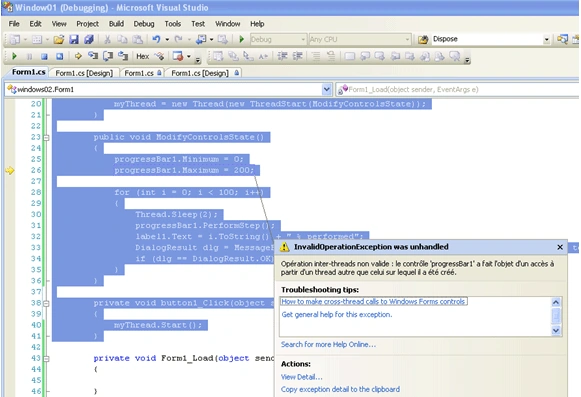
Figure1
Now the solution is performed through the following steps:
-
Add a void delegate class with the same characteristics conforming to the thread method signature
private delegate void MyDelegate();
MyDelegate myDelegate;
-
Add a method with the same signature as the thread method except the name Of Corse
public void Perform()
{
//TO DO: Cut the thread method implementation and paste it here}
-
Create a new delegate instance that points to the Perform method
private void Form1_Load(object sender, EventArgs e)
{
myDelegate = new MyDelegate(Perform);}
-
Cut and paste the thread method implementation within the Perform method zone as follow
public void Perform()
{
//TO DO: Cut the thread method implementation and paste it here
progressBar1.Minimum = 0;
progressBar1.Maximum = 100;
for (int i = 0; i <= 100; i = i + 1)
{
progressBar1.Increment(i);
label1.Text = progressBar1.Value.ToString() + "%omplete";
Thread.Sleep(10);
}
DialogResult dlg = MessageBox.Show("Do you want to close this window",
"Do you want to exit this window",
MessageBoxButtons.OKCancel);
if (dlg == DialogResult.OK) Application.Exit();}
-
And finally, you add this code within the thread method zone
public void ModifyControlsState()
{
Form1 form1 = this;
form1.Invoke(myDelegate);
}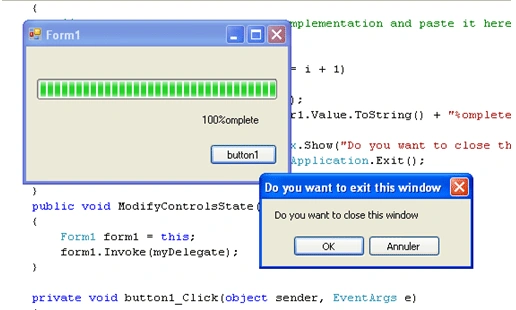
Figure 2
It works great, that's it.
Good Dotneting!!!
Santosh Kumar KotnalaPosted Sep 9, 2009, 11:37 PM
Hi, Bechir Bejaoui I am working on WPF Window application in .NET 3.5 . In your article thier is one method window.Invoke(p) in load function but I am working on window application thier is no method window.Invoke(). So thier is any replacement of Form.Invoke(p) or any solution I am waiting for your reply............ Thanks
rthomasPosted Apr 22, 2009, 8:02 AM
Great article! Question: is there any advantage to always calling Perform (via Invoke), rather than setting thing up so progressBar1.InvokeRequired() is checked first? Thanks, Rich Thomas