ARTICLE

Making Transparent Controls using GDI+ and C#

Posted by nildo Articles | GDI+ & Graphics May 14, 2003
This article shows you how to draw transparent controls with the help of GDI+.
Reader Level:
Download Files:
 

This article provides an approach to a Transparent Control that draws an ellipse with real transparent background and a brush that supports transparent colors.

Below sample project is included in the ZIP file. In addition, you will find a file that contains the control TranspControl.ddl. It was made and based on technique presented in this article.
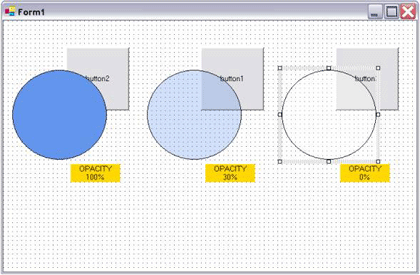


To make a transparent control you may create a default control and proceed with the following steps:

1. Add the transparent style to the control window.

Protected override CreateParams CreateParams
{
get
{
CreateParams cp = base.CreateParams;
cp.ExStyle |= 0x20;
return cp;
}
}

2. Override the OnPaintBackground event. This is necessary to prevent the background to be painted.

Protected override void OnPaintBackground(PaintEventArgs e)
{
// do nothing
}

3. Override the OnMove event with the following code.

Protected override void OnMove(EventArgs e)
{
RecriateHandle();
}

Login to add your contents and source code to this article
post comment
     

where is the code to the dll?

Posted by Matthew Morrow Feb 11, 2010

namespace Sample_Project { using System; using System.Drawing; using System.Windows.Forms; public class TranspControl : Control { // Fields private Color brushColor = Color.Transparent; private Timer delay = new Timer(); private int opacity = 100; // Methods public TranspControl() { this.delay.Tick += new EventHandler(this.TimerOnTick); this.delay.Enabled = true; this.delay.Interval = 50; } protected override void OnMove(EventArgs e) { base.RecreateHandle(); } protected override void OnPaint(PaintEventArgs e) { int num; Graphics graphics = e.Graphics; Rectangle rect = new Rectangle(0, 0, base.Width - 1, base.Height - 1); Color brushColor = this.brushColor; if (brushColor == Color.Transparent) { num = 0; } else { num = (this.opacity * 0xff) / 100; } Pen pen = new Pen(Color.Black); SolidBrush brush = new SolidBrush(Color.FromArgb(num, brushColor)); graphics.FillEllipse(brush, rect); graphics.DrawEllipse(pen, rect); pen.Dispose(); brush.Dispose(); graphics.Dispose(); } protected override void OnPaintBackground(PaintEventArgs e) { } private void TimerOnTick(object source, EventArgs e) { base.RecreateHandle(); this.delay.Stop(); } // Properties public Color BrushColor { get { return this.brushColor; } set { this.brushColor = value; base.RecreateHandle(); } } protected override CreateParams CreateParams { get { CreateParams createParams = base.CreateParams; createParams.ExStyle |= 0x20; return createParams; } } public int Opacity { get { if (this.opacity > 100) { this.opacity = 100; } else if (this.opacity < 0) { this.opacity = 0; } return this.opacity; } set { this.opacity = value; base.RecreateHandle(); } } } }

Posted by marwijn hessel Nov 30, 2008

The zip file doesn't include the source code for the control! Worthless...

Posted by Jon Jun 14, 2007
COMMENT USING
PREMIUM SPONSORS
Over-C is a holistic consortium of communications and technology specialists. We build, deploy and market both business as well as consumer products and solutions.
Join a Chapter
SPONSORED BY
  • PDF reports have never been easier to create. With our included WYSIWYG Designer, you can layout your reports, set up your data source and let DynamicPDF ReportWriter do the rest.