

In this article we will talk about the Decorator Pattern and how to implement it in an ASP.Net application.
Agenda
- What is a Decorator Pattern?
- When to use the DecoratorPattern. We will see an example and try to understand the problems with traditional approaches.
- How does the Decorator pattern solve this problem?
- Various components involved in the composite pattern.
- Implement the DecoratorPattern using an ASP.Net application.
- Class Diagram.
Before reading this article, please go through the following articles:
- Design Patterns: Introduction
- Learn Design Pattern - Singleton Pattern
- Learn Design Pattern - Factory Method Pattern
- Learn Design Pattern - Abstract Factory Pattern
- Learn Design Pattern - Builder Pattern
- Learn Design Pattern - Prototype Pattern
- Learn Design Pattern - Adapter Pattern
- Learn Design Pattern - Composite Pattern
- Learn Design Pattern - Facade pattern
- Learn Design Pattern - Flyweight pattern
What is Decorator Pattern?
- According to the GOF the intent of the Decorator Pattern is to "Attach additional responsibilities to an object dynamically.".
- Decorators provide a flexible alternative to subclassing for extending functionality.
- This pattern is designed so that multiple decorators can be stacked on top of each other, each time adding a new functionality to the overridden method(s).
(As usual the definition will be simpler after we see the problem and solution).
When to use?
Practical Example
Consider we have a 2-player Gaming System.
As the player progresses he is awarded with some weapons like Gun, Knife or both.
Our task is to create a web page which will get the player's description by his/her type and weapon he/she has.
The output should look like this:
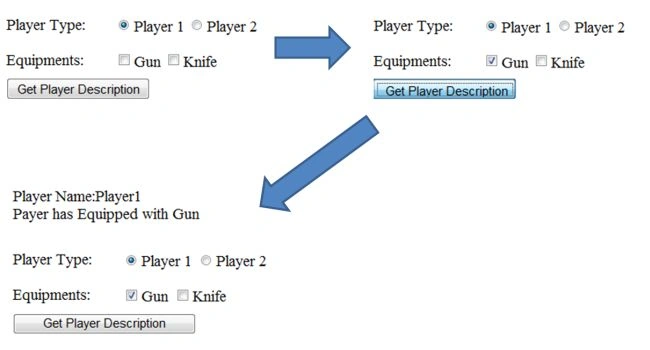
Player Structure

In short our task is to decorate Players with weapons at runtime.
Solution 1
Create 2 properties in the base called HasGun and HasKnife.
- It's true that using an inheritance we can decorate Objects at compile time but that will be fixed. In other words any new weapon entry (like rocket launcher) will result in modification of the Base class and violates Open Closed Principle (Open Closed Principle says "Software entities like classes, modules and functions should be open for extension but closed for modifications"). Any changes in a base may affect both Player1 and Player2, in other words changes increase the chances of error and therefore increase the test cases.
- Considering that now the game has a 3 player capability and the third player only has access to a Gun throughout the game, in other words the HasKnife value will be false for the entire time in the game. That implies this property is completely irrelevant for the third player.
Solution 2
Create 6 new classes called Player1WithGun, Player1WithKnife, Player1WithGunAndKnife, Player2WithGun, Player2WithKnife and Player2WithGunAndKnife.
It's obvious we are accomplishing nothing but creating maintenance nightmares for ourselves, every new combination results in a new class.
Decorator Pattern Solution.
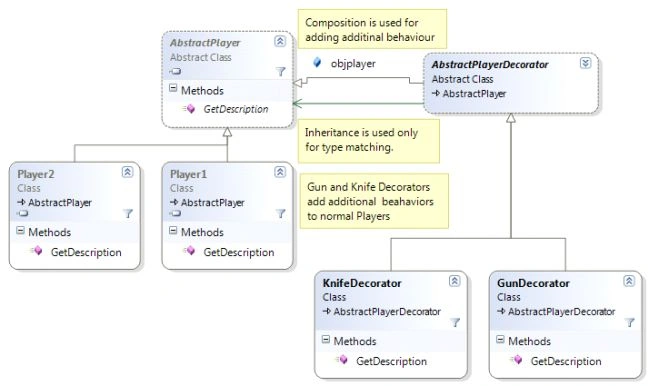
The Decorator pattern allows us to add a new behavior to an object using composition.
In short:
- The Decorator Class will have a member of type AbstarctPlayer.
- It adds some of its (the decorator's) own behavior to existing behavior of the concrete player.
Still confused? Let's create code and be clear :)
Step 1
Create AbstractClassAbstractPlayer as
publicabstractclassAbstractPlayer
{
publicabstractstringGetDescription();
}
Step 2
Create Concrete Players as
publicclassPlayer1:AbstractPlayer
{
publicoverridestringGetDescription()
{
return"Player Name:Player1";
}
}
publicclassPlayer2:AbstractPlayer
{
publicoverridestringGetDescription()
{
return"Player Name:Player2";
}
}
Step 3
Create AbstractPlayerDecorator as
publicabstractclassAbstractPlayerDecorator:AbstractPlayer
{
publicAbstractPlayerobjplayer;
publicAbstractPlayerDecorator(AbstractPlayerobjplayer)
{
this.objplayer = objplayer;
}
}
Step 4
Create Concrete Decorators as
publicclassGunDecorator : AbstractPlayerDecorator
{
publicGunDecorator(AbstractPlayer player)
: base(player)
{
}
publicoverridestringGetDescription()
{
returnthis.objplayer.GetDescription()+ "<BR>Payer has Equipped with Gun";
}
}
publicclassKnifeDecorator: AbstractPlayerDecorator
{
publicKnifeDecorator(AbstractPlayer player)
: base(player)
{
}
publicoverridestringGetDescription()
{
returnthis.objplayer.GetDescription() + "<BR>Payer has Equipped with Knife";
}
}
Step 5
Write the following Client Code:
AbstractPlayerobjPlayer = null;
if(RdbPlayer1.Checked)
{
objPlayer = newPlayer1();
}
else
{
objPlayer = newPlayer2();
}
if(ChkGun.Checked)
{
objPlayer=newGunDecorator(objPlayer);
}
if(ChkKnife.Checked)
{
objPlayer=newKnifeDecorator(objPlayer);
}
Response.Write(objPlayer.GetDescription());
- We have used the Decorator class and extended the normal behavior of the player.
- In the definition we specified "multiple decorators can be stacked on top of each other, each time adding a new functionality to the overridden method". In other words first we upgraded a Normal Player to a Player with Gun with the help of GunDecorator which may be upgraded to Player with Gun And Knife using KnifeDecorator.
(Here every decorator itself acts as a Player, so we can easily stack one above another.)
Note: we use inheritance to do the type matching and composition to acquire new behavior.
Hope you enjoyed reading this article.
Queries, Feedbacks and suggestions are always welcome.
For more Design Patterns and .NET stuff do visit us.
Sai SherlekarPosted Jul 30, 2013, 2:59 AM
What is the difference between bridge pattern and decorator? i read your both pattern and downloaded source code also. but i didnt get the difference. if u explain difference it would be helpful......
Ashish KalraPosted Jul 4, 2013, 6:16 PM
Dear Sukesh....Thanks for sharing such a valuable piece of information..I don't know whether i'm right or wrong but as per my understanding there is possibility that a player can have both knife and gun at the same time.This scenario is not getting covered in the example above.
Nagasundar NagarajanPosted Oct 3, 2012, 4:01 AM
Thanks
Sukesh MarlaPosted Sep 30, 2012, 8:22 AM
No dear, its fine, i am happy to see that you are so desperately waiting for my article. Don't worry i will cover bridge pattern, Before completing structural category. And Recent post is not my control, its c-sharp corner who puts that list. i can make sure that all patterns will be covered
Nagasundar NagarajaneditedPosted Sep 30, 2012, 8:07 AMEdited Sep 30, 2012, 8:14 AM
Hi Sukesh, TThanks for your articles. I have a doubt.In the Introduction article you mentiond Bridge pattern next to adapter pattern. Now we are in Decorator pattern. Will bridge pattern be covered next? I am just having another doubt.. I am seeing Builder pattern in recent published list. Pls forgive me if I have asked anything not reasonable..