ARTICLE

Get your System Information using C#

Posted by Ahmed Abdel Ghany Articles | Current Affairs May 05, 2004
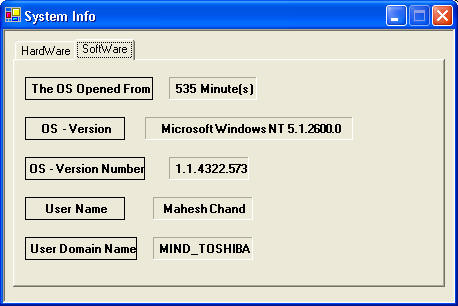
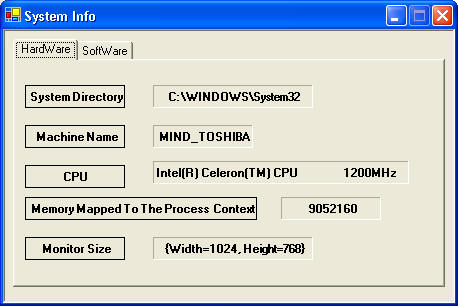
In this article I will discuss how you can get information about your system such as available operating system, hardware, and domain.
Reader Level:
Download Files:
 

In this article I will discuss how you can get information about your system such as available operating system, hardware, and domain.

I have used three different ways.

The first way is using the SystemInformation class. Which you can find in the System.Windows.Forms namespace. This class provides information about the operating system. This class has properties. You simply call the property. For example, this code gives the primary monitor size.

SystemInformation.PrimaryMonitorSize.ToString ();

The second way is to use the Environment class, which you can find in the System namespace. This Important class provides information about the current environment and platform. For example, the following code gives you the user domain name, and operating system version.

System.Environment.UserDomainName;
System.Environment.OSVersion.ToString ();

The third way is using the Registry class, which you can find in the Microsoft.Win32 namespace. This very important class helps you to access values and subkeys in Windows registry.

See the attached code for more details.


Login to add your contents and source code to this article
Article Extensions
Contents added by zabo hal on Dec 28, 2012
thanks a lot
post comment
     

thanks for sharing

Posted by Yakhtar Ali Apr 03, 2013

This is an application that's what I was looking for, thank you so much!

Posted by Quang Trung Pham Mar 28, 2013

thanks a lot

Posted by antvite Nov 04, 2012

muchas gracias me ha servido mucho !

Posted by Anthony Salazar Jun 04, 2012

thank you

Posted by hung pham Dec 07, 2011
COMMENT USING
PREMIUM SPONSORS
DynamicPDF™ product line allows you to dynamically generate PDF documents, merge PDF documents and add new content to existing PDF documents from within your applications.
Get Career Advice from Experts
SPONSORED BY
  • PDF reports have never been easier to create. With our included WYSIWYG Designer, you can layout your reports, set up your data source and let DynamicPDF ReportWriter do the rest.