

Introduction
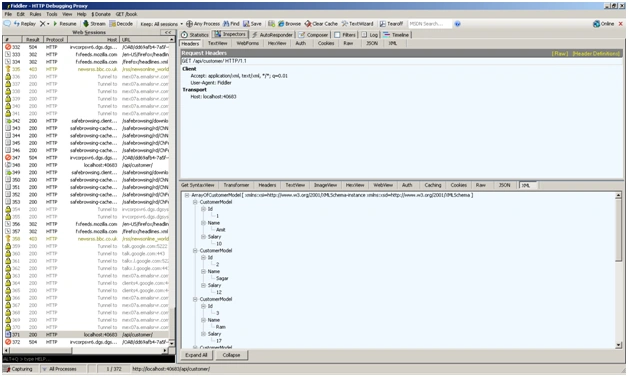
We can expose a Web API from ASP.NET MVC4. It is a new feature from Microsoft. Clients can get data from a Web API in any format such as JSON, XML, JSONP, HTML and etc.
I have already written about the Web API-based methods in the http://www.c-sharpcorner.com/Blogs/9470/mvc4-web-api-that-supports-crud-operations-part-1.aspx blog.
Now in this article, I am going to explain how to create a new Web API application and how to get data in various formats such as I mentioned above.
Purpose
HTTP is not just for serving up web pages. It is also a powerful platform for building APIs that expose services and data. HTTP is simple, flexible, and ubiquitous. Almost any platform that you can think of has an HTTP library, so HTTP services can reach a broad range of clients, including browsers, mobile devices, and traditional desktop applications.
The ASP.NET Web API is a framework for building web APIs on top of the .NET Framework. In this tutorial, you will use the ASP.NET Web API to create a web API that returns a list of products.
The following are the steps to create a new Web API application in Visual Studio 2011.
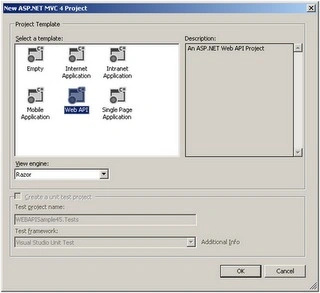
Step 1. We will create a new project and the project type will be MVC4. See the following image.

Step 2. Now we will select a Web API template from the Project template Dialog window.
Step 3. Now we will create a Customer controller inside the Controller folder and will select an API controller with read/write actions.

Step 4. Now we will add an Entity Data Model for our Database where we have a Customer Table. You can see it in the attached Source code.
Step 5. It's time to modify our CustomerController to fetch and save data. See the code below.
using System;
using System.Collections.Generic;
using System.Linq;
using System.Net.Http;
using System.Web.Http;
using WEBAPISample45.Models;
namespace WEBAPISample45.Controllers
{
    public class CustomerController : ApiController
    {
        private CompanyDBEntities context = new CompanyDBEntities();
        // GET /api/customer
        public IEnumerable<CustomerModel> Get()
        {
            IEnumerable<CustomerModel> list = null;
            list = (from c in context.Customers
                    select new CustomerModel
                    {
                        Id = c.Id,
                        Name = c.Name,
                        Salary = (long)c.Salary
                    }).AsEnumerable<CustomerModel>();
            return list;
        }
        // GET /api/customer/5
        public CustomerModel Get(int id)
        {
            return (from c in context.Customers
                    where c.Id == id
                    select new CustomerModel
                    {
                        Id = c.Id,
                        Name = c.Name,
                        Salary = (long)c.Salary
                    }).FirstOrDefault<CustomerModel>();
        }
        // POST /api/customer
        public void Post(CustomerModel customer)
        {
            context.AddToCustomers(new Customer
            {
                Id = customer.Id,
                Name = customer.Name,
                Salary = customer.Salary
            });
            context.SaveChanges(System.Data.Objects.SaveOptions.AcceptAllChangesAfterSave);
        }
        // PUT /api/customer/5
        public void Put(int id, CustomerModel customer)
        {
            var cust = context.Customers.First(c => c.Id == id);
            cust.Name = customer.Name;
            cust.Salary = customer.Salary;
            context.SaveChanges();
        }
        // DELETE /api/customer/5
        public void Delete(int id)
        {
            var cust = context.Customers.First(c => c.Id == id);
            context.Customers.DeleteObject(cust);
            context.SaveChanges();
        }
    }
}



Susanta RoutPosted Aug 3, 2016, 2:24 AM
Nice tutorial
Munesh SharmaPosted May 28, 2016, 7:35 AM
nice
Ravi PatelPosted Feb 19, 2015, 7:57 AM
awesome article
Richard ScannellPosted Dec 24, 2013, 5:54 AM
http://localhost:40683/api/Customer gives an error. This is from downloaded RAR file, & executed under VS 2012. I think its a routing issue. because when I added a garbage URL... /api/Aardvark, it did not change the message... Any clues would be great, because this looks like it could be a really straightforward way to publish an API. if I can get it to work. Method not found: 'Void System.Net.Http.Headers.HttpHeaders.AddWithoutValidation(System.String, System.Collections.Generic.IEnumerable`1<System.String>)'. Description: An unhandled exception occurred during the execution of the current web request. Please review the stack trace for more information about the error and where it originated in the code. Exception Details: System.MissingMethodException: Method not found: 'Void System.Net.Http.Headers.HttpHeaders.AddWithoutValidation(System.String, System.Collections.Generic.IEnumerable`1<System.String>)'. Source Error: An unhandled exception was generated during the execution of the current web request. Information regarding the origin and location of the exception can be identified using the exception stack trace below. Stack Trace: [MissingMethodException: Method not found: 'Void System.Net.Http.Headers.HttpHeaders.AddWithoutValidation(System.String, System.Collections.Generic.IEnumerable`1<System.String>)'.] System.Web.Http.WebHost.HttpControllerHandler.AddHeaderToHttpRequestMessage(HttpRequestMessage httpRequestMessage, String headerName, String[] headerValues) 0 System.Web.Http.WebHost.HttpControllerHandler.ConvertRequest(HttpContextBase httpContextBase) 390 System.Web.Http.WebHost.HttpControllerHandler.BeginProcessRequest(HttpContextBase httpContextBase, AsyncCallback callback, Object state) 157 System.Web.Http.WebHost.HttpControllerHandler.System.Web.IHttpAsyncHandler.BeginProcessRequest(HttpContext httpContext, AsyncCallback callback, Object state) 77 System.Web.CallHandlerExecutionStep.System.Web.HttpApplication.IExecutionStep.Execute() 301 System.Web.HttpApplication.ExecuteStep(IExecutionStep step, Boolean& completedSynchronously) 155