Introduction:
Have you ever thought of streaming thumbnails just by passing query string indicating width or height of thumbnail you need, and most importantly passing those to image itself?
<img src=MyImage.jpg?Height=200>
Well if you have little knowledge of what HTTP Handlers are, you can do that easily. So what are HTTP handlers?
HTTP Handlers:
HTTP handlers are the .NET components that implement the System.Web.IHttpHandler interface, they can act as a target for the incoming HTTP requests and can be called directly by using their file name in the URL.
HTTP handlers implement the following two methods:
1) ProcessRequest: called to process http requests and
2) IsReusable which indicates whether this instance of http handler can be reused for fulfilling another requests of the same type.
HTTP handlers can return either true or false in order to specify whether they can be reused. So lets Create Handler for Images.
Following HttpImageHandler Class Implements IHttpHandler Interface.
using
System;
using System.Web;
using System.IO ;
using System.Drawing;
using System.Drawing.Imaging;
namespace ImageHandler
{
public class HttpImageHandler: IHttpHandler
{
int Width = 0;
int Height = 0;
public void ProcessRequest(System.Web.HttpContext context)
{
if(context.Request.Params["height"] != null)
{
try
{
Height = int.Parse(context.Request.Params["height"]);
}
catch
{
Height = 0;
}
}
if(context.Request.Params["width"] != null)
{
try
{
Width = int.Parse(context.Request.Params["width"]);
}
catch
{
Width = 0;
}
}
if (Width <= 0 && Height <=0)
{
context.Response.Clear();
context.Response.ContentType = getContentType(context.Request.PhysicalPath); context.Response.WriteFile(context.Request.PhysicalPath);
context.Response.End();
}
else
{
context.Response.Clear();
context.Response.ContentType = getContentType(context.Request.PhysicalPath);
byte[] buffer = getResizedImage(context.Request.PhysicalPath,Width,Height);
context.Response.OutputStream.Write(buffer, 0, buffer.Length);
context.Response.End();
}
}
public bool IsReusable
{
get
{
return false;
}
}
byte[] getResizedImage(String path ,int width,int height)
{
Bitmap imgIn = new Bitmap(path);
double y = imgIn.Height;
double x = imgIn.Width;
double factor = 1;
if(width > 0)
{
factor = width/x;
}
else if (height>0)
{
factor = height/y;
}
System.IO.MemoryStream outStream = new System.IO.MemoryStream();
Bitmap imgOut = new Bitmap((int)(x * factor),(int)(y * factor));
Graphics g = Graphics.FromImage(imgOut);
g.Clear(Color.White);
g.DrawImage(imgIn,new Rectangle(0,0,(int)(factor * x),(int)(factor * y)),new Rectangle(0,0,(int)x,(int)y),GraphicsUnit.Pixel);
imgOut.Save(outStream, getImageFormat(path));
return outStream.ToArray();
}
string getContentType(String path)
{
switch (Path.GetExtension(path))
{
case ".bmp": return "Image/bmp";
case ".gif": return "Image/gif";
case ".jpg": return "Image/jpeg";
case ".png": return "Image/png";
default : break;
}
return "";
}
ImageFormat getImageFormat(String path)
{
switch (Path.GetExtension(path))
{
case ".bmp": return ImageFormat.Bmp;
case ".gif": return ImageFormat.Gif;
case ".jpg": return ImageFormat.Jpeg;
case ".png": return ImageFormat.Png;
default : break;
}
return ImageFormat.Jpeg;
}
}
}
So Whats happening in Code:
1) We are collecting information from Params about width and height required for image.
2) If no height or width is specified then we are streaming file back to user with out doing any thing.
3) If height or width is specified then we are creating resized image in memory and then we are streaming image in memory to client.
4) We also have two methods to getContentType and getImageFormat which are responsible to determining content type and image format necessary for streaming image back to client.
How to Use this Handler in your web application?
Step 1) Compile HttpImageHandler Class into assembly ImageHandler.dll and put that assembly into bin directory of your web application.
Step 2) ASP.NET maintains its configuration information in the machine.config and web.config, for simplicity we will put our information in web.config file.
We can use <httpHandlers> and <add> nodes for adding HTTP handlers to our Web applications.
<
httpHandlers>
<add verb="*" path="*.bmp" type="ImageHandler.HttpImageHandler,ImageHandler"/>
<add verb="*" path="*.jpg" type="ImageHandler.HttpImageHandler,ImageHandler"/>
<add verb="*" path="*.gif" type="ImageHandler.HttpImageHandler,ImageHandler"/>
<add verb="*" path="*.png" type="ImageHandler.HttpImageHandler,ImageHandler"/>
</httpHandlers>
Step 3) we also need to tell IIS about this extension and map it to ASP.NET. If we don't perform this step IIS will simply return image file rather than pass it to ASP.NET runtime. As a result, the HTTP handler will not be called.
Launch the Internet Services Manager tool, right click on Web Site, select Properties, go to Home Directory tab and press Configuration button. This will popup Application Configuration dialog. Click Add button and fill the Executable field with the path to the aspnet_isapi.dll file and fill .jpg in the Extension field. Also change other properties as shown in figure.
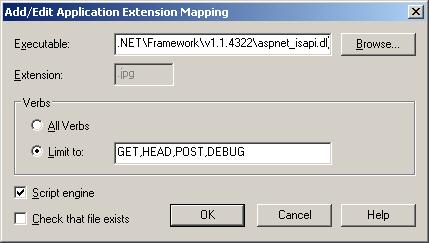
Repeat same steps for .bmp, .gif and .png extensions.
Test
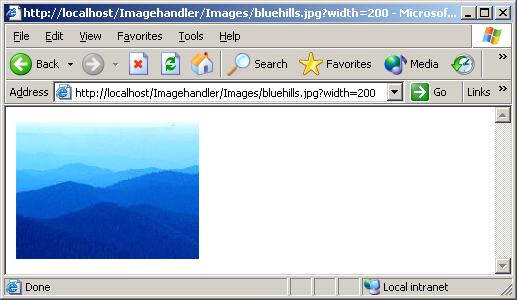
Put Image in your application directory and point browser to that image with query string added to it like Http://localhost/yourApplication/yourImage.jpg?Height=200
What more you can do
My examples just shows how to create http handler which can resize image you can easily extend that to perform flips, rotates, change of file type, etc.