ARTICLE

Client Server Multithreaded Application

Posted by Indika M W Articles | Multithreading in C# November 08, 2002
This is simple Client/Server (multi-threading) program that transfers data. Server can handle multiple clients.
Reader Level:
Download Files:
 

This is simple Client/Server (multi-threading) program that transfers data. Server can handle multiple clients.

I have used VS.NET to implement this program. Double click on ClientServer.Zip and extract all the files and folders to a folder in C drive.

Run the project using VS.NET:

Double click on Client.sln (Project file) and Server.sln (Project file). Then run the project (press F5).

Run using command-line prompt.

Copy Server (Form1.cs) files in to a folder (Server) in C drive. Then copy Client (From1.cs, LoginInfo.cs) in to another folder (Client) in C drive and compile it using

C:\FolderName> csc *.cs

This will create a Form1.exe file inside the folder. You have to compile files in both folders separately. Then run the Server and Client by double clicking on each Form.exe file.
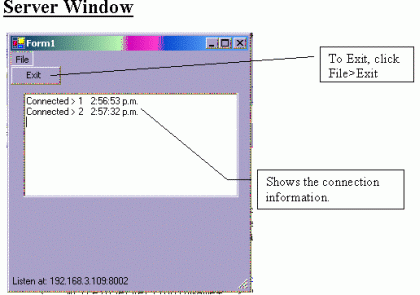

 
Important: Make sure that you enter the correct IP address of your computer. To find out the IP address of your computer type c:\>ipconfig and press enter. Port number is 8002. This will display the IP address of your computer. Enter that value in the Form1.cs

private string ipAddress = "Your IP Address";

For example:

private
string ipAddress = "192.168.5.106";
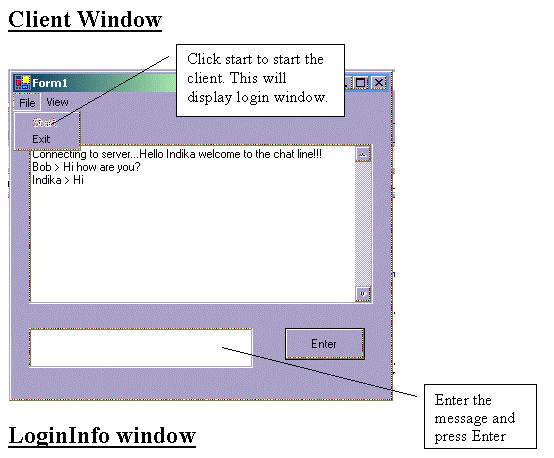
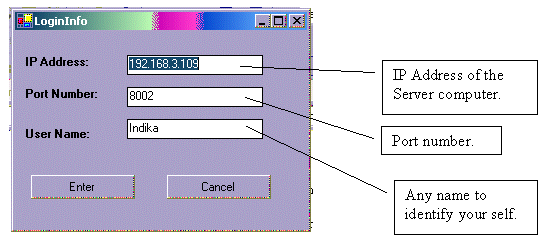
Fill all the details and press enter to connect to the server.Have Fun!!!!

Login to add your contents and source code to this article
post comment
     

hi, i can login from client program . and the server side is showing that conect id and time. but in client side i can not see any greeting message like welcome to chat indika. i think the writeToServer() function is not working . can u tell why its not working and what is the possible solution. thanks for post . and hope to hear from u soon.

Posted by vikas n Jun 30, 2012

the server code need some modification to work
this the working code

/* Author: Indika M Wickramanayake

Date: 7th November 2002

Email: indikamw@hotmail.com

*/

using System;

using System.Collections;

using System.Windows.Forms;

using System.Threading;

using System.Net.Sockets;

using System.IO;

namespace Server

{

/* This stores data about each client */

public struct ClientData

{ public Socket structSocket;

public Thread structThread;

}

/// <summary>

/// Summary description for Form1.

/// </summary>

public class Form1 : System.Windows.Forms.Form

{

private System.Windows.Forms.MainMenu mainMenu1;

private System.Windows.Forms.MenuItem menuItem1;

private System.Windows.Forms.MenuItem menuItemExit;

private System.Windows.Forms.StatusBar statusBar1;

private TcpListener tcpLsn;

private Hashtable dataHolder = new Hashtable();

private static long connectId=0;

private System.Windows.Forms.TextBox textBox1;

private Thread tcpThd;

private string ipAddress = "169.254.148.164";

delegate void SetTextCallBack(string text);

/// <summary>

/// Required designer variable.

/// </summary>

private System.ComponentModel.Container components = null;

public Form1()

{ InitializeComponent();

tcpLsn = new TcpListener(System.Net.IPAddress.Parse(ipAddress),8002);

tcpLsn.Start();

statusBar1.Text = "Listen at: " + tcpLsn.LocalEndpoint.ToString();

tcpThd = new Thread(new ThreadStart(WaitingForClient));

tcpThd.Start();

}

/// <summary>

/// Clean up any resources being used.

/// </summary>

protected override void Dispose( bool disposing )

{

if( disposing )

{

if (components != null)

{

components.Dispose();

}

}

base.Dispose( disposing );

}

#region Windows Form Designer generated code

/// <summary>

/// Required method for Designer support - do not modify

/// the contents of this method with the code editor.

/// </summary>

private void InitializeComponent()

{

this.mainMenu1 = new System.Windows.Forms.MainMenu();

this.menuItem1 = new System.Windows.Forms.MenuItem();

this.menuItemExit = new System.Windows.Forms.MenuItem();

this.statusBar1 = new System.Windows.Forms.StatusBar();

this.textBox1 = new System.Windows.Forms.TextBox();

this.SuspendLayout();

//

// mainMenu1

//

this.mainMenu1.MenuItems.AddRange(new System.Windows.Forms.MenuItem[] {

this.menuItem1});

//

// menuItem1

//

this.menuItem1.Index = 0;

this.menuItem1.MenuItems.AddRange(new System.Windows.Forms.MenuItem[] {

this.menuItemExit});

this.menuItem1.Text = "File";

//

// menuItemExit

//

this.menuItemExit.Index = 0;

this.menuItemExit.Text = "Exit";

this.menuItemExit.Click += new System.EventHandler(this.menuItemExit_Click);

//

// statusBar1

//

this.statusBar1.Location = new System.Drawing.Point(0, 251);

this.statusBar1.Name = "statusBar1";

this.statusBar1.Size = new System.Drawing.Size(292, 22);

this.statusBar1.TabIndex = 1;

this.statusBar1.Text = "Start the Server";

//

// textBox1

//

this.textBox1.Location = new System.Drawing.Point(16, 32);

this.textBox1.Multiline = true;

this.textBox1.Name = "textBox1";

this.textBox1.Size = new System.Drawing.Size(264, 128);

this.textBox1.TabIndex = 2;

this.textBox1.Text = "";

//

// Form1

//

this.AutoScaleBaseSize = new System.Drawing.Size(5, 13);

this.ClientSize = new System.Drawing.Size(292, 273);

this.Controls.AddRange(new System.Windows.Forms.Control[] {

this.textBox1,

this.statusBar1});

this.Menu = this.mainMenu1;

this.Name = "Form1";

this.Text = "Form1";

this.Load += new System.EventHandler(this.Form1_Load);

this.ResumeLayout(false);

}

#endregion

/// <summary>

/// The main entry point for the application.

/// </summary>

[STAThread]

static void Main()

{ Application.Run(new Form1());}

public void WaitingForClient()

{

ClientData CData;

while(true)

{ /* Accept will block until someone connects */

CData.structSocket = tcpLsn.AcceptSocket();

Interlocked.Increment(ref connectId);

CData.structThread = new Thread(new ThreadStart(ReadSocket));

lock(this)

{ // it is used to keep connected Sockets and active thread

dataHolder.Add(connectId, CData);

upDateDataGrid("Connected > "+connectId+" "+DateTime.Now.ToLongTimeString());

}

CData.structThread.Start();

}

}

public void ReadSocket()

{

/* realId will be not changed for each thread, but connectId is

* changed. it can't be used to delete object from Hashtable*/

long realId = connectId;

Byte[] receive;

ClientData cd = (ClientData)dataHolder[realId];

Socket s = cd.structSocket;

int ret = 0;

while (true)

{

if(s.Connected)

{ receive = new Byte[100] ;

try

{ /* Receive will block until data coming ret is 0 or Exception

* happen when Socket connection is broken*/

ret = s.Receive(receive,receive.Length,0);

if (ret>0)

{ foreach(ClientData clntData in dataHolder.Values)

{ if(clntData.structSocket.Connected)

clntData.structSocket.Send(receive,ret,SocketFlags.None);

}

}

else { break; }

}

catch (Exception e)

{ upDateDataGrid(e.ToString());

if( !s.Connected ) break;

}

}

}

CloseTheThread(realId);

}

private void CloseTheThread(long realId)

{

try

{ ClientData clientData = (ClientData)dataHolder[realId];

clientData.structThread.Abort();

}

catch(Exception e)

{ lock(this)

{ dataHolder.Remove(realId);

upDateDataGrid("Disconnected > "+realId+" "+DateTime.Now.ToLongTimeString());

}

}

}

public void upDateDataGrid(string displayString)

{

if (this.textBox1.InvokeRequired)

{

SetTextCallBack t = new SetTextCallBack(upDateDataGrid);

this.Invoke(t, new object[] { displayString });

}

else

{

textBox1.AppendText(displayString + "\r\n");

}

}

private void Form1_Load(object sender, System.EventArgs e)

{ }

private void menuItemExit_Click(object sender, System.EventArgs e)

{

if (tcpLsn!=null)

{ tcpLsn.Stop(); }

foreach (ClientData cd in dataHolder.Values)

{ if(cd.structSocket.Connected) cd.structSocket.Close();

if(cd.structThread.IsAlive) cd.structThread.Abort();

}

if(tcpThd.IsAlive) tcpThd.Abort();

Application.Exit();

}

}

}

Posted by ahmed sheimy May 24, 2010

im having the same problem.

Posted by qais Aug 29, 2008

hi InDika how r u .friend i run ur this program when i give ip and port in client and try to connect to the server the exception rises here public void upDateDataGrid(string displayString) { textBox1.AppendText(displayString + DateTime.Now); } Cross-thread operation not valid: Control 'textBox1' accessed from a thread other than the thread it was created on. this eroor generated in server code

Posted by Muhammad Umair Feb 27, 2008

hi, i can login from client program . and the server side is showing that conect id and time. but in client side i can not see any greeting message like welcome to chat indika. i think the writeToServer() function is not working . can u tell why its not working and what is the possible solution. thanks for post . and hope to hear from u soon.

Posted by wrade63 Jul 04, 2007
COMMENT USING
PREMIUM SPONSORS
Over-C is a holistic consortium of communications and technology specialists. We build, deploy and market both business as well as consumer products and solutions.
SPONSORED BY
  • PDF reports have never been easier to create. With our included WYSIWYG Designer, you can layout your reports, set up your data source and let DynamicPDF ReportWriter do the rest.
Join a Chapter