This article shows how to create a remote server and MDI window Remote Client using remote object. The remote server can be used as Auction Server and Real Time Data and News Server.
.NET Remoting is a technology that can be used to allow .NET applications to communicate to each other, it is does not matter to cross a network with firewall security, or over the Internet. The Remote object can be used to transport messages between remote objects using different transportation protocols, serialization formats, and object lifetime schemes.
An object derived from MarshalByRefObject can be used as Remotable objects. Remotable objects can be accessed by other application domain using a proxy or they can be passed to another application domain by value or by reference.
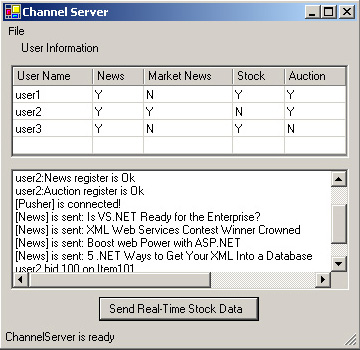
Figure 1. Channel Server
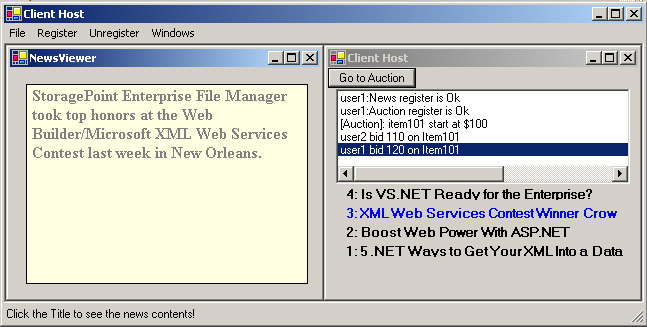
Figure 2. Client Host
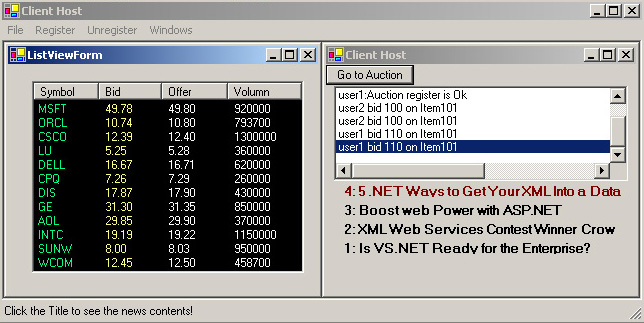
Figure 3. Client Host.
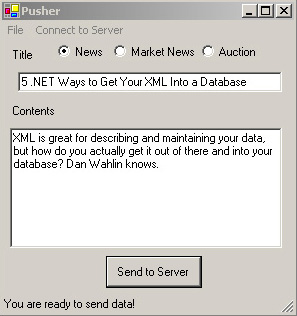
Figure 4.
The project includes six parts.
- RemoteObj contains remote class, which supports Auction, News, Market News, Real-time Stocks Data.
- WRemoteServer is a Window Server host a remote object. (See Fig 1)
- IServerImplClient includes a Shim class that is used to setup callback function for a client and an interface which defines the part implementations of the remote object; that are needed by the WRemoteClient.
- WRemoteClient is a MDI Window Client that is used to connect to the remote server and consume the information that is coming from the server. (See Fig 2, 3)
- IServerImplPusher explore part of the remoteObj to the Pusher.
- Pusher can be used to send all kind of information to sever then the server send all the information to the registered users. (See Fig 4)
Remote class :
namespace
WremoteServer
{
// Define the event
public delegate void ServerEventHandler (object sender, RemoteEventArgs e); public class RemoteServer : MarshalByRefObject, IServerImplClient, IServerImplPusher
{
public static event ServerEventHandler m_evtInvokeHostForm;
public event CallbackEventHandler m_evthAuctionEvent, m_evthNewsEvent, m_evthStockEvent, m_evthMarketEvent;
public static DataTable usrMgrTab = new DataTable("UsrMgr");
private static SortedList m_slAvailibleActions = new SortedList();
public void SendMsgToServer(object sd,RemoteEventArgs submitArgs)
{
// Fire server form event
if(m_evtInvokeHostForm != null)
m_evtInvokeHostForm(this, submitArgs);
}
private void Broadcast (CallbackEventHandler callbackEvent,RemoteEventArgs args){
System.Delegate[] eventList = callbackEvent.GetInvocationList();
IEnumerator ie = eventList.GetEnumerator();
while(ie.MoveNext())
{
CallbackEventHandler handler = (CallbackEventHandler) ie.Current;
try
{
IAsyncResult ar = handler.BeginInvoke(this, args, null, null);
}
catch(Exception e)
{
callbackEvent -= handler;
}
}
}
public void SendMsgToClient(int msgType, string title, string contents, string msg) {
RemoteEventArgs e = new RemoteEventArgs("", "", "", title, contents,0);
switch((ServerType)msgType)
{
case ServerType.News:
if((m_evthNewsEvent != null)
Broadcast(m_evthNewsEvent, e);
break;
case ServerType.MarketNews:
if((m_evthMarketEvent != null)
Broadcast(m_evthMarketEvent , e);
break;
case ServerType.Auction:
if((m_evthAuctionEvent != null)
Broadcast(m_evthAuctionEvent , e);
break;
case ServerType.ServerDown:
e.SendMessage = msg;
if((m_evthNewsEvent != null)
Broadcast(m_evthNewsEvent, e);
else if((m_evthMarketEvent != null)
Broadcast(m_evthMarketEvent , e);
else if((m_evthAuctionEvent != null)
Broadcast(m_evthAuctionEvent , e);
else if (m_evthStockEvent != null)
Broadcast(m_evthStockEvent, e);
break;
}
}
public override object InitializeLifetimeService()
{
// This is to insure that when created as a Singleton, the first
// instance never dies,regardless of the time between chat users.
return null;
}
.......
}
Server Host:
private
void startServer()
{
ListDictionary channelProperties = new ListDictionary();
channelProperties.Add("port", 8085);
HttpChannel chan = new HttpChannel(channelProperties, new SoapClientFormatterSinkProvider(),
new SoapServerFormatterSinkProvider());
if(ChannelServices.GetChannel(chan.ToString()) == null )
ChannelServices.RegisterChannel(chan); RemotingConfiguration.RegisterWellKnownServiceType( Type.GetType("WRemoteServer.RemoteServer,RemoteServer"), "RemoteObj", WellKnownObjectMode.Singleton);
m_objActSrv = (RemoteServer)Activator.GetObject( typeof WRemoteServer.RemoteServer), "http://localhost:8085/RemoteObj"); SrvActObj.CreateUsrInfo();
usrGrid.DataSource = RemoteServer.usrMgrTab;
}
Client Host:
The client open a remote channel and pass their remote objects to the server to register their callback function and keep a cookie to cleanup the register when the client is closed. This gives the remote server more flexibility and more control to the clients than the method described in the Remote Object Part1.
public
void ConnctServer()
{
channelProperties = new ListDictionary();
channelProperties.Add("port", 0);
HttpChannel chan = new HttpChannel(channelProperties, new SoapClientFormatterSinkProvider(), new SoapServerFormatterSinkProvider());
if(ChannelServices.GetChannel(chan.ToString()) == null ) ChannelServices.RegisterChannel(chan);
string url =String.Format("http://{0}:8085/RemoteObj",m_dlgLogin.srvLoc);
ISrvObj=(IServerImplClient)Activator.GetObject(typeof(IServerImplClient),url);
......
}
private void registerClient(Login MyDlg)
{
RemoteEventArgs e = new RemoteEventArgs((int)ServerType.Stock); CallbackEventHandler callBackHD = new CallbackEventHandler(OnMsgHandler);
switch(m_dlgLogin.srvType)
{
case "News":
m_cbNews = RemotingEventShim.CreateEventHandler(callBackHD, ISrvObj, m_dlgLogin.username, m_dlgLogin.password, m_dlgLogin.srvType);
if(m_cbNews != null)
{
ISrvObj.m_evthNewsEvent += m_cbNews;
m_bNewsFlg = true;
e.SendMessage = m_dlgLogin.username + ":News is registered";
ISrvObj.SendMsgToServer(this, e);
m_lbMsg.Items.Add(m_dlgLogin.username + ":" + m_dlgLogin.srvType+" is registered!" );
m_currentUser = m_dlgLogin.username; m_currentUserCounts++;
}
else
m_lbMsg.Items.Add(m_dlgLogin.username + ":" + m_dlgLogin.srvType+" can't registered!" );
break;
case "Market"
.......
}
Client interface and Shim class:
Using Interface to define implementation of remote object separates the actual remote object from clients and can hiden and explore different implementations from clients. It also make the dll smaller when you deploy the project.
namespace
IServerClient
{
public delegate void CallbackEventHandler(object sender, RemoteEventArgs e);
public interface IServerImplClient
{
event CallbackEventHandler m_evthAuctionEvent, m_evthNewsEvent, m_evthStockEvent, m_evthMarketEvent;
bool CheckUser(string uname, string password, string srvType);
void SendMsgToServer(object sender, RemoteEventArgs submitArgs);
void SrvAuctionMethod(string ItemId, long price, string usrname);
SortedList GetAvailibleAction();
}
// ***** SHIM CLASS oraginal by Mike Woodring ****
public class RemotingEventShim : MarshalByRefObject
{
private CallbackEventHandler delegateTarget;
public RemotingEventShim(CallbackEventHandler target)
{
delegateTarget += target;
}
// This method will forward the call to the client's handler
public void CallbackEventShim(object sender, RemoteEventArgs e)
{
// Delegate it to the user callback handler.
delegateTarget(sender, e);
}
public override object InitializeLifetimeService() { return null; }
public static CallbackEventHandler CreateEventHandler
(CallbackEventHandler target, IServerImplClient ISrvObj, string usrname, string psword, string srvType)
{
if(ISrvObj.CheckUser(usrname, psword, srvType))
{
RemotingEventShim rcEventShim=new RemotingEventShim(target);
return new CallbackEventHandler(rcEventShim.CallbackEventShim);
}
else return null;
}
}
}
Guide to use all the function that the server supplied:
The project file in the RemoteObj directory.
Start all three programs (may start more than one clients). The server holds three registered users (user1, user2 and user3) who can request different function on this server.
Connect to server on Pusher. Now you are ready to send all information to registered clients. (See Fig 4)
Only one user name can be used for each client. Each user can get different services that
depemd on the information of the data table on the server.
If the Stock is selected, a child form appear, you can click the button Send real-time stock data on the server to get real time data from a file (Dont missing Issue.txt in the WRemoteServer Directory). (See Fig 3)
Before the client can bet on the Item you should start a new auction by Pusher and log on as "Manager" then click Radio button, enter the Auction ID and the Price.
If Auction is selected, a Go to Auction button appears. Click it to bid your items. All the data will be showed in the ListBox (See Fig 2)
If news is selected, the client host child form can only display 5 titles of the news. The oldest one will be removed. Click the title of the news, a child form appears, that displays the contents of the news (See Fig 2)
Conclusion
.Net Remoting the most advantage technology that could be used in the client/server application than the others. Remoting is very flexible, powerful and easy to program with TCP, HTTP and SOAP. (Compare with DCOM)
If you have any comments, I would love to hear about it. You can reach me at Jibin Pan.