Introduction
Ajax and jQuery are emerging technologies gaining an important space in the Web 2.0 world every day. Recent news has confirmed that Microsoft is going to include jQuery in the future ASP.NET release. In this article, I will explain how consume an Ajax-enabled Web service using jQuery through a simple example to see how they fit together. The objective is to have an Ajax-enabled Web service which returns a friendly message (the classic message: "Hello world") which, in turn, is rendered as a HTML document using jQuery code and Microsoft.NET and Oracle AS technologies.
Getting started with the solution inVisual Studio.NET
The first step is to open Visual Studio.NET 2008 and create a Web project for this example, then add an Ajax-enabled Web service to provide the salutation message (see Figure 1).
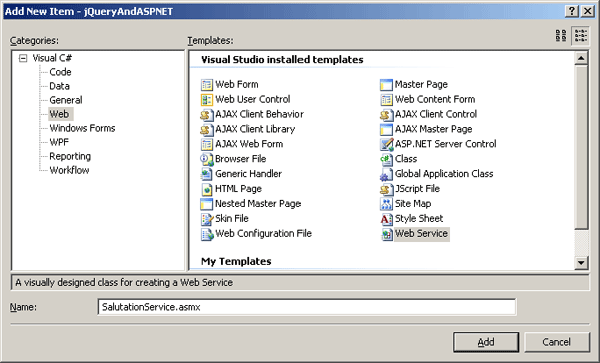
Figure 1
The service definition is shown in Listing 1.
using System; using System.Collections; using System.ComponentModel; using System.Data; using System.Linq; using System.Web; using System.Web.Services; using System.Web.Services.Protocols; using System.Xml.Linq; using System.Web.Script.Services; namespace jQueryAndASPNET {     /// <summary>     /// Summary description for SalutationService     /// </summary>     [WebService(Namespace = "http://examples.john.org/")]     [WebServiceBinding(ConformsTo = WsiProfiles.BasicProfile1_1)]     [ScriptService]     [ToolboxItem(false)]     // To allow this Web Service to be called from script, using ASP.NET AJAX, uncomment the following line.     // [System.Web.Script.Services.ScriptService]     public class SalutationService : System.Web.Services.WebService     {         [WebMethod]         public string GetSalutation()         {             return "Hello world";         }     }
}
|
Listing 1
In order to add JSON support for the Web service, you should decorate the Web service with the ScriptServiceAttribute found at the assembly System.Web.Script.Services. JSON is the ability to have JavaScript code call a Web service enabling to represent complex data structures in an interchangeable format. The JSON format specification can be found in RFC 4627. This format is an alternative to XML format for the serialization of business entities and its main application is in the Ajax programming model.
After you decorate the Web services using ScriptServiceAttribute, then this service can be called by your any JavaScript program on the client side.
Now it's time to start on the jQuery development. You need to download the jQuery library and include it in the project. I've created a "js" directory and add this jquery-1.3.2.js file (see Figure 2).
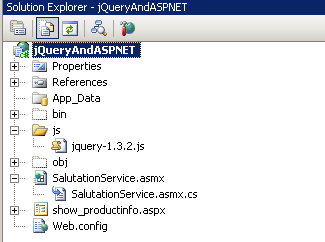
Figure 2
Now let's create the ASP.NET page to display the result of invocation of the Web service (see Figure 3).
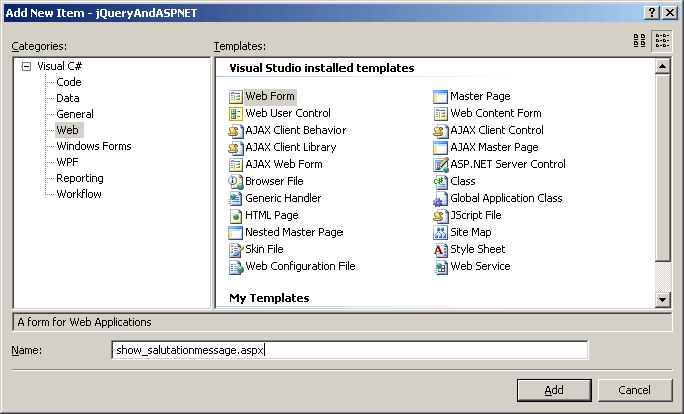
Figure 3
Traditionally, we have included the <asp:ScriptManager> tag in the ASP.NET Web page to reference the Web service (see Listing 2).
<asp:ScriptManager ID="ScriptManager1" runat="server">     <Scripts>         <asp:ScriptReference Path="~/js/jquery-1.3.2.js" />     </Scripts>     <Services>         <asp:ServiceReference Path="~/SalutationService.asmx" />     </Services>
</asp:ScriptManager>
|
Listing 2
In this case, we're going to call the Web service directly using jQuery and JSON.
In order to invoke the Web service, we're going to add a button inside a panel (a <div> tag) to the page (see Listing 3).
 <div>     <button id="btnGetMessage">Click to get message</button>
</div>
|
Listing 3
And finally, let's write jQuery code to handle the event of clicking the "Click to get message" button, and calling directly the Web service using jQuery and JSON. The mechanism is based on $(document).ready and $.ajax jQuery methods.
The main logic is to use the request type as "POST", set the url of the Web service, specify which data to transfer to the Web service, set the contentType as " application/json; charset=utf-8", set the datatype as "json" and specify a function for success and failure (see Listing 4).
$(document).ready(function() {
$("#btnGetMessage").click(function(event){ $.ajax({ type: "POST", url: "SalutationService.asmx/GetSalutation", data: "{}", contentType: "application/json; charset=utf-8", dataType: "json", success: function(msg) { GetSalutationSucceeded(msg.d); }, error: GetSalutationFailed }); }); });
|
Listing 4
The whole application is shown in Listing 5.
<%@ Page Language="C#" AutoEventWireup="true" CodeBehind="show_salutationmessage.aspx.cs" Inherits="jQueryAndASPNET.show_ salutationmessage" %>
<!DOCTYPE html PUBLIC "-//W3C//DTD XHTML 1.0 Transitional//EN" "http://www.w3.org/TR/xhtml1/DTD/xhtml1-transitional.dtd">
<html xmlns="http://www.w3.org/1999/xhtml" > <head runat="server"> <title>Untitled Page</title> <script src ="js/jquery-1.3.2.js" type="text/javascript"></script> <script type="text/javascript"> $(document).ready(function() { $("#btnGetMessage").click(function(event){ $.ajax({ type: "POST", url: "SalutationService.asmx/GetSalutation", data: "{}", contentType: "application/json; charset=utf-8", dataType: "json", success: function(msg) { GetSalutationSucceeded(msg.d); }, error: GetSalutationFailed }); }); }); function GetSalutationSucceeded(msg) { alert('Operation has completed successfully. Message='+msg); } function GetSalutationFailed(msg) { alert('Error message. '+msg.status + ' ' + msg.statusText); } </script> </head> <body> <form id="form1" runat="server"> <div> <button id="btnGetMessage">Click to get message</button> </div> </form> </body> </html>
|
Listing 5
Getting started with the solution in JDeveloper
First of all, let's open JDeveloper and create a new application (see Figure 4).
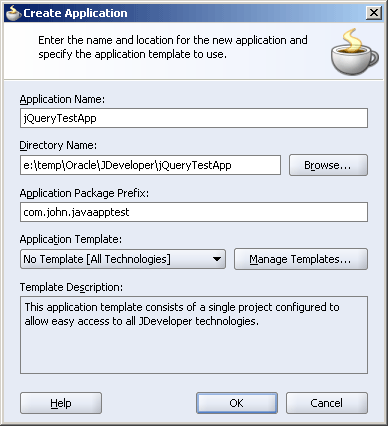
Figure 4
And an Empty project for the Web components (see Figure 6).
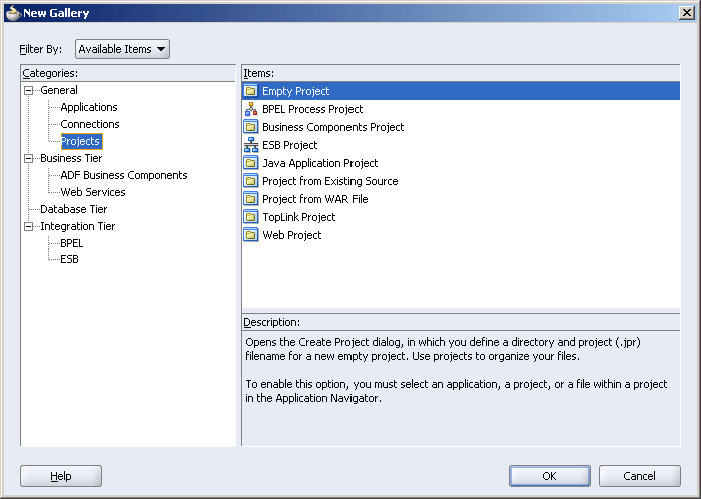
Figure 5
Then, add JSF components to this project. The first component is JSF "Page Flow And Configuration" (the faces-config.xml file) to define the pages and its flow (see Figure 6).
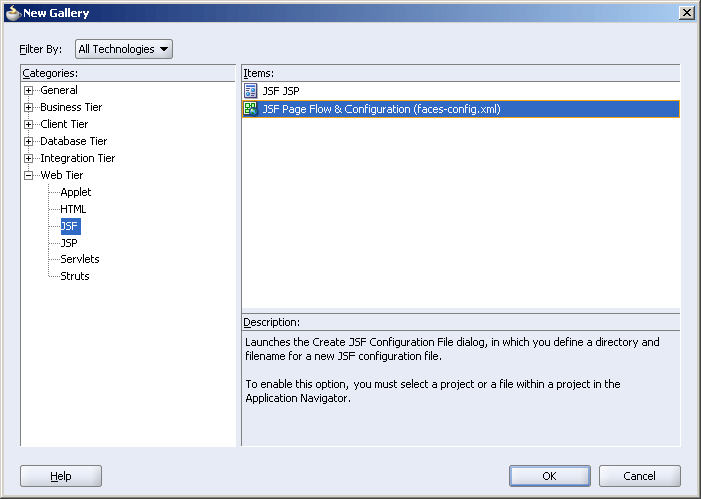
Figure 6
Then drag and drop a JSF Page shape from the JSF Navigation Diagram panel onto the surface of the faces-config.xml file and name it /show_messagesalutation.jsp. Double-click on this shape and define the page.
Now we're going to invoke the Ajax-enabled Web service hosted in the ASP.NET environment defined in the previous section from this page JDeveloper using jQuery and JSON.
In order to use the jQuery library, we need to copy the js directory along with the jquery-1.3.2.js, ui.core.js and ui.draggable.js files to the Web content directory in JDeveloper ([ProjectName]\public_html).
Now let's find out the URL of the Web service (see Figure 7).
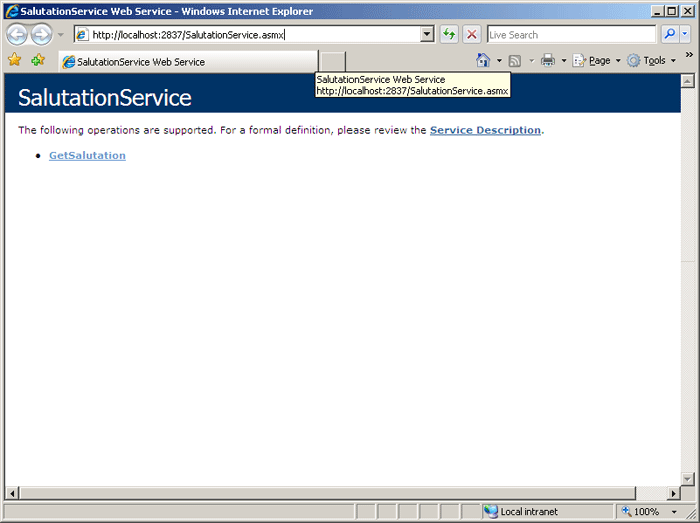
Figure 7
Next step is to include the jQuery code in the JSP page inside the <html>/<head> tag inside the <f:view> jsp tag (highlighted in yellow). And include the HTML elements to show the button inside the <h:form> jsp tag (highlighted in yellow). See the resulting JSP, HTML and jQuery code in Listing 6.
 <!DOCTYPE HTML PUBLIC "-//W3C//DTD HTML 4.01 Transitional//EN"
"http://www.w3.org/TR/html4/loose.dtd">
<%@ page contentType="text/html;charset=windows-1252"%>
<%@ taglib uri="http://java.sun.com/jsf/core" prefix="f"%>
<%@ taglib uri="http://java.sun.com/jsf/html" prefix="h"%>
<%@ taglib uri="http://xmlns.oracle.com/adf/faces" prefix="af"%>
<%@ taglib uri="http://xmlns.oracle.com/adf/faces/html" prefix="afh"%>
<%@ taglib uri="http://java.sun.com/jsp/jstl/core" prefix="c"%>
<%@ taglib uri="http://jakarta.apache.org/struts/tags-html" prefix="html"%>
<%@ taglib uri="http://xmlns.oracle.com/adf/faces/webcache" prefix="afc"%>
<%@ taglib uri="http://xmlns.oracle.com/adf/industrial/faces" prefix="afi"%>
<f:view>
  <html>
    <head>
      <meta http-equiv="Content-Type"
            content="text/html; charset=windows-1252"/>
      <title>Create Department</title>
      <script src="js/jquery-1.3.2.js" type="text/javascript"></script>
      <script type="text/javascript">
       $(document).ready(function() {
         $("#btnGetMessage").click(function(event){
             $.ajax({
                 type: "POST",
                 url: http://localhost:2837/SalutationService.asmx/GetSalutation,
                 data: "{}",
                 contentType: "application/json; charset=utf-8",
                 dataType: "json",
                 success: function(msg)
                {
                     GetSalutationSucceeded(msg.d);
                 },
                 error: GetSalutationFailed
             });
         });
       });            function GetSalutationSucceeded(msg)
      {
         alert('Operation has completed successfully. Message='+msg);
       }
       function GetSalutationFailed(msg)
       {
         alert('Error message. '+msg.status + ' ' + msg.statusText);
       }
      </script>
    </head>
    <body>
        <h:form binding="#{backing_show_messagesalutation.form1}" id="form1">
          <div>
            <button id="btnGetMessage">Click to get message</button>
          </div>
        </h:form>
    </body>
  </html>
</f:view>
<%-- oracle-jdev-comment:auto-binding-backing-bean-name:backing_show_messagesalutation--%>
|
Listing 6
Now after you run the application and click on the "Click to get message", the remote Web service hosted in ASP.NET environment is invoked and result is displayed using an alert windows (see Figure 8).
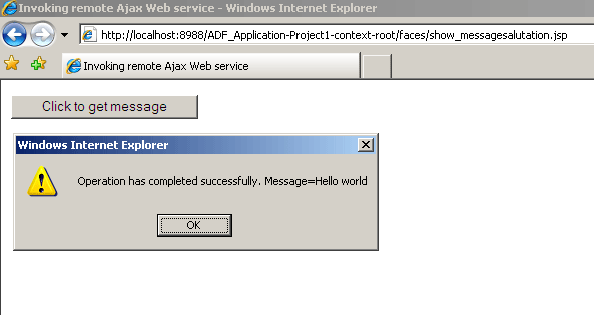
Figure 8
Conclusion
In this article, I've explained how consume an Ajax-enabled Web service using jQuery through a simple example to see how they fit together through an Ajax-enabled Web service which returns a friendly message (the classic message: "Hello world") which, in turn, is rendered as a HTML document using jQuery code and Microsoft.NET and Oracle AS technologies.