Introduction
Bulk copying of data from one data source to another data source is a new feature added to ADO.NET 2.0. Bulk copy classes provides the fastest way to transfer set of data from once source to the other.
Each ADO.NET data provider provides bulk copy classes. For example, in SQL .NET data provider, the bulk copy operation is handled by SqlBulkCopy class, which is described in Figure 1. As you can see from Figure 1, data from a data source can be copied to one of the four types - DataReader, DataSet, DataTable, or XML.
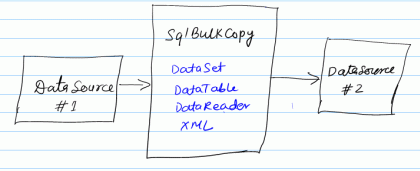
Figure 1. Bulk Copy operation in ADO.NET 2.0
Using bulk copy operation, you can transfer data between two tables on the same SQL Server, between two different SQL Servers, or even two different types of database servers.
Filling Data from the Source
The first step in copying bulk data from a data source to another is to fill data from the source database. This source data can be filled in a DataSet, DataTable, or a DataReader.
// Select data from Products table
cmd = new SqlCommand("SELECT * FROM Products", source);
// Execute reader
SqlDataReader reader = cmd.ExecuteReader();
Creating SqlBulkCopy Object
In ADO.NET 2.0, each data provider has a bulk copy operations class, which provides bulk copy related functionality. For example, SQL data provider has SqlBulkCopy class.
SqlBulkCopy class constructor takes a connection string or SqlConnection object as first parameter, which defines the destination data source. After creating the object, you need to set the DestinationTableName propety to the table, which you want to copy date to.
// Create SqlBulkCopy
SqlBulkCopy bulkData = new SqlBulkCopy(destination);
// Set destination table name
bulkData.DestinationTableName = "BulkDataTable";
Copying Data to the Destination
The SqlBulkCopy class provides WriteToServer method which is used to write data from a DataReader, DataSet, or DataTable to the destination data source.
bulkData.WriteToServer(reader);
In this code, I fill data in a DataReader object from the source data source. You can even fill data in a DataSet and pass DataSet as the input parameter of WriteToServer method. You can also pass an XML object or fill data in a DataSet from XML document.
Closing SqlBulkCopy Object
The Close method of SqlBulkCopy closes the bulk copy operation.
bulkData.Close();
Complete Source Code
The following table lists the complete source code. See attached source code for more details:
// Create source connection
SqlConnection source = new SqlConnection(connectionString);
// Create destination connection
SqlConnection destination = new SqlConnection(connectionString);
// Clean up destination table. Your destination database must have the
// table with schema which you are copying data to.
// Before executing this code, you must create a table BulkDataTable
// in your database where you are trying to copy data to.
SqlCommand cmd = new SqlCommand("DELETE FROM BulkDataTable", destination);
// Open source and destination connections.
source.Open();
destination.Open();
cmd.ExecuteNonQuery();
// Select data from Products table
cmd = new SqlCommand("SELECT * FROM Products", source);
// Execute reader
SqlDataReader reader = cmd.ExecuteReader();
// Create SqlBulkCopy
SqlBulkCopy bulkData = new SqlBulkCopy(destination);
// Set destination table name
bulkData.DestinationTableName = "BulkDataTable";
// Write data
bulkData.WriteToServer(reader);
// Close objects
bulkData.Close();
destination.Close();
source.Close();
Note
Before executing this code, make sure your database has a table named "BulkDataTable" with same schema as "Products" table.
Summary
ADO.NET 2.0 has many new features and bulk copy is one of them. In this article, we discussed how we can take advantage of SqlBulkCopy class and its members when copying data from a source database to a destination database.