Tools Used: Visual C#.NET
You may be asking yourself: What's a GridView? I certainly didn't see it in the toolbox. Though it would be nice to have one... This example shows you how I've wrapped a ListView in a UserControl and turned it into a simple grid control. Many times I find myself not wanting to think about items, subitems, listitems, whatever. I just want to put a string in a row and column position, or populate a row, or populate a column. I suspect Microsoft never intended the ListView to be used as a Grid, but so many people were doing it, they enabled the capability for using it as a grid without supplying the methods. The GridView class wraps a bunch of the powerful ListView methods and properties, and gives you an easy means of sticking a string in a row and column position.
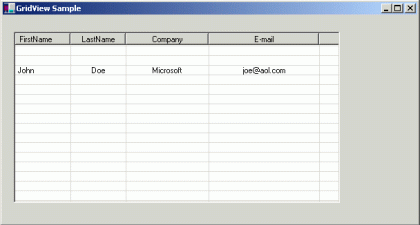
Fig 1.01
Below is the code for populating the line you see in Fig 1.01:
public Form1()
{
//
Required for Windows Form Designer support
//
InitializeComponent();
// set the column names at the top
gridView1.SetColumnNames(new string[]
{
"FirstName",
"LastName",
"Company",
"E-mail"
}
);
gridView1.SetColumnWidth(0, 10); // sets the width of the column in font units
gridView1.SetColumnWidth(1, 10); // sets the width of the column in font units
gridView1.SetColumnWidth(2, 15); // sets the width of the column in font units
gridView1.SetColumnWidth(3, 20); // sets the width of the column in font units
//
populate a row of data
gridView1.SetFullRow(2, new string[]{"John", "Doe", "Microsoft", [email protected]});
}
You can also use the gridView UserControl1 to set individual cells:
gridView1.SetCell(4, 3, [email protected]);
The Design of the Control is fairly easy. It just takes advantage of all the features of a ListView and wraps them so the control behaves as a grid. Below is the code for populating a cell in a GridView. Note that it works around the problem of a SubItem starting in column 1 (the second column).
public void SetCell(int aRow, int aColumn, string text)
{
if (aRow >= listView1.ListItems.Count) // precondition
{
MessageBox.Show("SetCell:Row out of range");
return;
}
if (aColumn >= listView1.Columns.Count) // precondition
{
MessageBox.Show("SetCell:Column out of range");
return;
}
// populate the cell at the position specified by row and column
if (aColumn == 0)
{
listView1.ListItems[aRow].Text = text;
}
else
{
listView1.ListItems[aRow].SetSubItem(aColumn - 1, text);
}
}
Once the UserControl is installed in your project, you can use it from the toolbox and size the grid to what you need. Also the Grid can be constructed with the dimensions of rows and columns you are using:
this.gridView1 = new GridViewSample.GridView (20,4);
It has really become easy to create your own components. This one could be expanded to have editing capability like Excel. Hope you find it useful!