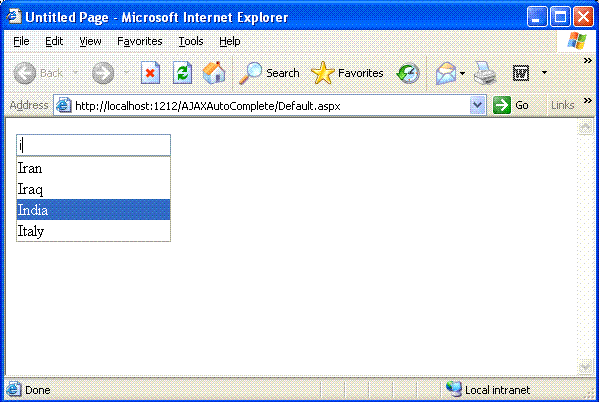
Here is the solution.
<%@ Register Assembly="AjaxControlToolkit" Namespace="AjaxControlToolkit" tagprefix="ajaxToolkit"%>
Which says that the reference assembly "AjaxControlToolkit.dll" should be registered on the page by using above method. We should also have tagprefix="ajaxToolkit" which is similar to <ajaxToolkit: AutoCompleteExtender>.
In this article I have a very simple database table called "Tbl_Countries" with fields as:
CountryId int primary key,
CountryName varchar(50)
I am using a web service called "AutoComplete.asmx" whose code behind gets automatically added to the "App_Code" folder.
Note: A very important part is you need to give a reference of "AjaxControlToolkit.dll".
Here is complete code for "AutoComplete.asms.cs".
using System;
using System.Web;
using System.Collections;
using System.Web.Services;
using System.Web.Services.Protocols;
using System.Data;
using System.Data.SqlClient;
using System.Configuration;
/// <summary>
/// Summary description for AutoComplete
/// </summary>
[WebService(Namespace = "http://tempuri.org/")]
[WebServiceBinding(ConformsTo = WsiProfiles.BasicProfile1_1)]
[System.Web.Script.Services.ScriptService]
public class AutoComplete : System.Web.Services.WebService
{
[WebMethod]
public string[] GetCountriesList(string prefixText)
{
DataSet dtst = new DataSet();
SqlConnection sqlCon = new SqlConnection(ConfigurationManager.AppSettings["ConnectionString"]);
string strSql = "SELECT CountryName FROM Tbl_Countries WHERE CountryName LIKE '" + prefixText + "%' ";
SqlCommand sqlComd = new SqlCommand(strSql, sqlCon);
sqlCon.Open();
SqlDataAdapter sqlAdpt = new SqlDataAdapter();
sqlAdpt.SelectCommand = sqlComd;
sqlAdpt.Fill(dtst);
string[] cntName = new string[dtst.Tables[0].Rows.Count];
int i = 0;
try
{
foreach (DataRow rdr in dtst.Tables[0].Rows)
{
cntName.SetValue(rdr["CountryName"].ToString(), i);
i++;
}
}
catch { }
finally
{
sqlCon.Close();
}
return cntName;
}
}
Let us take another page called "default.aspx" in which there is a <ScriptManager> tag containing a <Services> tag for specifying the path of webservices. You have already registered Assembly="AjaxControlToolkit" on this page so you can use that.
So my entire code will look something like this
<%@ Page Language="C#" AutoEventWireup="true" CodeFile="Default.aspx.cs" Inherits="_Default" %>
<%@ Register Assembly="AjaxControlToolkit" Namespace="AjaxControlToolkit" tagprefix="ajaxToolkit"%>
<!DOCTYPE html PUBLIC "-//W3C//DTD XHTML 1.1//EN" "http://www.w3.org/TR/xhtml11/DTD/xhtml11.dtd">
<html xmlns="http://www.w3.org/1999/xhtml">
<head id="Head1" runat="server">
<title>Untitled Page</title>
</head>
<body>
<form id="form1" runat="server">
<asp:ScriptManager ID="ScriptManager1" runat="server">
<Services>
<asp:ServiceReference Path="AutoComplete.asmx" />
</Services>
</asp:ScriptManager>
<div>
<asp:TextBox ID="txtCountry" runat="server"></asp:TextBox>
<ajaxToolkit:AutoCompleteExtender runat="server" ID="autoComplete1" TargetControlID="txtCountry" ServicePath="AutoComplete.asmx" ServiceMethod="GetCountriesList" MinimumPrefixLength="1" EnableCaching="true" />
</div>
</form>
</body>
</html>
Following snapshot gives you a clear idea of how the AutoCompleteExtender works.