SIGN UP MEMBER LOGIN:    
ARTICLE

Sending Multiple emails using Mail Merge and SMTP using ASP.NET and C#

Posted by Saurabh Vartak Articles | ASP.NET Programming June 26, 2007
This utility is used to send emails to multiple users by using the Mail Merge functionality and SMTP. The prerequisite for the same is that the DataGrid should be populated with the list of the desired recipient's email addresses.
Reader Level:
Download Files:
 

In the source code, fill in the proper connection string of your database. After doing so, write the query in the source code that will generate at least a column comprising of the email addresses of the recipients. So now, the DataGrid will be having the contents of the result of the query that has been fired as well as a check box against each tuple.


The checkbox against the recipients (to whom the email is to be sent) is checked.


Also, for the email body, the desired information pertinent to a particular recipient can be included along in the mail, by enclosing the column name in the merge tags "%". The mail is written in the text box that appears below the DataGrid.


For example:


Say the DataGrid contains the following column names (as a result of your query)


1. UserName


2. MachineName


3. EmailID


4. BirthDate

The following figure shows the output window:
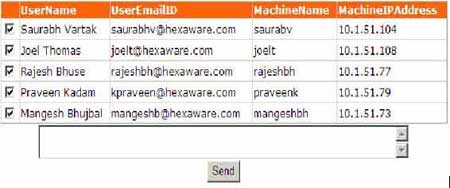

Figure 1.


So the email can be written as:


Dear %UserName%,

Your computer name is %MachineName%. And your birthdate is %BirthDate%.

Regards,

Team

After the 'Send' button is clicked, the emails are sent to the users (against whom the check mark appears) with the merge tags being replaced with the relevant information.

Login to add your contents and source code to this article
share this article :
post comment
 

i wanna know more about emails sending like how many emails i can put in
Too: textbox

Posted by Satish Wadekar May 29, 2009

Based on your title I was expecting to view code that was going to use the Mail Merge feature of MS Word....Nope. Just using RegEx to replace the tags. Those are 10 mins. that I'll never get back. Also, like Simon, I would highly recommend actually discussing your code in the article and not just screenies. Could save others time. Thanks!

Posted by Erik Lane Jul 16, 2007

I wish you would explain your code in your article

Posted by Simon Jul 10, 2007
Team Foundation Server Hosting
Become a Sponsor
PREMIUM SPONSORS
  • ceTE software specializes in components for dynamic PDF generation and manipulation. The DynamicPDF™ product line allows you to dynamically generate PDF documents, merge PDF documents and new content to existing PDF documents from within your applications. Visit DynamicPDF here
    Finally – a virtual platform that delivers next-generation Windows Server 2008 Hyper-V virtualization technology from a managed hosting partner you can truly depend on. Visit www.maximumasp.com/max for a FREE 30 day trial. Hurry offer ends soon. Climb aboard the MaxV platform and take advantage of High Availability, Intelligent Monitoring, Recurrent Backups, and Scalability – with no hassle or hidden fees. As a managed hosting partner focused solely on Microsoft technologies since 2000, MaximumASP is uniquely qualified to provide the superior support that our business is built on. Unparalleled expertise with Microsoft technologies lead to working directly with Microsoft as first to offer IIS 7 and SQL 2008 betas in a hosted environment; partnering in the Go Live Program for Hyper-V; and product co-launches built on WS 2008 with Hyper-V technology.
6 Months Free & No Setup Fees ASP.NET Hosting!
Become a Sponsor