This is an IP Address-Hostname converter written in C# using Windows Forms. You simply enter a hostname or IP address in the boxes on the form and press the arrow button to convert it. While calling the DNS resolver, the mouse cursor becomes a WaitCursor.
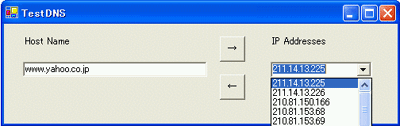
The screen shot shows that www.yahoo.co.jp has several IP addresses.
using System;
using System.Drawing;
using System.Collections;
using System.ComponentModel;
using System.Windows.Forms;
using System.Data;
using System.Net;
namespace TestDNS
{
/// <summary>
/// Form1
/// </summary>
public class TestDNS : System.Windows.Forms.Form
{
private System.Windows.Forms.Button ButtonByAddress;
private System.Windows.Forms.Button ButtonByName;
private System.Windows.Forms.TextBox hostName;
private System.Windows.Forms.Label label1;
private System.Windows.Forms.ComboBox combIPAddress;
private System.Windows.Forms.Label label2;
/// <summary>
///
/// </summary>
private System.ComponentModel.Container components = null;
public TestDNS()
{
//
//
//
InitializeComponent();
//
//
//
}
/// <summary>
///
/// </summary>
protected override void Dispose( bool disposing )
{
if( disposing )
{
if (components != null)
{
components.Dispose();
}
}
base.Dispose( disposing );
}
#region Windows Form Designer generated code
/// <summary>
///
///
/// </summary>
private void InitializeComponent()
{
this.ButtonByAddress = new System.Windows.Forms.Button();
this.ButtonByName = new System.Windows.Forms.Button();
this.hostName = new System.Windows.Forms.TextBox();
this.label1 = new System.Windows.Forms.Label();
this.combIPAddress = new System.Windows.Forms.ComboBox();
this.label2 = new System.Windows.Forms.Label();
this.SuspendLayout();
//
// ButtonByAddress
//
this.ButtonByAddress.Location = new System.Drawing.Point(272, 64);
this.ButtonByAddress.Name = "ButtonByAddress";
this.ButtonByAddress.Size = new System.Drawing.Size(32, 32);
this.ButtonByAddress.TabIndex = 1;
this.ButtonByAddress.Text = "←";
this.ButtonByAddress.MouseDown += new
System.Windows.Forms.MouseEventHandler(this.OnByAddress);
//
// ButtonByName
//
this.ButtonByName.Location = new System.Drawing.Point(272, 16);
this.ButtonByName.Name = "ButtonByName";
this.ButtonByName.Size = new System.Drawing.Size(32, 32);
this.ButtonByName.TabIndex = 2;
this.ButtonByName.Text = "→";
this.ButtonByName.MouseDown += new
System.Windows.Forms.MouseEventHandler(this.OnByName);
//
// hostName
//
this.hostName.Location = new System.Drawing.Point(24, 48);
this.hostName.Name = "hostName";
this.hostName.Size = new System.Drawing.Size(232, 19);
this.hostName.TabIndex = 3;
this.hostName.Text = "Hostname";
//
// label1
//
this.label1.Location = new System.Drawing.Point(336, 16);
this.label1.Name = "label1";
this.label1.Size = new System.Drawing.Size(128, 16);
this.label1.TabIndex = 5;
this.label1.Text = "IP Addresses";
//
// combIPAddress
//
this.combIPAddress.Location = new System.Drawing.Point(336, 48);
this.combIPAddress.Name = "combIPAddress";
this.combIPAddress.Size = new System.Drawing.Size(128, 20);
this.combIPAddress.TabIndex = 6;
this.combIPAddress.Text = "xxx.xxx.xxx.xxx";
//
// label2
//
this.label2.Location = new System.Drawing.Point(24, 16);
this.label2.Name = "label2";
this.label2.Size = new System.Drawing.Size(128, 16);
this.label2.TabIndex = 7;
this.label2.Text = "Host Name";
//
// TestDNS
//
this.AutoScaleBaseSize = new System.Drawing.Size(5, 12);
this.ClientSize = new System.Drawing.Size(496, 126);
this.Controls.AddRange(new System.Windows.Forms.Control[] {
this.label2,
this.combIPAddress,
this.label1,
this.hostName,
this.ButtonByName,
this.ButtonByAddress});
this.Name = "TestDNS";
this.Text = "TestDNS";
this.ResumeLayout(false);
}
#endregion
/// <summary>
///
/// </summary>
[STAThread]
static void Main()
{
Application.Run(new TestDNS());
}
private void OnByAddress(object sender,
System.Windows.Forms.MouseEventArgs e)
{
Cursor cursor = this.Cursor;
try
{
// Cursor to WaitCursor
this.Cursor = Cursors.WaitCursor;
System.Net.IPHostEntry ipEntry =
System.Net.Dns.GetHostByAddress(this.combIPAddress.Text);
this.hostName.Text = ipEntry.HostName;
}
catch (System.Exception exc)
{
// Catch format error, etc.
MessageBox.Show(exc.Message, "TestDNS", MessageBoxButtons.OK,
MessageBoxIcon.Exclamation);
}
finally
{
// restore cursor
this.Cursor = cursor;
}
}
private void OnByName(object sender, System.Windows.Forms.MouseEventArgs
e)
{
Cursor cursor = this.Cursor;
try
{
// Cursor to WaitCursor
this.Cursor = Cursors.WaitCursor;
System.Net.IPHostEntry ipEntry =
System.Net.Dns.GetHostByName(this.hostName.Text);
// stop repainting
this.combIPAddress.BeginUpdate();
// clear the comboBox
this.combIPAddress.Items.Clear();
foreach (IPAddress i in ipEntry.AddressList)
{
this.combIPAddress.Items.Add( i.ToString() );
}
this.combIPAddress.Text = this.combIPAddress.Items[0].ToString();
// restart painting
this.combIPAddress.EndUpdate();
}
catch (System.Exception exc)
{
// catch exception.
MessageBox.Show(exc.Message, "TestDNS", MessageBoxButtons.OK,
MessageBoxIcon.Exclamation);
}
finally
{
// restore the cursor.
this.Cursor = cursor;
}
}
}
}