

Introduction
In this article , you will learn how to deal with the refresh token when you use jwt (JSON Web Token) as your access_token.
Backgroud
Many people choose jwt as their access_token when the client sends a request to the Resource Server.
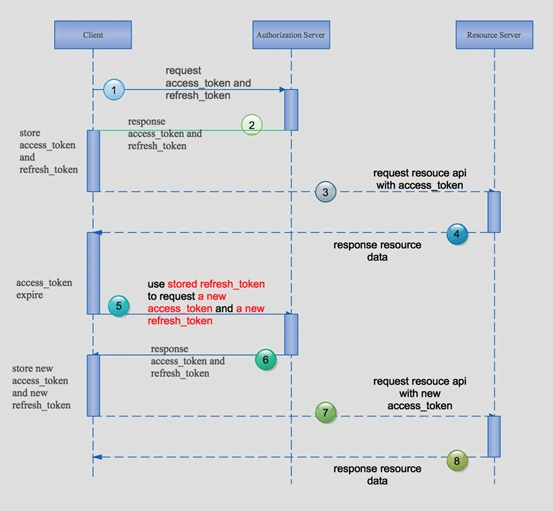
However, before the client sends a request to the Resource Server, the client needs to get the access_token from the Authorization Server. After receiving and storing the access_token, the client uses access_token to send a request to the Resource Server.
But as all we know, the expired time for a jwt is too short. And we do not require the users to pass their name and password once more! At this time, the refresh_token provides a vary convenient way that we can use to exchange a new access_token.
The normal way may be as per the following.
I will use ASP.NET Core 2.0 to show how to do this work.
Requirement first
You need to install the SDK of .NET Core 2.0 preview and the VS 2017 preview.
Now, let's begin!
First of all, building a Resource Server
Creating an ASP.NET Core Web API project.
Edit the Program class to specify the url when we visit the API.
- public class Program
- {
- public static void Main(string[] args)
- {
- BuildWebHost(args).Run();
- }
- public static IWebHost BuildWebHost(string[] args) =>
- WebHost.CreateDefaultBuilder(args)
- .UseStartup<Startup>()
- .UseUrls("http://localhost:5002")
- .Build();
- }
Add a private method in Startup class which configures the jwt authorization. There are some differences when we use the lower version of .NET Core SDK.
- public void ConfigureJwtAuthService(IServiceCollection services)
- {
- var audienceConfig = Configuration.GetSection("Audience");
- var symmetricKeyAsBase64 = audienceConfig["Secret"];
- var keyByteArray = Encoding.ASCII.GetBytes(symmetricKeyAsBase64);
- var signingKey = new SymmetricSecurityKey(keyByteArray);
- var tokenValidationParameters = new TokenValidationParameters
- {
- // The signing key must match!
- ValidateIssuerSigningKey = true,
- IssuerSigningKey = signingKey,
- // Validate the JWT Issuer (iss) claim
- ValidateIssuer = true,
- ValidIssuer = audienceConfig["Iss"],
- // Validate the JWT Audience (aud) claim
- ValidateAudience = true,
- ValidAudience = audienceConfig["Aud"],
- // Validate the token expiry
- ValidateLifetime = true,
- ClockSkew = TimeSpan.Zero
- };
- services.AddAuthentication(options =>
- {
- options.DefaultAuthenticateScheme = JwtBearerDefaults.AuthenticationScheme;
- options.DefaultChallengeScheme = JwtBearerDefaults.AuthenticationScheme;
- })
- .AddJwtBearerAuthentication(o =>
- {
- o.TokenValidationParameters = tokenValidationParameters;
- });
- }
And, we need to use this method in the ConfigureServices method.
- public void ConfigureServices(IServiceCollection services)
- {
- //configure the jwt
- ConfigureJwtAuthService(services);
- services.AddMvc();
- }
Do not forget touse the authentication in the Configure method.
- public void Configure(IApplicationBuilder app, IHostingEnvironment env, ILoggerFactory loggerFactory)
- {
- loggerFactory.AddConsole(Configuration.GetSection("Logging"));
- loggerFactory.AddDebug();
- //use the authentication
- app.UseAuthentication();
- app.UseMvc();
- }
The last step of our Resource Server is to edit the ValueController so that we can use the authentication when we visit this API.
- [Route("api/[controller]")]
- public class ValuesController : Controller
- {
- // GET api/values/5
- [HttpGet("{id}")]
- [Authorize]
- public string Get(int id)
- {
- return "visit by jwt auth";
- }
- }
Turn to the Authentication Server
How to design the authentication?
Here is my point of view,
When the client uses the parameters to get an access_token , the client needs to pass the parameters in the querystring are as follow:
| Parameter | Value |
| grant_type | the value must be password |
| client_id | the client_id is assigned by manager |
| client_secret | the client_secret is assigned by manager |
| username | the name of the user |
| password | the password of the user |
When the client use the parameters to refresh a expired access_token , the client need to pass the parameters in the querystring are as follow,
| Parameter | Value |
| grant_type | the value must be refresh_token |
| client_id | the client_id is assigned by manager |
| client_secret | the client_secret is assigned by manager |
| refresh_token | after authentication the server will return a refresh_token |
Here is the implementation!
Create a new ASP.NET Core project and a new controller named TokenController.
- [Route("api/token")]
- public class TokenController : Controller
- {
- //some config in the appsettings.json
- private IOptions<Audience> _settings;
- //repository to handler the sqlite database
- private IRTokenRepository _repo;
- public TokenController(IOptions<Audience> settings, IRTokenRepository repo)
- {
- this._settings = settings;
- this._repo = repo;
- }
- [HttpGet("auth")]
- public IActionResult Auth([FromQuery]Parameters parameters)
- {
- if (parameters == null)
- {
- return Json(new ResponseData
- {
- Code = "901",
- Message = "null of parameters",
- Data = null
- });
- }
- if (parameters.grant_type == "password")
- {
- return Json(DoPassword(parameters));
- }
- else if (parameters.grant_type == "refresh_token")
- {
- return Json(DoRefreshToken(parameters));
- }
- else
- {
- return Json(new ResponseData
- {
- Code = "904",
- Message = "bad request",
- Data = null
- });
- }
- }
- //scenario 1 : get the access-token by username and password
- private ResponseData DoPassword(Parameters parameters)
- {
- //validate the client_id/client_secret/username/passwo
- var isValidated = UserInfo.GetAllUsers().Any(x => x.ClientId == parameters.client_id
- && x.ClientSecret == parameters.client_secret
- && x.UserName == parameters.username
- && x.Password == parameters.password);
- if (!isValidated)
- {
- return new ResponseData
- {
- Code = "902",
- Message = "invalid user infomation",
- Data = null
- };
- }
- var refresh_token = Guid.NewGuid().ToString().Replace("-", "");
- var rToken = new RToken
- {
- ClientId = parameters.client_id,
- RefreshToken = refresh_token,
- Id = Guid.NewGuid().ToString(),
- IsStop = 0
- };
- //store the refresh_token
- if (_repo.AddToken(rToken))
- {
- return new ResponseData
- {
- Code = "999",
- Message = "OK",
- Data = GetJwt(parameters.client_id, refresh_token)
- };
- }
- else
- {
- return new ResponseData
- {
- Code = "909",
- Message = "can not add token to database",
- Data = null
- };
- }
- }
- //scenario 2 : get the access_token by refresh_token
- private ResponseData DoRefreshToken(Parameters parameters)
- {
- var token = _repo.GetToken(parameters.refresh_token, parameters.client_id);
- if (token == null)
- {
- return new ResponseData
- {
- Code = "905",
- Message = "can not refresh token",
- Data = null
- };
- }
- if (token.IsStop == 1)
- {
- return new ResponseData
- {
- Code = "906",
- Message = "refresh token has expired",
- Data = null
- };
- }
- var refresh_token = Guid.NewGuid().ToString().Replace("-", "");
- token.IsStop = 1;
- //expire the old refresh_token and add a new refresh_token
- var updateFlag = _repo.ExpireToken(token);
- var addFlag = _repo.AddToken(new RToken
- {
- ClientId = parameters.client_id,
- RefreshToken = refresh_token,
- Id = Guid.NewGuid().ToString(),
- IsStop = 0
- });
- if (updateFlag && addFlag)
- {
- return new ResponseData
- {
- Code = "999",
- Message = "OK",
- Data = GetJwt(parameters.client_id, refresh_token)
- };
- }
- else
- {
- return new ResponseData
- {
- Code = "910",
- Message = "can not expire token or a new token",
- Data = null
- };
- }
- }
- //get the jwt token
- private string GetJwt(string client_id, string refresh_token)
- {
- var now = DateTime.UtcNow;
- var claims = new Claim[]
- {
- new Claim(JwtRegisteredClaimNames.Sub, client_id),
- new Claim(JwtRegisteredClaimNames.Jti, Guid.NewGuid().ToString()),
- new Claim(JwtRegisteredClaimNames.Iat, now.ToUniversalTime().ToString(), ClaimValueTypes.Integer64)
- };
- var symmetricKeyAsBase64 = _settings.Value.Secret;
- var keyByteArray = Encoding.ASCII.GetBytes(symmetricKeyAsBase64);
- var signingKey = new SymmetricSecurityKey(keyByteArray);
- var jwt = new JwtSecurityToken(
- issuer: _settings.Value.Iss,
- audience: _settings.Value.Aud,
- claims: claims,
- notBefore: now,
- expires: now.Add(TimeSpan.FromMinutes(2)),
- signingCredentials: new SigningCredentials(signingKey, SecurityAlgorithms.HmacSha256));
- var encodedJwt = new JwtSecurityTokenHandler().WriteToken(jwt);
- var response = new
- {
- access_token = encodedJwt,
- expires_in = (int)TimeSpan.FromMinutes(2).TotalSeconds,
- refresh_token = refresh_token,
- };
- return JsonConvert.SerializeObject(response, new JsonSerializerSettings { Formatting = Formatting.Indented });
- }
- }
Both above two scenarios only use one action , because the parameters are similar.
When the grant_type is password ,we will create a refresh_token and store this refresh_token to the sqlite database. And return the jwt toekn to the client.
When the grant_type is refresh_token ,we will expire or delete the old refresh_token which belongs to this client_id and store a new refresh_toekn to the sqlite database. And return the new jwt toekn to the client.
Note
I use a GUID as my refresh_token , because GUID is more easier to generate and manager , you can use a more complex value as the refresh token.
At last , Create a console app to test the refresh token.
- class Program
- {
- static void Main(string[] args)
- {
- HttpClient _client = new HttpClient();
- _client.DefaultRequestHeaders.Clear();
- Refresh(_client);
- Console.Read();
- }
- private static void Refresh(HttpClient _client)
- {
- var client_id = "100";
- var client_secret = "888";
- var username = "Member";
- var password = "123";
- var asUrl = $"http://localhost:5001/api/token/auth?grant_type=password&client_id={client_id}&client_secret={client_secret}&username={username}&password={password}";
- Console.WriteLine("begin authorizing:");
- HttpResponseMessage asMsg = _client.GetAsync(asUrl).Result;
- string result = asMsg.Content.ReadAsStringAsync().Result;
- var responseData = JsonConvert.DeserializeObject<ResponseData>(result);
- if (responseData.Code != "999")
- {
- Console.WriteLine("authorizing fail");
- return;
- }
- var token = JsonConvert.DeserializeObject<Token>(responseData.Data);
- Console.WriteLine("authorizing successfully");
- Console.WriteLine($"the response of authorizing {result}");
- Console.WriteLine("sleep 2min to make the token expire!!!");
- System.Threading.Thread.Sleep(TimeSpan.FromMinutes(2));
- Console.WriteLine("begin to request the resouce server");
- var rsUrl = "http://localhost:5002/api/values/1";
- _client.DefaultRequestHeaders.Add("Authorization", "Bearer " + token.access_token);
- HttpResponseMessage rsMsg = _client.GetAsync(rsUrl).Result;
- Console.WriteLine("result of requesting the resouce server");
- Console.WriteLine(rsMsg.StatusCode);
- Console.WriteLine(rsMsg.Content.ReadAsStringAsync().Result);
- //refresh the token
- if (rsMsg.StatusCode == HttpStatusCode.Unauthorized)
- {
- Console.WriteLine("begin to refresh token");
- var refresh_token = token.refresh_token;
- asUrl = $"http://localhost:5001/api/token/auth?grant_type=refresh_token&client_id={client_id}&client_secret={client_secret}&refresh_token={refresh_token}";
- HttpResponseMessage asMsgNew = _client.GetAsync(asUrl).Result;
- string resultNew = asMsgNew.Content.ReadAsStringAsync().Result;
- var responseDataNew = JsonConvert.DeserializeObject<ResponseData>(resultNew);
- if (responseDataNew.Code != "999")
- {
- Console.WriteLine("refresh token fail");
- return;
- }
- Token tokenNew = JsonConvert.DeserializeObject<Token>(responseDataNew.Data);
- Console.WriteLine("refresh token successful");
- Console.WriteLine(asMsg.StatusCode);
- Console.WriteLine($"the response of refresh token {resultNew}");
- Console.WriteLine("requset resource server again");
- _client.DefaultRequestHeaders.Clear();
- _client.DefaultRequestHeaders.Add("Authorization", "Bearer " + tokenNew.access_token);
- HttpResponseMessage rsMsgNew = _client.GetAsync("http://localhost:5002/api/values/1").Result;
- Console.WriteLine("the response of resource server");
- Console.WriteLine(rsMsgNew.StatusCode);
- Console.WriteLine(rsMsgNew.Content.ReadAsStringAsync().Result);
- }
- }
- }
We should pay attention to the request of the Resource Server!
We must add a HTTP header when we send a HTTP request : `Authorization:Bearer token`
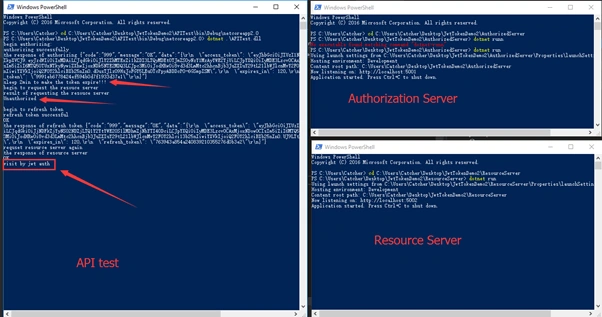
Now , using the dotnet CLI command to run our three projects.
Here is the screenshot of the runninng result.
Note
- In the console app, I do not store the access_token and the refresh_token, I just used them once . You should store them in your project ,such as the web app, you can store them in localstorage.
- When the access_token is expired , the client should remove the expired access_toekn and because the short time will cause the token expired , we do not need to worry about the leakage of the token !
Summary
This article introduced an easy way to handle the refresh_token when you use jwt. Hope this will help you to understand how to deal with the tokens.
Ano MepaniPosted Jul 19, 2019, 9:17 PM
Thanks for sharing this. Very advanced topic with much detail and good conversation on comment. Nice clarification by @Agus
Pblaze PblazePosted Oct 7, 2018, 11:48 PM
Your screenshots are too small that I can't read well. Also , there are still many things from the explanation graphic that are unclear to me. What I understand is: the client will request a new access token if it detects the token in its hand has expried, then it will bring the new token that is just granted from the previous process to access resources. Do I understand it right. If I understand it right, how can the client know if the token has expired? Does the client use the time in "expired in" to know? If yes, then does it work like this?: "IF (Token IsNot Expired) => UseTheCurrentTokenToRequestResource ELSE => RequestNewTokenUsingRefreshToken; UseTheJustGrantedTokenToRequestResource;". Sorry that my texts are hard to read but I don't know how to break line (enter) in comment.
Tony PhilipPosted Jul 19, 2018, 5:27 AM
Hi, I am a beginner. My doubt is we gets token from one project(AuthorizedServer) and when sends that token to second project (ResourceServer) it authenticates and gets result as expired or not. How it happens please?
DotNetGuts DNGPosted May 24, 2018, 11:43 AM
Nice explanation, thanks. Where is the access_token? Your diagram shows along with refresh_token, access_token will be issued.
Gabriel ArmendarizPosted Apr 17, 2018, 10:24 AM
Nice one. Just one observation: When you find the user on the DB "&& x.Password == parameters.password);", you shouldn't store the real password on the DB. You should get the user with first 3 conditions, and then check if the Hash of the password sent is equal to the password saved on the DB.
Fredrik NilssonPosted Apr 10, 2018, 3:16 AM
I might be missing something when I look through this article. But shouldn'nt den refresh token expire at some point?
Alex FlorinPosted Mar 17, 2018, 3:33 AM
I've have a .NET Core and Angular project and I've implemented JWT tokens. However, I now want to implement refresh tokens using this article but I am unclear as to the use of Client_ID and Client_Secret . Who generates them and what are they for?
Tridip BhattacharjeePosted Nov 13, 2017, 4:11 AM
You said you use Edraw but i checked Edraw is not free one. can you suggest any good free tool which we can use to draw different kind of flow chart.
kea feaPosted Nov 12, 2017, 11:10 AM
How do you determine when access token is expired?
Tridip BhattacharjeePosted Oct 12, 2017, 5:32 AM
HI, one small question. did you develop the sequence diagram by photoshop or visio?
Agus SuhantoPosted Oct 7, 2017, 2:26 AM
I have made an adaptation of the source code to target ASP.NET 2.0 RTM version here: https://github.com/ganagus/JwtRefreshSample/. I also made some minor changes/addition that do not change the semantics of the application's goal.
Андрій БоклашкоPosted Sep 10, 2017, 5:06 AM
Very usefull article, thank you. I'm designing web api that will be consumed by Android app as well as the Angular web application. For the first case I can just hardcode client id and secret into app, but it will be insecure to do so for the second one. Am I get something wrong or it should be some workaround here?
Yip WaiPosted Aug 16, 2017, 5:38 AM
Thanks for your article. Could you please update the source code for ASP.Net Core 2.0.0 release version? Because I got "CS1061 'AuthenticationBuilder' does not contain a definition for 'AddJwtBearerAuthentication' ...". Thanks!
Tridip BhattacharjeePosted Jul 21, 2017, 7:53 AM
What is Refresh Token and how it is different from access token? please explain.
Miguel SalesPosted Jul 11, 2017, 10:36 PM
Great stuff. I was using a similar code with dotnet core 1.1 and was unsure on how to update to 2.0. Many thanks