
Introduction
JavaScript is a language of the Web. This series of articles will talk about my observations learned during my decade of software development experience with JavaScript. Before moving further let us look at the previous articles of the series:
- Voice of a Developer: JavaScript Data Types - Part One
- Voice of a Developer: JavaScript Objects - Part Two
- Voice of a Developer: JavaScript Engines - Part Three
- Voice of a Developer: JavaScript Common Mistakes - Part Four
- Voice of a Developer: Editors - Part Five
- Voice of a Developer: VSCode - Part Six
- Voice of a Developer: Debugging Capabilities of VSCode - Part Seven
- Voice of a Developer: JavaScript OOP - Part Eight
- Voice of a Developer: JavaScript Useful Reserved Keywords - Part Nine
- Voice of a Developer: JavaScript Functions - Part Ten
- Voice of a Developer: JavaScript Functions Invocations - Part Eleven
- Voice of a Developer: JavaScript Anonymous Functions - Part Twelve
- Voice of a Developer: JavaScript Pure And Impure Function - Part Thirteen
- Voice of a Developer: JavaScript Closures - Part Fourteen
- Voice of a Developer: JavaScript Currying - Part Fifteen
- Voice of a Developer: JavaScript Chaining - Part Sixteen
- Voice of a Developer: JavaScript Array Methods - Part Seventeen
- Voice of a Developer: JavaScript ECMAScript 6 - Part Eighteen
- Voice of a Developer: JavaScript ECMAScript 6 Features v1 - Part Nineteen
- Voice of a Developer: JavaScript ECMAScript 6 Features v2 - Part Twenty
- Voice of a Developer: JavaScript Web Workers - Part Twenty One
- Voice of a Developer: JavaScript JSLint v1 - Part Twenty-Two
- Voice of a Developer: JavaScript JSLint v2 - Part Twenty Three
- Voice of a Developer: XMLHttpRequest API - Part Twenty Four
- Voice of a Developer: Web Storage API - Part Twenty-Five
- Voice of a Developer: Application Cache API - Part Twenty-Six
In this article, we will understand WebSocket, which is a new revolution in client-server communication. Modern browsers support this protocol. The server shall also support WebSocket thus a handshake between client & server is possible.
It is based on ws schema and establishes a full-duplex connection between client & server. At the client-end, it is a browser and it can work with any server capable of running WebSocket protocol.
WebSocket
Advantages of WebSocket
- Faster than TCP
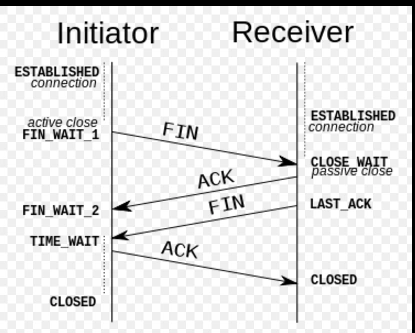
Quick response from the server where you are using an HTTP connection to connect. TCP connection lifecycle is SYN, SYN/ACK, ACK, and then send a GET request. TCP header contains 10 mandatory fields and an optional field. TCP has close ends at both sides – Refer a useful diagram from Wiki.
 However, WebSocket simply receives the response with a small header.
 - Better than other methods like polling, AJAXFor duplex communication, developers used a technique like polling to constantly synchronize with the server. This technique was never effective for duplex communication. Hence, WebSocket came into the picture.
- Easy to use
It is easy to use on both ends. At the server, it is independent of the platform too.
Disadvantages of WebSocket
- Open connectionThe disadvantage is that it keeps the connection open on the server for the duration of the time user is interacting with the page. Therefore, it consumes more resources on the server.
- Single-channel communication
If your app does not need too much duplex communication with the server then you can think of using other approaches like long polling, AJAX over WebSocket.
WebSocket server
Steps to run the server
- Download WebSocketd from URL.
- Extract the zip file in a folder like C:\websocket
- The server is platform-independent and can run any program
- Create a server program in C# and build to generate myProgram.exe,
- using System;
- using System.Threading;
- //myProgram.cs
- class Counter
- {
- static void Main()
- {
- for (int i = 1; i <= 10; i++)
- {
- Console.WriteLine(i);
- Thread.Sleep(500);
- }
- }
- }
- You can copy myProgram.exe into c:\websocket for convenience
- Open a command shell and goto c:\websocket and run below command
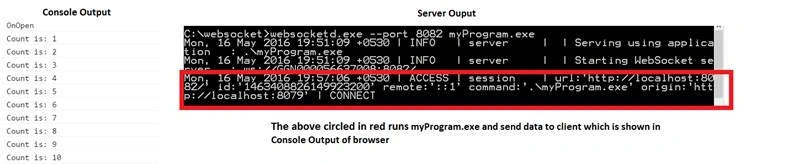
- websocketd.exe -- port 80 myProgram.exe



WebSocket client object
Receiving messages
- var ws = new WebSocket('ws://localhost:8082/');
- // this will establish connection with server at port 8082
- //notice ws: this is new URL schema for WebSocket connection
- ws.onmessage = function(event) {
- console.log('Count is: ' + event.data);
- }; // this will receive output from server in event.data
Sending messages
- ws.onopen = function () {
- console.log('OnOpen');
- ws.send('my message');
- }
Log errors
- ws.onerror = function (error) {
- console.log('WebSocket Error ' + error);
- };
ReadyState
- 0 | Connecting- the connection is not yet open
- 1 | Open- the connection is open & ready to communicate
- 2 | Closing- the connection is closing
- 3 | Closed- the connection is closed
Vignesh ManiPosted May 21, 2016, 4:48 PM
nice
Kuppurasu NagarajPosted May 18, 2016, 1:42 PM
Nice Sharing..
Debasis SahaPosted May 18, 2016, 10:21 AM
Good One..