
Introduction
JavaScript is a language of the Web. This series of articles will talk about my observations learned during my decade of software development experience with JavaScript. I hope this series on JavaScript is giving you a good understanding and you are enjoying most parts of it.
Before moving further let us look at the previous articles of the series:
- Voice of a Developer: JavaScript Data Types - Part One
- Voice of a Developer: JavaScript Objects - Part Two
- Voice of a Developer: JavaScript Engines - Part Three
- Voice of a Developer: JavaScript Common Mistakes - Part Four
- Voice of a Developer: Editors - Part Five
- Voice of a Developer: VSCode - Part Six
- Voice of a Developer: Debugging Capabilities of VSCode - Part Seven
- Voice of a Developer: JavaScript OOP - Part Eight
- Voice of a Developer: JavaScript Useful Reserved Keywords - Part Nine
- Voice of a Developer: JavaScript Functions - Part Ten
- Voice of a Developer: JavaScript Functions Invocations - Part Eleven
- Voice of a Developer: JavaScript Anonymous Functions - Part Twelve
- Voice of a Developer: JavaScript Pure And Impure Function - Part Thirteen
- Voice of a Developer: JavaScript Closures - Part Fourteen
- Voice of a Developer: JavaScript Currying - Part Fifteen
- Voice of a Developer: JavaScript Chaining - Part Sixteen
- Voice of a Developer: JavaScript Array Methods - Part Seventeen
- Voice of a Developer: JavaScript ECMAScript 6 - Part Eighteen
- Voice of a Developer: JavaScript ECMAScript 6 Features v1 - Part Nineteen
- Voice of a Developer: JavaScript ECMAScript 6 Features v2 - Part Twenty
- Voice of a Developer: JavaScript Web Workers - Part Twenty One
We will begin this article by reading this phrase "The Software shall be used for Good, not Evil." - Wikipedia
We will discuss in this section about how to write good code. Our code shall be clean, beautified, and other programmers are able to read & understand it; rather debug it. In order to achieve that we will look into the process of linting and then apply in the context of JavaScript.
It is a tool, which is used to flag code quality. It takes source code and find issues in it. This tool is available for many programming languages like C, PHP, etc. Linting is a process of running a program that will analyze code for potential errors.
As JavaScript is so popular and widely used, a lint for JavaScript is needed. In JavaScript, I am a fan of JSLint. This tool was developed by Douglas Crockford http://www.crockford.com/. Let us, deep-dive, into this tool.
JSLint is a code quality tool for JavaScript. There are various advantages of this tool:
Lint
JSLint
- Provide another pair of eyes at your code
- Another layer of language on top of JavaScript
- Helps you write better JavaScript
- Reject the code which claims that it is perfectly fine
- Reduce error and give perfect code
URL: http://www.jslint.com/
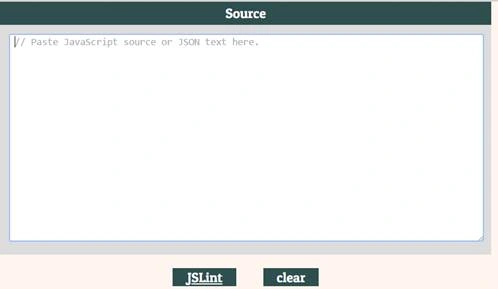
You can use an online version of JSLint and paste your JavaScript code & test it.
Here is a simple f1() function and we will validate in JSLint
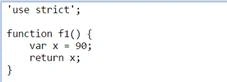 The above will validate perfectly fine and this code will sail perfectly. To see how JSLint helps let me modify code & generate warnings:
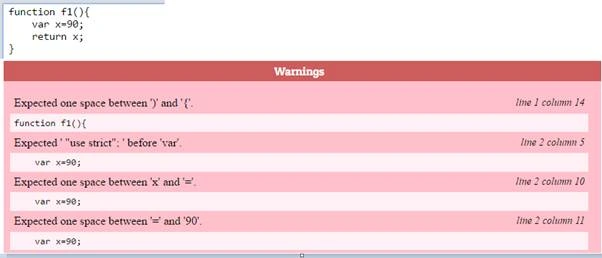 It is so fantastic to do statistical analysis of your code so quickly! If we review four warnings, three are related to ‘whitespace’. One grabs my attention is
Expected ‘” use strict”: ‘before ‘var’. line 2 column 5
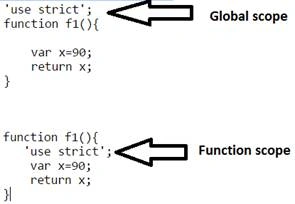
We have not talked about ‘use strict’ rule so far. Nevertheless, this is an instruction that JavaScript code should be executed in ‘strict mode’. This directive was introduced in ECMAScript 5. You can define scope of ‘use strict’ to the beginning of a script (global scope) or a function but you cannot keep it within block statements enclosed in {} braces. The below picture could explain it better.
It is so fantastic to do statistical analysis of your code so quickly! If we review four warnings, three are related to ‘whitespace’. One grabs my attention is
Expected ‘” use strict”: ‘before ‘var’. line 2 column 5
We have not talked about ‘use strict’ rule so far. Nevertheless, this is an instruction that JavaScript code should be executed in ‘strict mode’. This directive was introduced in ECMAScript 5. You can define scope of ‘use strict’ to the beginning of a script (global scope) or a function but you cannot keep it within block statements enclosed in {} braces. The below picture could explain it better.
What is ‘use strict’?
Advantages of script mode are
- Avoid created an undeclared variable
- Cannot duplicate variable
- Avoid mistyping a variable to avoid a global variable declaration
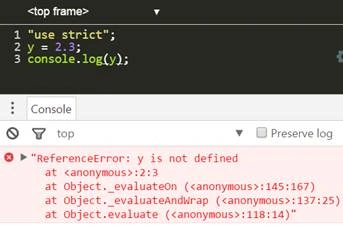
In the above example ‘y’ was not declared but referred, hence it caused below error ‘y is not defined’. Switch gear back to JSLint now
Other examples where JSLint could help in finding issues in code:
- Declaring variable again: In JavaScript if you declare variable again it does not pose any problem, as we know JavaScript uses ‘hoisting’, closures model. As good programmers, we shall not re-declare or duplicate variable declaration in the same scope. Take a look at below code:
- // fahrenheit to celsius code
- 'use strict';
- function toFahreheit(celsius)
- {
- var celsius = celsius;
- var F = celsius * 9 / 5 + 32;
- return F;
- }
Upon execution, JSLint will give below message:
 There are various advantages of JSLint and it helps programmers a lot. In the next article, I will talk about various options associated with it & how useful these are. Much more is coming in the ‘Voice of developer’ series; please share your feedback/comment below.
Rajib Das GuptaPosted Jun 10, 2016, 5:48 AM
Nice Sharing.
Kuppurasu NagarajPosted May 17, 2016, 11:02 AM
Nice sharing..
Sonu ChaudharyPosted May 16, 2016, 3:24 PM
good one...
Debasis SahaPosted May 16, 2016, 1:53 PM
Nice One..
Prasanna MuraliPosted May 16, 2016, 9:58 AM
Nice one...
Debasis SahaPosted May 16, 2016, 4:15 AM
Good one..