
SIGN UP MEMBER LOGIN:    
ARTICLE

C# ProgressBar

Posted by Nikhil Kumar Articles | Windows Forms C# February 22, 2009
The attached project shows how to use a progress bar control in C# and Windows Forms.
Reader Level:
Download Files:
 

A ProgressBar control is used to display the progress of some activity.

The attached application creates a ProgressBar and shows the server activity. The project is developed using C#, Windows Forms, and Visual Studio 2005.

The UI of the application looks like following.
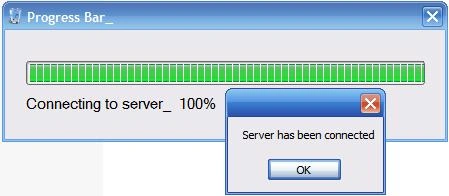
The source code is listed below.

As you can see below, I add a timer control to the form and on the timer tick event handler, I increament the value of the progressbar.

Download the attached project for more details.


namespace Progress_Bar
{
    public partial class Form1 : Form
    {
        public Form1()
        {
            InitializeComponent();
        }

        // Call the function of tick event of the timer:_...
        // Set the timer Intervel at 60:_
        // Set the timer enabled "True" by the timer properties:_
        private void timer1_Tick(object sender, EventArgs e)
        {
            fn_prbar_();
        }

        //Create the function for progress bar:_
        public void fn_prbar_()
        {
            progressBar1.Increment(1);
            label1.Text = "Connecting to server_  "  + progressBar1.Value.ToString() +  "%";
            if (progressBar1.Value == progressBar1.Maximum)
            {
                timer1.Stop();
                MessageBox.Show("Server has been connected");
                this.Close();
                timer1.Stop();
            }
        }
    }
}


Login to add your contents and source code to this article
share this article :
post comment
 

hi i have a problem with progress bar that i cant use it when the other task run.i want something like when we setup program and progress bar continued. i try background worker but i cant understand how long the other task gets time. like a sending email . can u help me?

Posted by fatemeh kazemi Mar 06, 2011

Thanks Supratim ,

for playing sound when you click on the button,
you have to just declare SoundPlyayer sp;
see this code ...

using System;
using System.Collections.Generic;
using System.ComponentModel;
using System.Data;
using System.Drawing;
using System.Text;
using System.Windows.Forms;
using System.Data.SqlClient;

using System.Media;                     // Add this namespace

namespace Database_Master
{
    public partial class frmlogin : Form
    {
        SoundPlayer sp;


And type this code in click event of  button

      sp = new SoundPlayer("C:Sounds\\incorrec.wav") //you can give any path here.
      sp.Play();
      sp.PlayLoop // type this code if you want to play sound in loop mode...

for more help visit my blog and try to leave you precious comments...

www.dotnetask.blog.co.in

Posted by Nikhil Kumar Jun 29, 2009

Hello I am SUPRATIM,
                         How will I add sound in an Windows Application when I run it to when I close with looping ? My Email id is: Supratim@memyself.in

Posted by SUPRATIM DAS Jun 28, 2009
Nevron Gauge for SharePoint
Become a Sponsor
PREMIUM SPONSORS
  • The leading .NET charting control now features PDF, Flash and Silverlight export, visualization of large datasets and more. Deliver true charting functionality to your BI, Scorecard, Presentation or Scientific apps. Download evaluation now.
    Get 2 Months Free of ASP.NET Hosting for Only $4.95/month! Receive FREE MS SQL and MySQL Databases Including ASP.NET 4/3.5, MVC 3.0, Silverlight 4, Windows 2008/IIS 7.0 Plus FREE IIS 7 Modules. Host UNLIMITED ASP.NET Web Sites - Click Here!
Team Foundation Server Hosting
Become a Sponsor