

In this article we will be seeing about projected fields in SharePoint 2010.
Introduction:
SharePoint 2010 enables you to display additional columns from the target list
in the view of the list that contains the lookup column. These additional
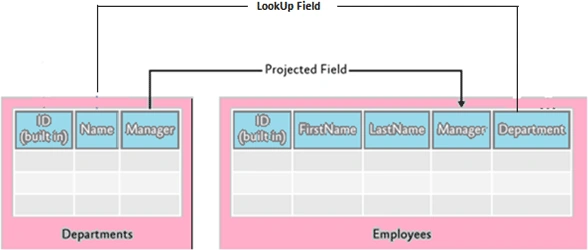
generated columns are known as projected fields. I have created two lists
"Departments" and "Employees to model the relationship between them. I have
created a Department lookup column for the Employees list and I also want to
display the name of the department manager in the list of employees, as shown in
the following illustration.
Departments List:

Employees List:
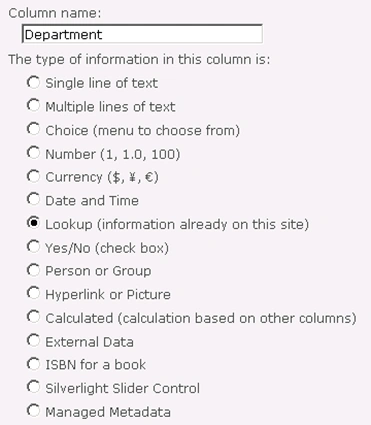
In the "Employees" list I have created a Department lookup column as shown in
the following
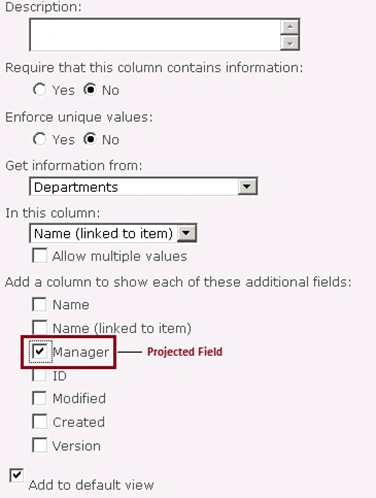
You could be able to see the projected field "Department: Manager" as shown in
the following

Using SharePoint Object Model:
- Open Visual Studio 2010.
- Go to File => New => Project.
- Select Console Application template from the installed templates.
- Enter the Name and click Ok.
- Add the following assembly.
- Microsoft.SharePoint.dll
- Add the following namespace.
- Using Microsoft.SharePoint ;
- Program.cs looks like the following.
using System;
using System.Collections.Generic;
using System.Linq;
using System.Text;
using Microsoft.SharePoint;namespace ProjectedFields
{
class Program
{
static void Main(string[] args)
{
using (SPSite site = new SPSite("http://serverName:22222/sites/test"))
{
using (SPWeb web = site.RootWeb)
{
SPList lookupList = web.Lists.TryGetList("Departments");
SPList list = web.Lists.TryGetList("Employees");if (lookupList != null && list != null)
{
// Create the lookup column.
string strPrimaryColumn = list.Fields.AddLookup("Department", lookupList.ID, true);
SPFieldLookup primaryColumn = (SPFieldLookup)list.Fields.GetFieldByInternalName(strPrimaryColumn);
primaryColumn.LookupField = lookupList.Fields["Name"].InternalName;
primaryColumn.Indexed = true;
primaryColumn.RelationshipDeleteBehavior = SPRelationshipDeleteBehavior.Restrict;
primaryColumn.Update();// Projected Field
string strProjectedCol = list.Fields.AddDependentLookup("LookUp:Manager", primaryColumn.Id);
SPFieldLookup projectedCol = (SPFieldLookup)list.Fields.GetFieldByInternalName(strProjectedCol);
projectedCol.LookupField = lookupList.Fields["Manager"].InternalName;
projectedCol.Update();// Add the columns to the "All Items" view
SPView view = list.Views["All Items"];
view.ViewFields.Add(primaryColumn);
view.ViewFields.Add(projectedCol);
view.Update();
}
}
}
}
}
}
Using powershell:
- Go to Start => All Programs => Microsoft SharePoint 2010 products => SharePoint 2010 Management Shell.
- Run as an administrator.
- Run the following script.
$site=Get-SPSite "http://serverName:22222/sites/test"
$web=$site.Rootweb
$lookupList=$web.Lists.TryGetList("Departments")
$list = $web.Lists.TryGetList("Employees")
#------------------------- Create a lookup column----------------------------------------------------------
[String]$strPrimaryColumn = $list.Fields.AddLookup("Department", $lookupList.ID, $true)
$primaryColumn = [Microsoft.SharePoint.SPFieldLookup]$list.Fields.GetFieldByInternalName($strPrimaryColumn)
$primaryColumn.LookupField = $lookupList.Fields["Name"].InternalName
$primaryColumn.Indexed = $true
$primaryColumn.RelationshipDeleteBehavior = [Microsoft.SharePoint.SPRelationshipDeleteBehavior]::Restrict
$primaryColumn.Update()
#------------------------- Projected field----------------------------------------------------------
$strProjectedCol = $list.Fields.AddDependentLookup("LookUp:Manager", $primaryColumn.Id)
$projectedCol = [Microsoft.SharePoint.SPFieldLookup]$list.Fields.GetFieldByInternalName($strProjectedCol)
$projectedCol.LookupField = $lookupList.Fields["Manager"].InternalName
$projectedCol.Update()
#------------------------- Add the columns to the view----------------------------------------------------------
$view = $list.Views["All Items"]
$view.ViewFields.Add($primaryColumn)
$view.ViewFields.Add($projectedCol)
$view.Update()
Khushi SshaikhPosted Aug 4, 2011, 1:39 PM
Could you please throw some light on Querying Employee List to fetch the name of those employees who has manager ='Ram'? Juggling with SPQuery/JOIN/Projected fields :-(