Introduction
In this article we will see how can we scroll with mouse for a DataGrid.
Creating Silverlight Project
Fire up Visual Studio 2008 and create a new Silverlight 3 Project. Name it as MouseScroll.
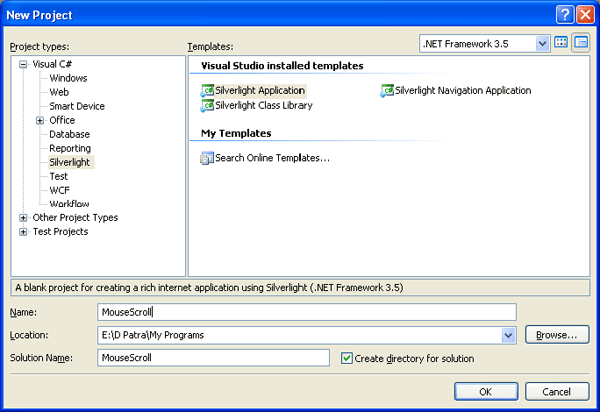
Add a Class to the Silverlight Project and name it as ScrollDataGrid.cs
Now inherit DataGrid to the class as follows:
public class ScollDataGrid: DataGrid
{
}
You need to use the following namespaces in this class.
using System.Windows.Automation.Peers;
using System.Windows.Automation.Provider;
using System.Windows.Automation;
Now write a method for OnMouseWheel as described below:
protected override void OnMouseWheel(MouseWheelEventArgs e)
{
base.OnMouseWheel(e);
//Try getting the automationpeer from this datagrid
AutomationPeer automationPeer = FrameworkElementAutomationPeer.FromElement(this);
if (automationPeer == null)
{
//if not try creating a new one for this datagrid
automationPeer = FrameworkElementAutomationPeer.CreatePeerForElement(this);
}
//Try getting the scroll provider for this datagrid
IScrollProvider scrollProvider = automationPeer.GetPattern(PatternInterface.Scroll) as IScrollProvider;
if (scrollProvider != null)
{
ScrollAmount scrollAmount = ScrollAmount.NoAmount;
if (e.Delta < 0)
scrollAmount = ScrollAmount.SmallIncrement;//for scroll down
else if (e.Delta > 0)
scrollAmount = ScrollAmount.SmallDecrement;//for scoll up
if (scrollProvider.VerticallyScrollable)
{
scrollProvider.Scroll(ScrollAmount.NoAmount, scrollAmount);
}
}
}
Now in the MainPage.xaml add the namespace as follows:
xmlns:local="clr-namespace:MouseScroll"
Now place a DataGrid of type ScrollDataGrid and use the normal properties of DataGrid to look better.
<local:ScollDataGrid x:Name="myDataGrid" Height="100" HorizontalAlignment="Left" VerticalAlignment="Top" Width="271" Margin="20,20,0,0" />
Now we will write some dummy data to fill in the DataGrid.
public class PersonalData
{
public string FirstName { get; set; }
public string LastName { get; set; }
public int Age { get; set; }
}
Create a list of the above class and bind data to DataGrid.
public partial class MainPage : UserControl
{
List<PersonalData> myList;
public MainPage()
{
InitializeComponent();
#region Dummy List
myList = new List<PersonalData>
{
new PersonalData{ FirstName="FirstName1", LastName="LastName1", Age=39},
new PersonalData{ FirstName="FirstName2", LastName="LastName2", Age=40},
new PersonalData{ FirstName="FirstName3", LastName="LastName3", Age=41},
new PersonalData{ FirstName="FirstName4", LastName="LastName4", Age=42},
new PersonalData{ FirstName="FirstName5", LastName="LastName5", Age=43},
new PersonalData{ FirstName="FirstName6", LastName="LastName6", Age=44},
new PersonalData{ FirstName="FirstName7", LastName="LastName7", Age=45},
new PersonalData{ FirstName="FirstName8", LastName="LastName8", Age=46},
new PersonalData{ FirstName="FirstName9", LastName="LastName9", Age=47},
new PersonalData{ FirstName="FirstName10", LastName="LastName10", Age=48},
new PersonalData{ FirstName="FirstName11", LastName="LastName11", Age=49},
new PersonalData{ FirstName="FirstName12", LastName="LastName12", Age=50},
new PersonalData{ FirstName="FirstName13", LastName="LastName13", Age=51},
new PersonalData{ FirstName="FirstName14", LastName="LastName14", Age=52},
};
#endregion
myDataGrid.ItemsSource = myList;
}
}
That's it now run your application and scroll the DataGrid with your mouse.
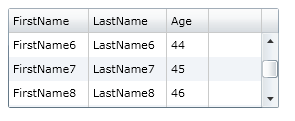
Hope this helps.